Introduction
If you are using ZappySys Salesforce ODBC Driver, SSIS Salesforce Source, or Destination, choosing the correct OAuth /authorize and /token URLs is critical for authentication. The domain you use must match the domain your Salesforce org uses when you log into the browser.
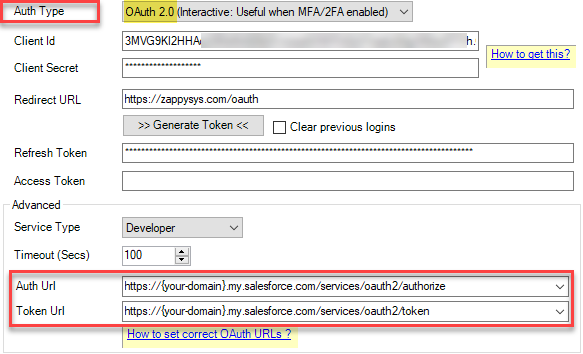
Recommended URL format (Use this whenever possible)
-- For Production Instance --
https://<your-domain>.my.salesforce.com/services/oauth2/authorize
https://<your-domain>.my.salesforce.com/services/oauth2/token

-- For Sandbox Instance --
https://<your-domain>--<sandbox-name>.sandbox.my.salesforce.com/services/oauth2/authorize
https://<your-domain>--<sandbox-name>.sandbox.my.salesforce.com/services/oauth2/token

-- For Developer Instance (Dev Edition) --
https://<your-domain>.develop.my.salesforce.com/services/oauth2/authorize
https://<your-domain>.develop.my.salesforce.com/services/oauth2/token

NOTE: If an older sandbox does not have Enhanced Domains enabled, the URL might be ...--<sandbox-name>.my.salesforce.com (missing the .sandbox part).
Works for:
- Production
- Developer Edition
- Free Trial / Playground
- Most orgs with My Domain enabled
How to find your correct domain
- Log in to Salesforce in a browser
- Look at the URL in the address bar
- Use that base domain in your OAuth URLs
Example browser URL:
https://zappysys5-dev-ed.develop.my.salesforce.com/...
Use:
https://zappysys5-dev-ed.develop.my.salesforce.com/services/oauth2/authorize
https://zappysys5-dev-ed.develop.my.salesforce.com/services/oauth2/token
Validating the URL variations you may see
Standard My Domain (most common)
https://<domain>.my.salesforce.com/services/oauth2/token
New developer edition cluster
https://<domain>.develop.my.salesforce.com/services/oauth2/token
Legacy Lightning UI domain
https://<domain>.lightning.force.com/services/oauth2/token
Global login for Production
https://login.salesforce.com/services/oauth2/token
Global login for Sandbox
https://test.salesforce.com/services/oauth2/token
DO NOT hardcode these (Will break)
- Using instance URLs like https://na85.salesforce.com
- Assuming all orgs behave the same
Quick rule of thumb
This guarantees correct routing for your Salesforce org.
Use the same domain you see in your browser after login, then append:
/services/oauth2/authorize
/services/oauth2/token
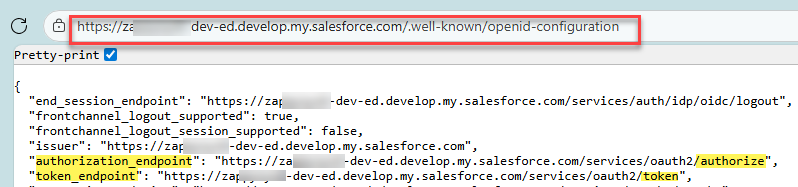
Optional: Automatic endpoint discovery
Advanced users can dynamically discover the OAuth endpoints:
GET https://<domain>/.well-known/openid-configuration
This returns authorization_endpoint, token_endpoint, and more.
Still need help?
If the issue persists, please contact our support team:
- Live Chat: Open the chat widget (bottom right of this page)
- Email: support@zappysys.com
- Support Center: Support | ZappySys