Introduction
API Source and API Destination components support SSIS variables the same way API Connection Managers do, using {{User::VariableName}} syntax. This lets you set parameters (headers, query string values, request body fields, etc.) dynamically at runtime instead of hardcoding them, without needing to move that configuration into the Connection Manager. This article explains how to insert variables directly into the parameters of an API Source or Destination component.
Prerequisites
- Download and install the ZappySys SSIS PowerPack.
Steps
- Open the API Source or API Destination component editor.
- Go to the parameter grid, click Raw Edit to open the full parameters editor.
- Use the Insert Variable button to pick an existing SSIS variable, or type the variable reference directly using the format:
{{User::VariableName}}
- If the value needs to be safely encoded for JSON (e.g., to avoid breaking the request when the variable contains quotes or special characters), append the
JSONENCmodifier:
{{User::VariableName,JSONENC}}
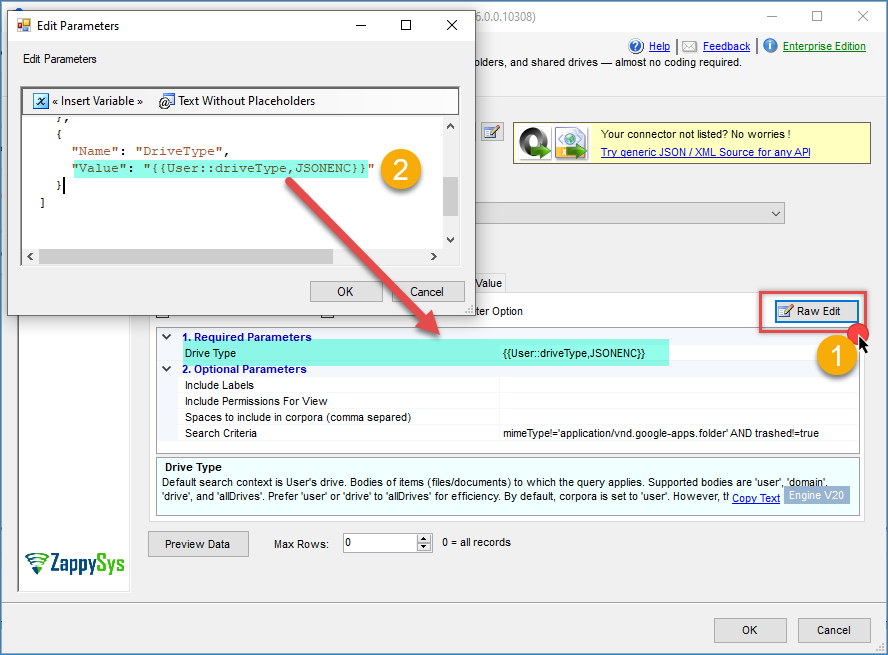
- Click OK to save the parameter configuration.
- Use Preview Data to confirm the request runs correctly with the variable’s current value.
- If you want to use expressions inside the component, this article can help you.
Conclusion
API Source and API Destination components accept the same {{User::VariableName}} syntax used in API Connection Managers, so any parameter (required or optional) can be set dynamically at runtime. Using Insert Variable or Raw Edit, along with the JSONENC modifier when needed, enables driving requests entirely from SSIS variables rather than hardcoded values.
Still need help?
If you need assistance using variables in your API Source or Destination component, please contact our support team:
- Live Chat: Open the chat widget (bottom right of this page)
- Email: support@zappysys.com
- Support Center: Support | ZappySys