Introduction
The ZappySys SSIS Send HTML Email Task allows developers to send rich, dynamic HTML-formatted emails from SSIS. One helpful feature is the ability to inject formatted variables directly into the email body, which is particularly handy when displaying numbers as currency or dates in localized formats.
This tutorial specifically shows how to work with custom currency and date formats, such as 3.082,00 € for financial reports, or 03/07/2025 for date outputs and use them in HTML emails.
Prerequisites
- Download and install the ZappySys SSIS PowerPack
- SQL Server Data Tools (SSDT) with SSIS project support
Step 1: Set up Variables
Create the following SSIS variables:
| Name | Type | Value |
|---|---|---|
Amount |
Double | 3082.5 |
ReportDate |
DateTime | 2025-07-03 14:00:00 |
FormattedAmount |
String | (Leave blank) |
FormattedDate |
String | (Leave blank) |
Step 2: Format Currency for European Style
Since ZappySys HTML Email Task uses raw string values, you must format the currency manually using an Expression Task.
Expression for FormattedAmount
Use the following expression in variable FormattedAmount to convert a number into 3.082,00 € style:
REPLACE( REPLACE( (DT_WSTR,50) (DT_CY) @[User::Amount], ".", "," ), ",", "." ) + " €"
Step 3: Format Date
To format the date as 03/07/2025, use the variable FormattedDate and assign this expression:
(DT_WSTR,10) DAY(@[User::ReportDate]) + "/" +
RIGHT("0" + (DT_WSTR,10) MONTH(@[User::ReportDate]),2) + "/" +
(DT_WSTR,10) YEAR(@[User::ReportDate])
This returns dates in dd/MM/yyyy format.
Step 4: Use Variables in HTML Email Task
- Drag and drop a ZS Send HTML Email Task onto your Control Flow.
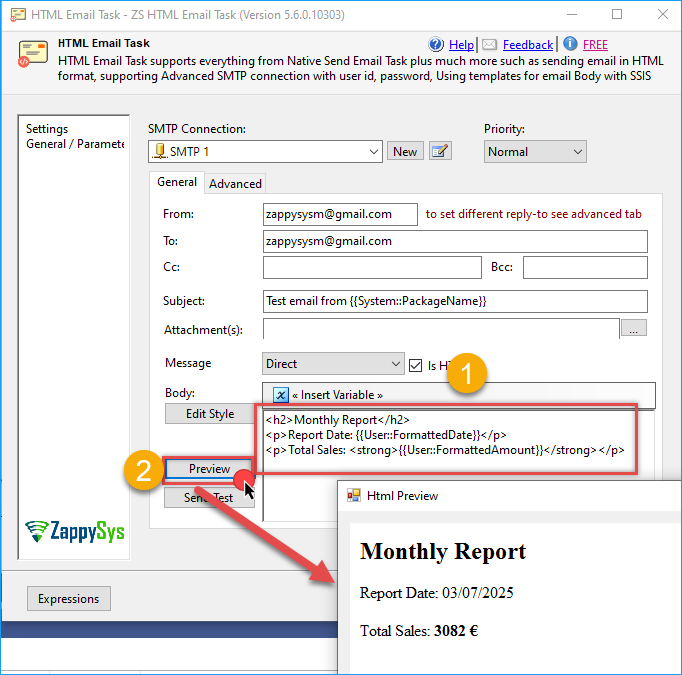
- In the Body, add variable like this example:
<h2>Monthly Report</h2>
<p>Report Date: {{User::FormattedDate}}</p>
<p>Total Sales: <strong>{{User::FormattedAmount}}</strong></p>
- Preview or run your package. The email will show something like:
Conclusion
By using SSIS expressions along with the ZappySys HTML Email Task, you can easily deliver polished, professional emails that include localized currency and custom-formatted dates. This eliminates the need for complex scripting or external formatting tools. Whether you’re sending financial summaries, system alerts, or monthly reports, the ability to control how values are displayed ensures clarity and improves your communication with end users.
Visit our official page to explore more SSIS components, automation features, and real-time data integration tools included in ZappySys SSIS PowerPack.
References
Contact us
If you encounter any issues or have specific questions, reach out to our support team via live chat or support ticket using our email support@zappysys.com.