Problem
After configuring the ZappySys JDBC Bridge Driver for Infor Data Lake, Power BI was able to connect successfully, but only tables were listed in the Navigator. Database Views were missing.
The same Views were visible in the JDBC Bridge Driver Preview, confirming that the connection and permissions were working correctly.
Solution
This behavior can occur because some JDBC drivers expect the Catalog and Table Type parameters passed by SQLTables() to be NULL when listing database objects.
To resolve the issue:
-
Open your ZappySys ODBC DSN.
-
Navigate to Metadata Settings.
-
Set Tables Metadata Mode to:
Ignore Table Type (always) and Catalog Filter (when * or blank) for SQLTablesW
-
Save the DSN.
-
Reconnect from Power BI and refresh the Navigator.
Below is the sample screenshot
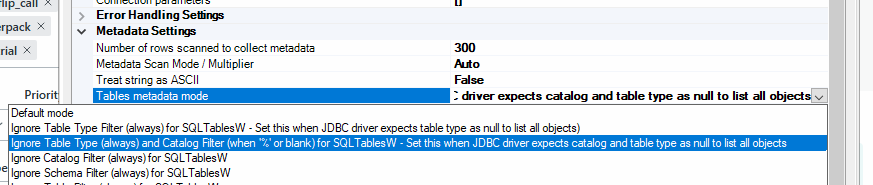
The missing Views should now be displayed.
Additional Information
The JDBC Bridge Driver Preview and Power BI retrieve metadata differently. While the Preview lists objects directly, Power BI relies on the ODBC SQLTables() API to enumerate tables and views.
Enabling the metadata option above allows the ZappySys ODBC Driver to ignore the Catalog and Table Type filters when appropriate, ensuring that the JDBC driver returns all available database objects.
Troubleshooting
If the Views are still not displayed, please provide the following information when contacting support:
-
ZappySys ODBC Driver version
-
JDBC Bridge Driver version
-
Screenshot of the JDBC Bridge Preview
-
Screenshot of the Power BI Navigator
-
ZappySys Driver Log
-
ODBC Trace Log
These details help determine whether the issue is related to metadata returned by the JDBC driver or how the client application is requesting it.
See Also
This issue was resolved by changing the Tables Metadata Mode setting, after which the missing Infor Data Lake Views became visible in Power BI.
This is much closer to the articles published on the ZappySys Community: concise, technical, solution-first, with short sections and without AI-style narrative or overly conversational language.