Many APIs and enterprise applications require binary files to be represented as Base64-encoded strings. While the FUN_FILE_BASE64ENC placeholder is commonly used to upload files directly to REST APIs, there are also scenarios where you may need to generate the Base64 content locally and save it for later use.
Using the ZappySys ODBC CSV Driver , you can convert any local file (such as Excel, PDF, ZIP, image, or other binary files) into a Base64 string and save the output as a plain text file or embed it within JSON or XML documents—all using simple SQL queries without writing custom code.
This approach is useful when you need to:
- Prepare payloads for later processing.
- Archive binary files in a text-based format.
- Generate JSON or XML documents that include Base64-encoded file content together with metadata.
- Exchange files with applications that require Base64-encoded payloads.
Using the ZappySys ODBC CSV Driver , you can accomplish this without writing any custom C#, Python, or PowerShell code. By combining the FUN_FILE_BASE64ENC placeholder with the FILE_WRITE_TEXT function, you can generate Base64 output directly.
The following examples demonstrate three common approaches.
Prerequisites
Before you begin, ensure you have the following:
- ZappySys ODBC PowerPack installed.
- A local file to convert (for example, an Excel, PDF, ZIP, or image file).
- Write permission to the destination folder where the output file will be created.
- Basic familiarity with executing SQL queries against the ZappySys ODBC Driver.
Note: The examples in this article use
D:\temp\as the working directory. Update the file paths as needed to match your environment.
Use Case 1: Save a Raw Base64 String to a Text File
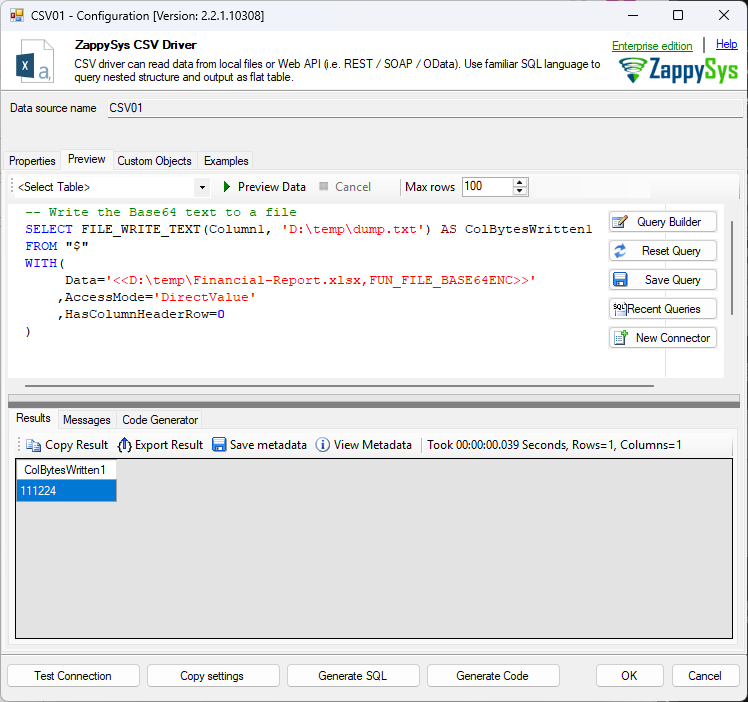
If your goal is simply to convert a file into a Base64 string and save the encoded content into a text file, use the following query.
SELECT FILE_WRITE_TEXT(Column1, 'D:\temp\dump.txt') AS ColBytesWritten1
FROM "$"
WITH(
     Data='<<D:\temp\Financial-Report.xlsx,FUN_FILE_BASE64ENC>>'
    ,AccessMode='DirectValue'
    ,HasColumnHeaderRow=0
)
How It Works
FUN_FILE_BASE64ENCreads the specified file and converts its binary contents into a Base64-encoded string.AccessMode='DirectValue'treats the generated Base64 string as inline data.- Since no header exists,
HasColumnHeaderRow=0prevents a header row from being generated. - The generated Base64 value is exposed as
Column1. FILE_WRITE_TEXT()writes the Base64 string to the destination file and returns the number of bytes written.
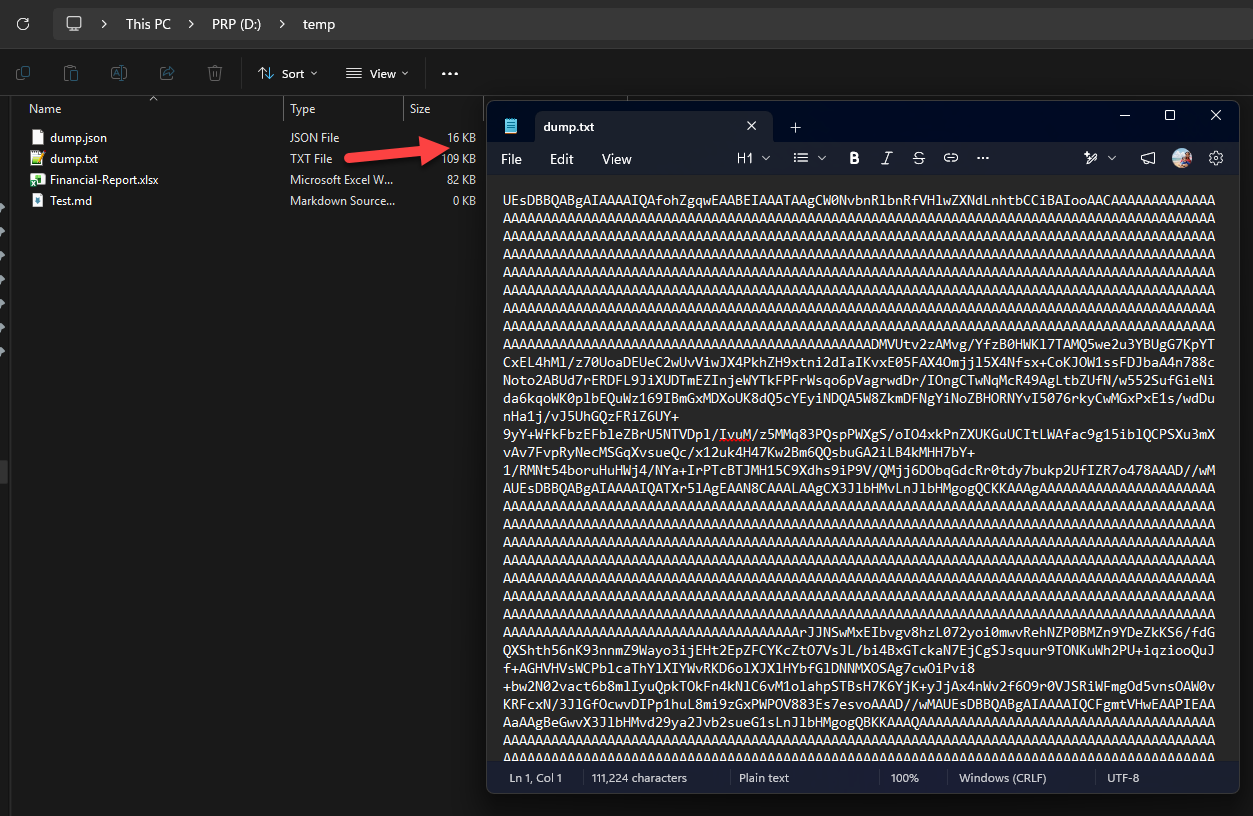
The resulting dump.txt file contains only the Base64-encoded representation of the original file.
Use Case 2: Save a JSON Document Containing Base64 Data
In many integrations, the Base64 string must be included inside a JSON document together with additional metadata such as the file name, content type, or upload timestamp.
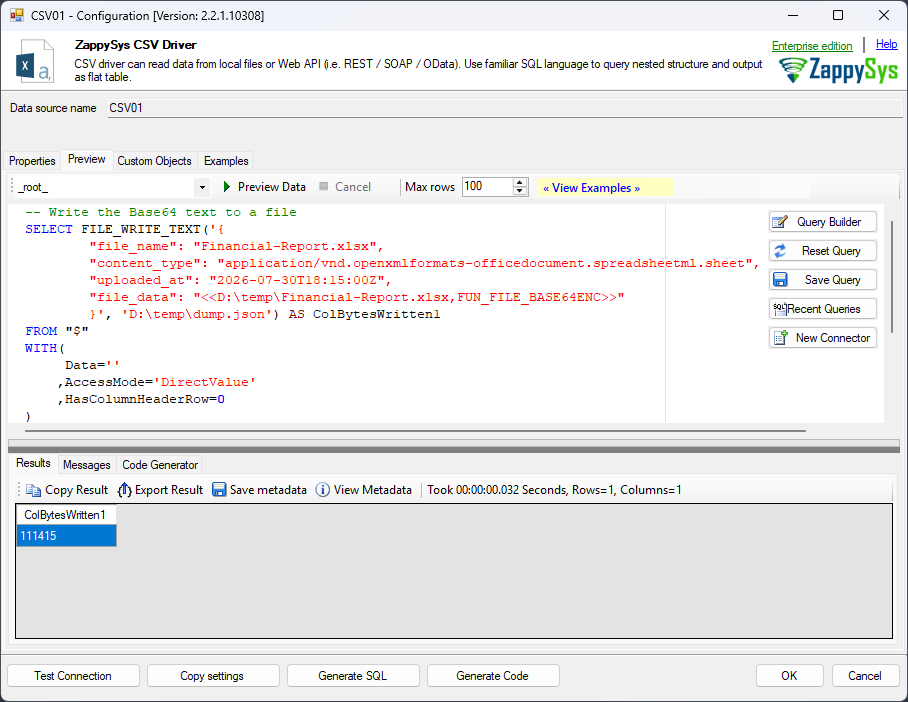
Rather than writing only the encoded string, you can build the complete JSON payload and inject the Base64 value wherever required.
SELECT FILE_WRITE_TEXT('{
    "file_name": "Financial-Report.xlsx",
    "content_type": "application/vnd.openxmlformats-officedocument.spreadsheetml.sheet",
    "uploaded_at": "2026-07-30T18:15:00Z",
    "file_data": "<<D:\temp\Financial-Report.xlsx,FUN_FILE_BASE64ENC>>"
}', 'D:\temp\dump.json') AS ColBytesWritten1
FROM "$"
WITH(
     Data=''
    ,AccessMode='DirectValue'
    ,HasColumnHeaderRow=0
)
How It Works
- A complete JSON document is passed directly to
FILE_WRITE_TEXT(). - The
FUN_FILE_BASE64ENCplaceholder is evaluated before the file is written. - The encoded file contents are automatically inserted into the
file_dataproperty. - The completed JSON document is saved to
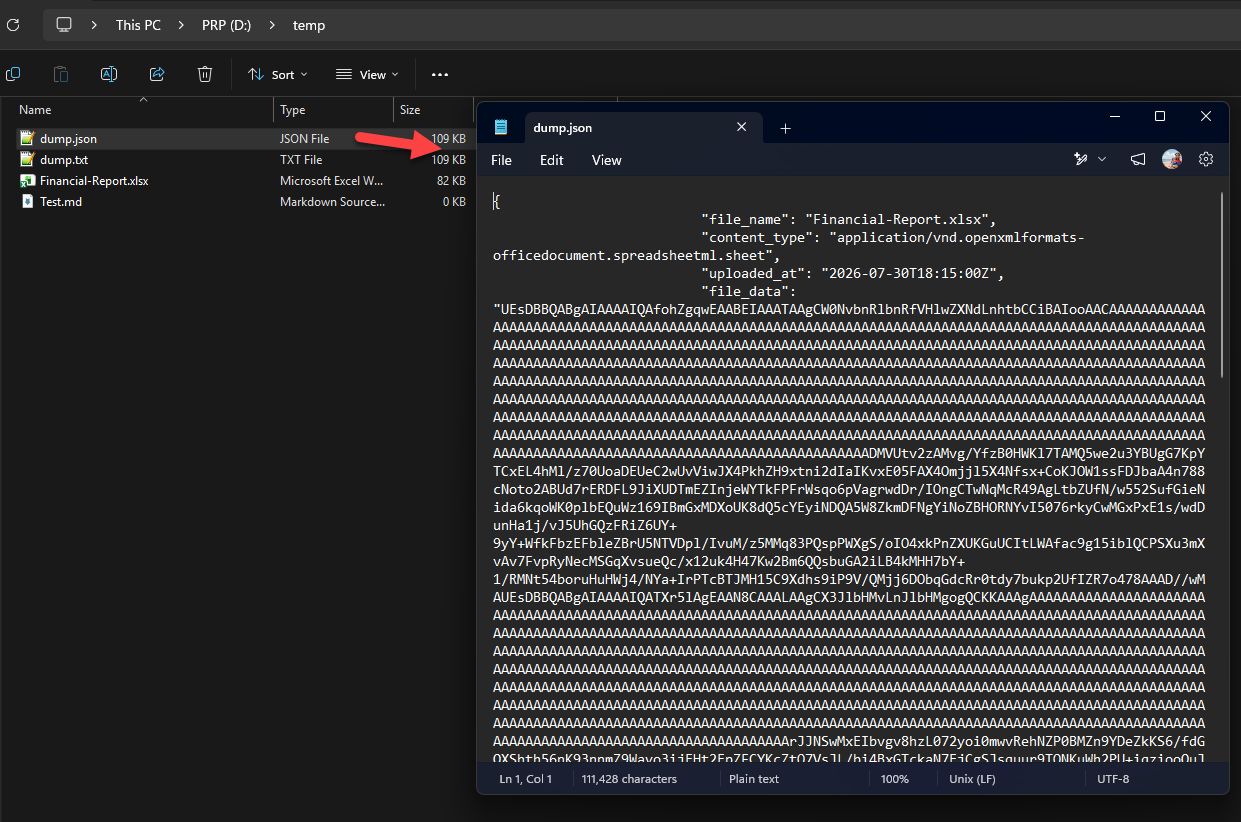
D:\temp\dump.json.
This technique is ideal when preparing payloads for APIs, message queues, or other applications that consume JSON.
Use Case 3: Save an XML Document Containing Base64 Data
Some applications and legacy systems require XML instead of JSON. The same approach can be used by embedding the Base64 placeholder inside an XML document.
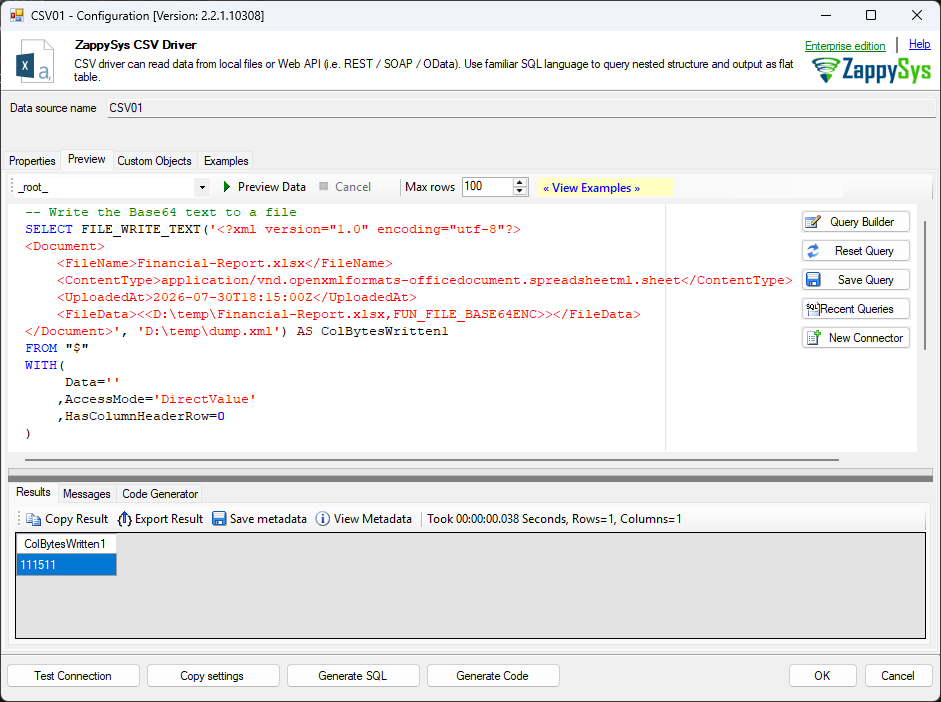
SELECT FILE_WRITE_TEXT('<?xml version="1.0" encoding="utf-8"?>
<Document>
    <FileName>Financial-Report.xlsx</FileName>
    <ContentType>application/vnd.openxmlformats-officedocument.spreadsheetml.sheet</ContentType>
    <UploadedAt>2026-07-30T18:15:00Z</UploadedAt>
    <FileData><<D:\temp\Financial-Report.xlsx,FUN_FILE_BASE64ENC>></FileData>
</Document>', 'D:\temp\dump.xml') AS ColBytesWritten1
FROM "$"
WITH(
     Data=''
    ,AccessMode='DirectValue'
    ,HasColumnHeaderRow=0
)
How It Works
- A complete XML document is constructed as a string.
FUN_FILE_BASE64ENCconverts the file into a Base64 string.- The encoded content is inserted directly inside the
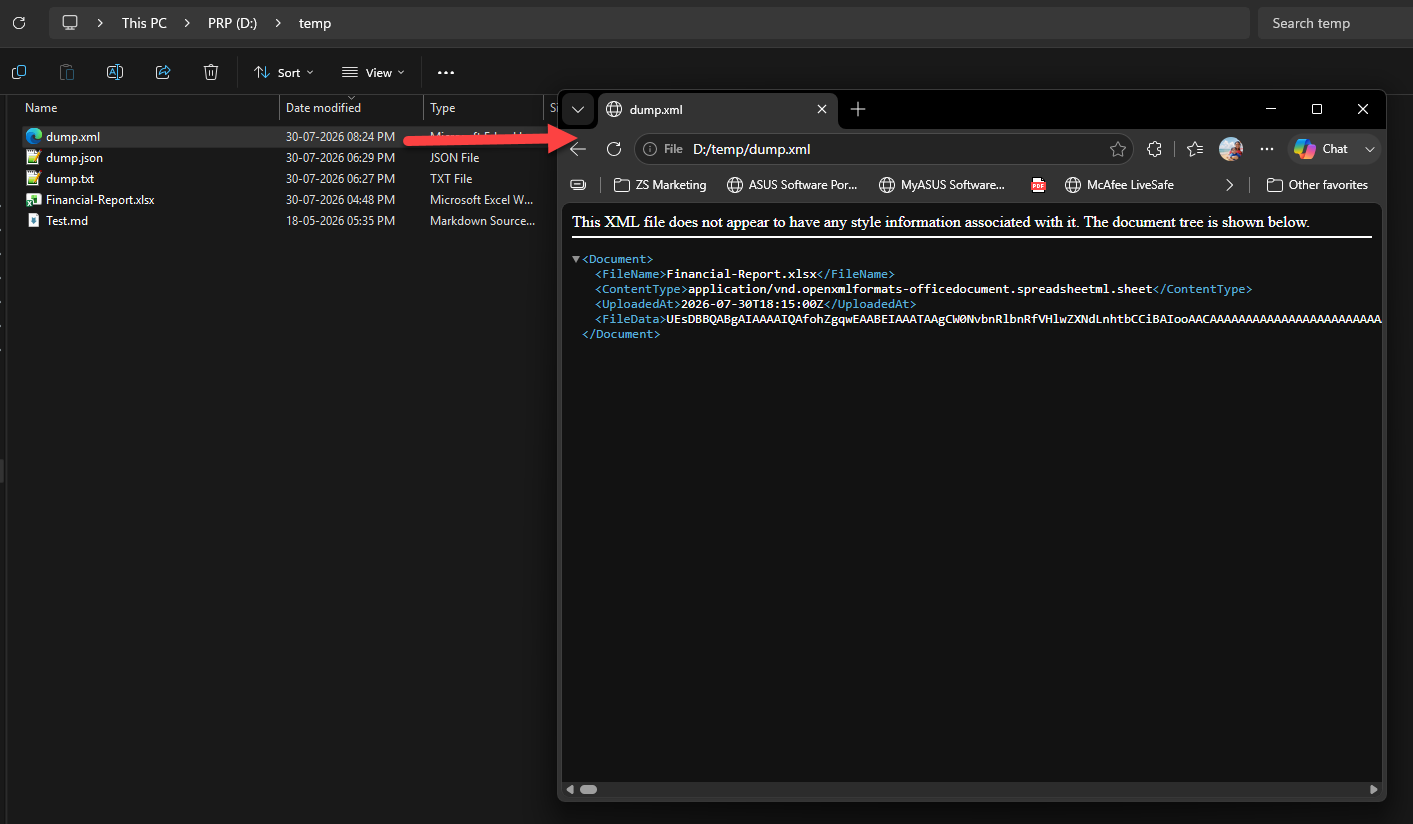
<FileData>element. FILE_WRITE_TEXT()writes the final XML document toD:\temp\dump.xml.
This method is useful for SOAP services, XML-based integrations, and enterprise systems that require embedded binary data.
Summary
Using the ZappySys ODBC CSV Driver , you can easily convert local files into Base64-encoded strings and save the output in multiple formats without writing custom code.
By combining the FUN_FILE_BASE64ENC placeholder with the FILE_WRITE_TEXT() function, you can:
- Save a raw Base64 string to a text file.
- Generate JSON payloads containing encoded file data.
- Create XML documents with embedded Base64 content.
- Build reusable payloads for APIs, file exchanges, or archival purposes.
- Eliminate the need for custom scripting languages such as C#, Python, or PowerShell.
This SQL-based approach provides a simple and efficient way to generate Base64 content directly within your existing ODBC workflows.