This document provides a high-level architecture overview of ZappySys SSIS PowerPack and ODBC PowerPack, focusing on data flow, security boundaries, and deployment model for compliance and security review purposes.
Download PDF: ZappySys Architecture Overview
SSIS PowerPack Architecture
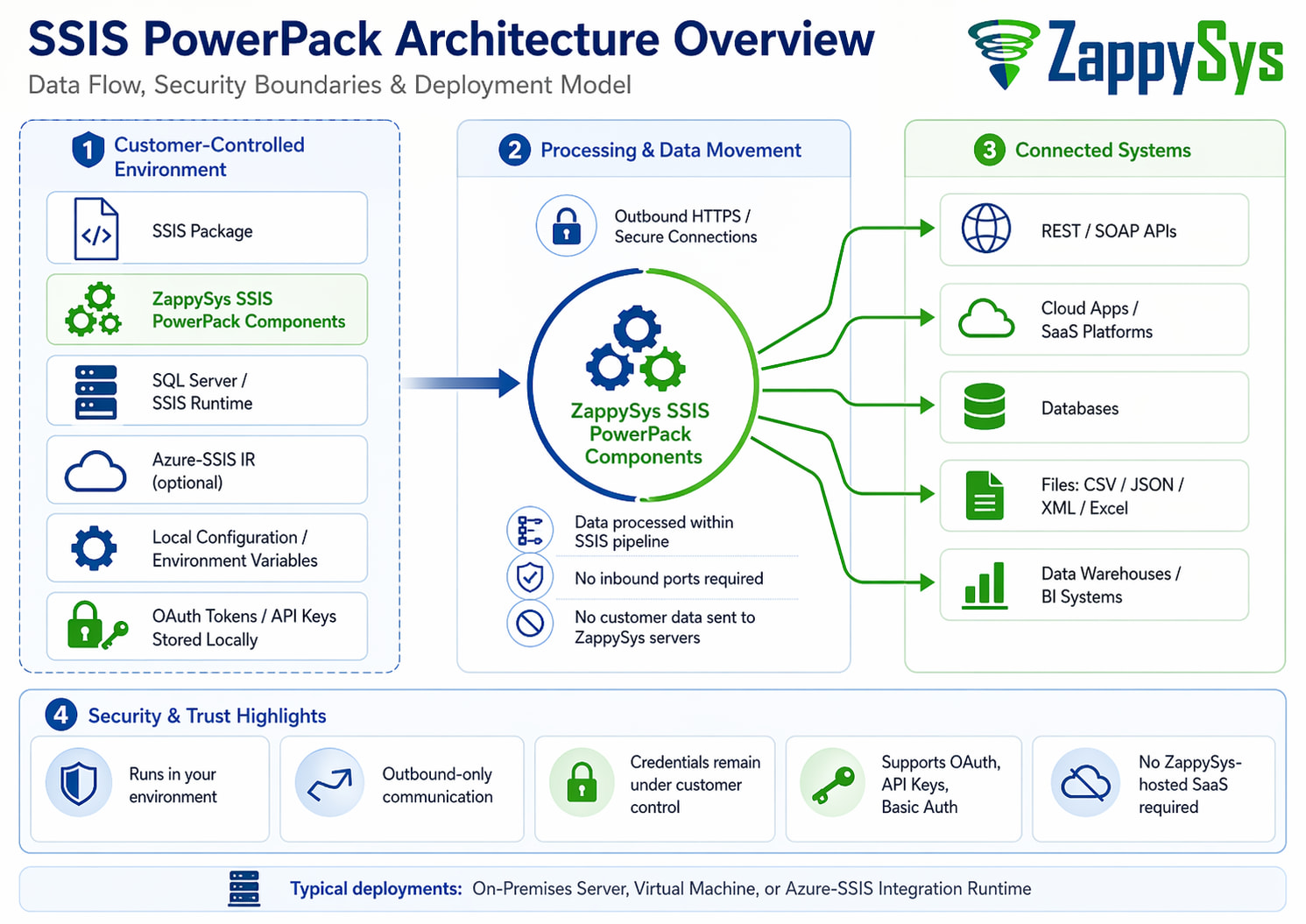
Key Components
-
SSIS Package (SQL Server Integration Services)
Runs inside your environment (on-premises VM or Azure-SSIS IR). -
ZappySys SSIS PowerPack Components
Includes connectors for REST APIs, JSON/XML, cloud apps, and databases. -
Secure Credential Handling
- Credentials stored in SSIS configurations / environment variables
- OAuth tokens stored locally within the execution environment
- No credential storage on ZappySys servers
-
External Systems
- Cloud APIs (REST / SOAP)
- SaaS platforms (e.g., CRM, Helpdesk, Marketing tools)
- Databases (SQL Server, Oracle, etc.)
- Files (CSV, JSON, XML, Excel)
Data Flow Summary
- SSIS package executes inside customer-controlled environment
- ZappySys connectors make outbound API/database calls
- Data is processed in-memory within SSIS pipeline
- Data is written to destination systems (DB, file, warehouse)
Security Notes
 No inbound connections required
- All communication is outbound (HTTPS)
- Data stays within customer-controlled infrastructure
- Supports secure token-based authentication (OAuth, API keys, etc.)
ODBC PowerPack Architecture
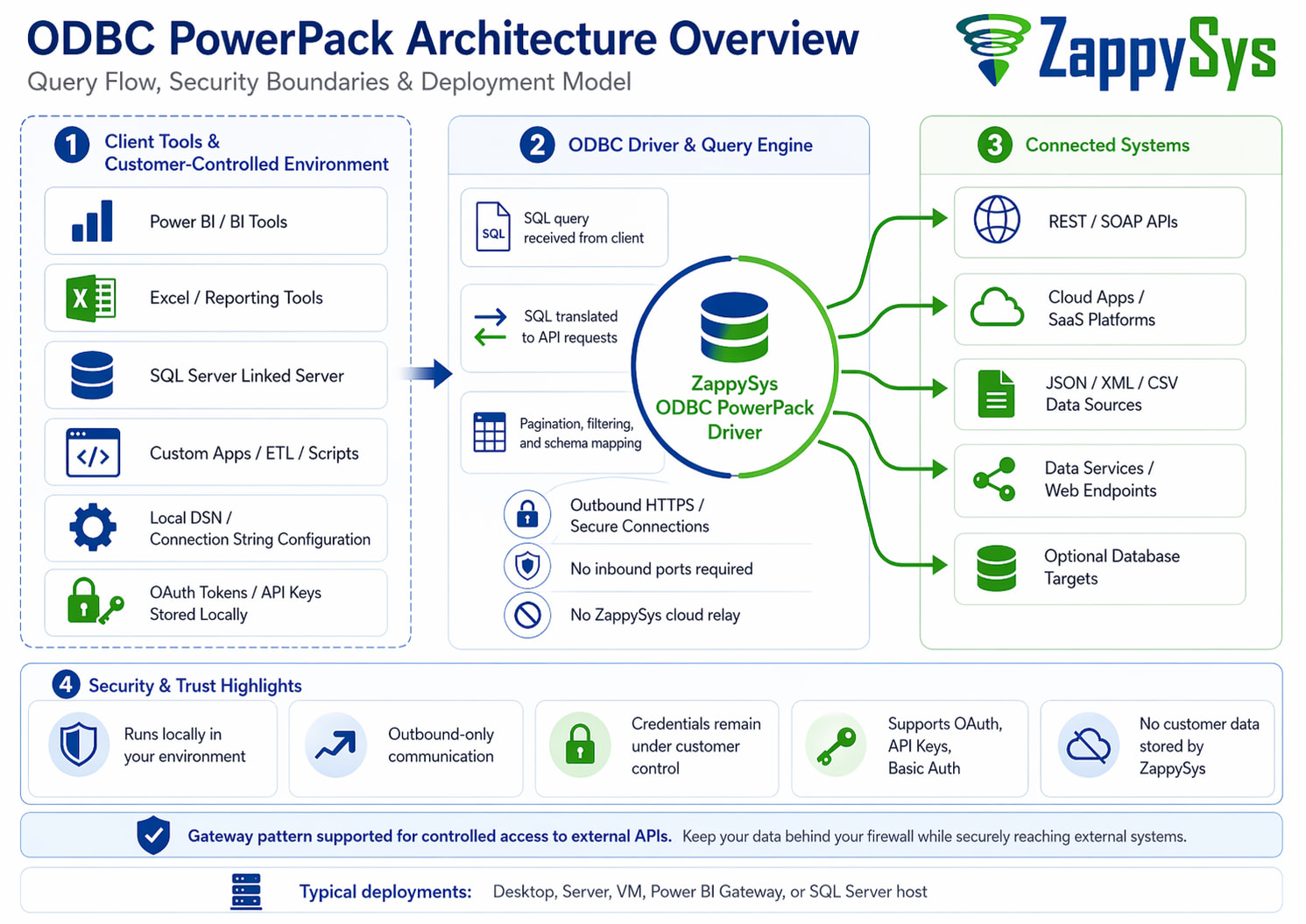
Key Components
-
ODBC Driver (ZappySys API Driver)
Installed on client machine or server. -
Client Applications
- Power BI (DirectQuery / Import)
- Excel
- SQL Server Linked Server
- Any ODBC-compliant tool
-
ZappySys Query Engine
- Translates SQL queries into API requests
- Handles pagination, filtering, joins (where supported)
-
External Systems
- REST APIs / SaaS platforms
- Cloud data services
Data Flow Summary
- Client tool issues SQL query via ODBC
- ZappySys driver translates SQL → API calls
- Data fetched via HTTPS from external systems
- Results streamed back to client tool
Security Notes
- Driver runs locally (no cloud dependency)
- No data stored or persisted by ZappySys
- All API calls are outbound over HTTPS
- Credentials stored locally (DSN or connection string)
Data Gateway & Linked Server Security Overview
In some enterprise scenarios, a Data Gateway pattern is used to securely bridge internal systems with external APIs or cloud services. This is common when using:
- SQL Server Linked Server (via ODBC Driver)
- On-premise reporting tools (Power BI, Excel, SSRS)
- Restricted environments behind firewalls
 How It Works
- The ODBC Driver (ZappySys PowerPack) is installed inside your secure network
- All API calls are executed locally from within your environment
- External systems are accessed via outbound HTTPS only
- No inbound ports or external callbacks are required
 Security Characteristics
- Runs entirely inside your network boundary
- No data persistence outside your system
- No middleware or cloud relay by ZappySys
- Works with existing firewalls, proxies, and network controls
- Credentials remain local (DSN / secure config / vault integration)
 Special Note (SQL Server Linked Server Stability)
When using ODBC drivers with SQL Server Linked Server, there are known stability considerations depending on driver configuration and environment.
We strongly recommend reviewing the following guide for best practices, fixes, and secure configuration:
 Read More:
https://zappysys.com/blog/sql-server-linked-server-odbc-crash-fix/
This guide covers:
- Common crash scenarios and root causes
- Secure and stable configuration patterns
- Best practices for production deployments
 When to Use This Pattern
Use Data Gateway / Linked Server architecture when:
- Direct cloud connectivity is restricted
- You need centralized access via SQL Server
- Multiple users/tools must query external APIs through a controlled layer
- Security policies require no direct client-to-API access
Ports, Protocols & Compliance Connectivity Diagram
The diagram below provides a compliance-focused view of ZappySys connectivity for both SSIS PowerPack and ODBC PowerPack, including typical ports, protocols, traffic direction, and security boundaries.
This diagram is intended for network/security review and complements the high-level architecture diagrams above.
Important: ZappySys products are generic integration tools. Actual ports and protocols depend on the target system, authentication method, and customer environment. Only the applicable connectivity paths need to be enabled.
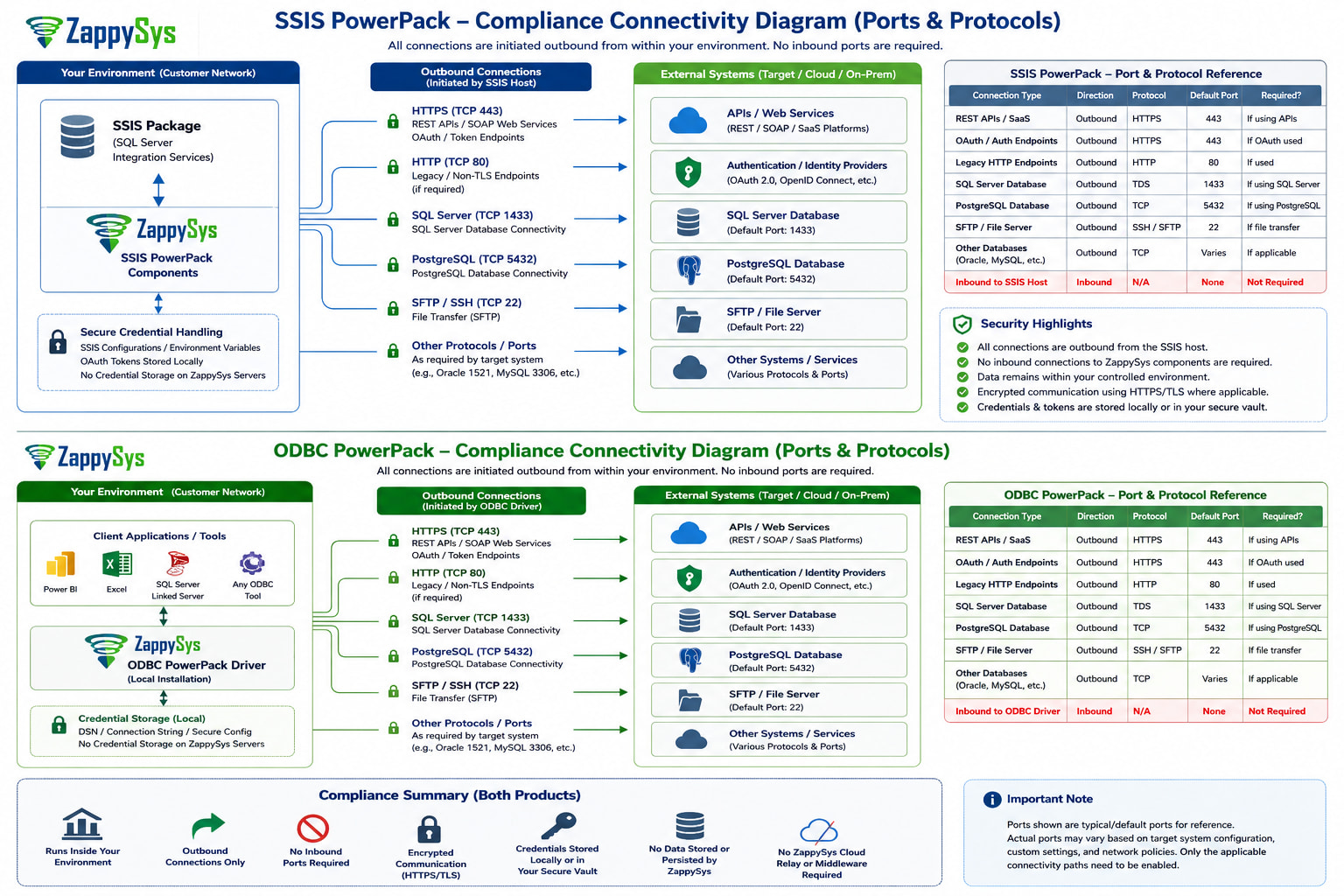
Key Connectivity Notes
- ZappySys components run inside the customer-controlled environment.
- All external connections are initiated outbound from the customer environment.
- No inbound ports are required for ZappySys components.
- No ZappySys-hosted cloud relay or middleware is required.
- Credentials, API keys, and OAuth tokens remain stored locally or within the customer-controlled execution environment.
- Ports shown are typical/default ports for review purposes. Actual ports may vary based on the target system and customer configuration.
Typical Ports and Protocols
| Connection Type | Direction | Protocol | Default Port | When Used |
|---|---|---|---|---|
| REST APIs / SaaS endpoints | Outbound | HTTPS | 443 | API integrations |
| OAuth / Authentication endpoints | Outbound | HTTPS | 443 | OAuth authentication |
| Legacy HTTP endpoints | Outbound | HTTP | 80 | Only if non-TLS endpoint is used |
| SQL Server database | Outbound | TDS / SQL Server | 1433 | SQL Server database connectivity |
| PostgreSQL database | Outbound | TCP / PostgreSQL | 5432 | PostgreSQL database connectivity |
| SFTP / File server | Outbound | SSH / SFTP | 22 | File-based exchange |
| Other databases / services | Outbound | Target-specific | Varies | Oracle, MySQL, custom services, etc. |
| Inbound to ZappySys host | Inbound | N/A | None | Not required |
Compliance Summary
| Area | SSIS PowerPack | ODBC PowerPack |
|---|---|---|
| Execution location | Customer-controlled SSIS host | Customer-controlled client/server host |
| Connection direction | Outbound only | Outbound only |
| Inbound ports required | None | None |
| Common API protocol | HTTPS | HTTPS |
| Common API port | TCP 443 | TCP 443 |
| Database ports | Target-system native port | Target-system native port |
| Credential storage | Local/customer-controlled environment | Local DSN / connection string / customer-controlled environment |
| ZappySys cloud relay required | No | No |
Compliance note: Typical/default ports are shown for review purposes. Actual ports may vary based on the customer’s network configuration, target system configuration, and integration pattern.