Problem
An SSIS job that reads several MongoDB views (for example, 5 views processed by separate packages or Data Flow Tasks) fails randomly:
- On some runs, most of the views fail (e.g., 4 of 5).
- On other runs, most of them succeed (e.g., 4 of 5).
- The only consistent result is that the job fails almost every day, even though there are no changes to the views or the data.
Cause
Random failures like this usually point to timing and concurrency, not to the views themselves. Common causes are:
- Connection timeout is too low. When several MongoDB queries start at once, some connections take longer than the timeout to open or return the first batch of data, so they fail.
- Too many tasks run in parallel. With MaxConcurrentExecutables set to
-1(the default, meaning number of processors + 2), SSIS runs as many tasks and child packages at the same time as it can. As a result, the MongoDB server receives many simultaneous connections and queries. - Validation opens connections too early. If validation is not delayed, every Data Flow and source tries to connect to MongoDB at the same moment while the package starts, which adds to the connection spike.
Solution
Apply the following changes in the parent package and in every child package that reads from MongoDB.
Method 1: Increase the connection timeout
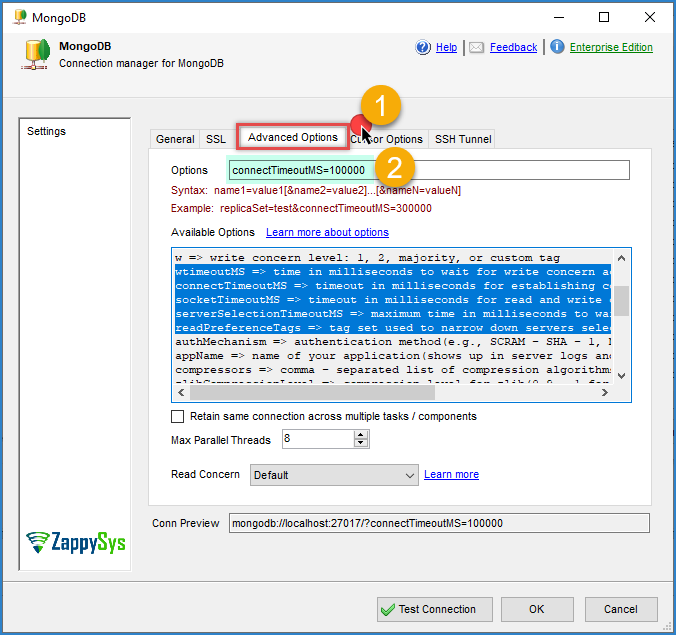
- In Connection Managers, double-click the MongoDB connection.
- Increase the connection timeout (and the command/request timeout, if available) to a value that fits your slowest view.
Method 2: Limit concurrency
-
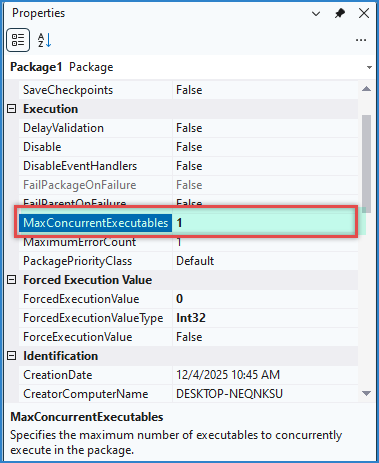
Click an empty area of the Control Flow to select the package.
-
Open the Properties window (F4).
-
Change MaxConcurrentExecutables from
-1to1, so tasks and child packages run one at a time.
-
If the total run time is too long, try a small value such as
2or3instead, and test again.
Method 3: Enable Delay Validation
-
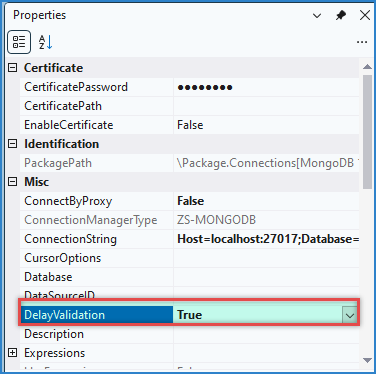
Select the MongoDB connection manager, open the Properties window, and set DelayValidation to
True. -
Select each Data Flow Task that reads from MongoDB and set DelayValidation to
True.
-
Do the same on the source component level if the property is available there.
-
This way, the connection is opened only when the task actually runs, not during package validation.
Deploy and test
- Repeat the changes above in all child packages, not only in the parent package.
- Deploy the updated project to the server (for example, the staging server first).
- Run the job several times and confirm it completes successfully every time before moving the change to production.
Best practice
To avoid recurring issues:
- Do not run many MongoDB sources in parallel against the same server unless it can handle the load.
- Set a timeout that fits your slowest query, not the average one.
- Use DelayValidation on connections and Data Flows that depend on external systems.
- Apply these settings to child packages too, since they have their own properties and do not inherit them from the parent.
- If the issue persists, enable logging on the component and compare a failed run against a successful one to see which step times out.
Need more help?
If the issue persists, contact ZappySys Support:
- Live Chat: Use the chat widget (bottom-right corner)
- Email: support@zappysys.com
- Support Center: https://zappysys.com/support/