Problem
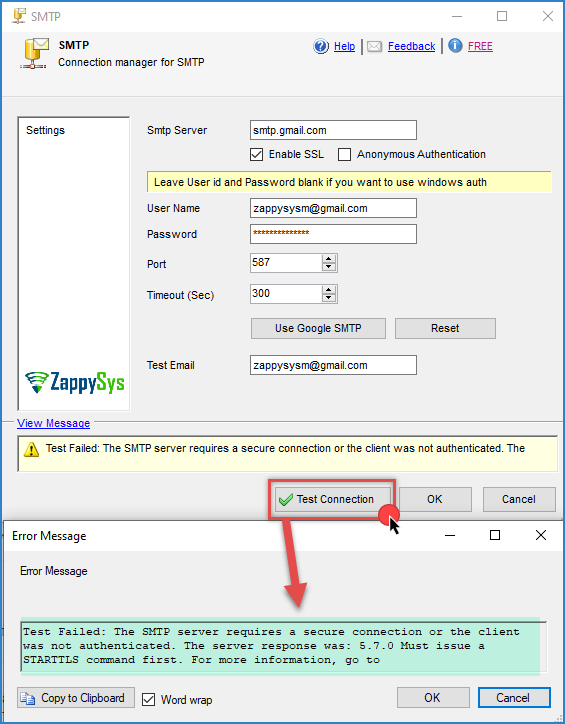
When you click Test Connection in the ZappySys SMTP connection (ZS-SMTP), or when you run a package that uses the Send HTML Email Task, you get the following error:
Test Failed: The SMTP server requires a secure connection or the client was not authenticated. The server response was: 5.7.0 Must issue a STARTTLS command first. For more information, go to
Cause
The SMTP server accepts only encrypted connections, but the connection is trying to send the email unencrypted.
Most public email providers (Gmail, Microsoft 365, Outlook.com) require STARTTLS on port 587. With STARTTLS, the client connects unencrypted, then asks the server to switch to an encrypted (TLS) channel before sending the username and password. If the SSL option is not checked in the SMTP connection, the client never asks for that switch, and the server rejects the request with 5.7.0 Must issue a STARTTLS command first.
The text For more information, go to at the end of the message is how Gmail formats this error, so you will usually see it with smtp.gmail.com.
Solution
Common SMTP settings
| Provider | SMTP server | Port | SSL |
|---|---|---|---|
| Gmail / Google Workspace | smtp.gmail.com |
587 |
Checked |
| Microsoft 365 | smtp.office365.com |
587 |
Checked |
Outlook.com / Hotmail |
smtp-mail.outlook.com |
587 |
Checked |
| Amazon SES | email-smtp.<region>.amazonaws.com |
587 |
Checked |
| SendGrid | smtp.sendgrid.net |
587 |
Checked |
Always confirm the values in your provider documentation, because they can change.
Why port 587 and not 465?
Port 465 uses implicit SSL, which means the connection must be encrypted from the first byte. Port 587 uses STARTTLS, which is what this error is asking for. Use port 587 with the SSL option checked. If you use port 465, the test usually hangs and then times out.
Other errors you may see after the fix
Once the connection is encrypted, the server checks your credentials. These are the most common errors at this point:
-
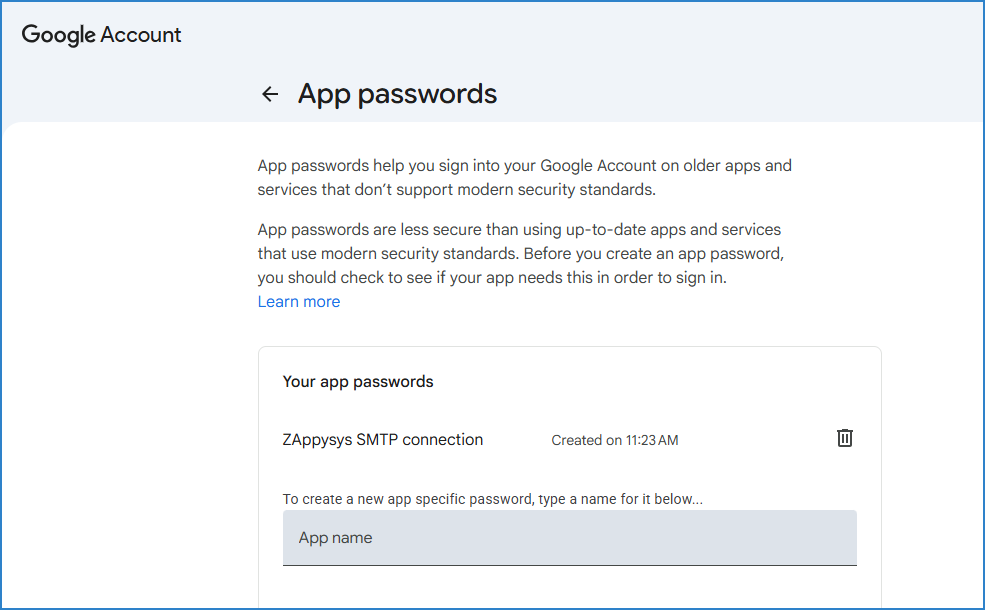
5.7.8 Username and Password not accepted(Gmail): Gmail does not accept your normal account password for SMTP. Turn on 2-Step Verification for the account, create an app password at https://myaccount.google.com/apppasswords, and use it in the Password field.
-
5.7.139 Authentication unsuccessful, SmtpClientAuthentication is disabled(Microsoft 365): SMTP AUTH is disabled for the mailbox or the tenant. Ask your Microsoft 365 administrator to enable Authenticated SMTP for the mailbox that sends the email. -
5.7.0 Authentication Requiredor5.5.1 Authentication Required: The password is empty or not saved. Check that Anonymous Authentication is unchecked and that a password is entered. -
Timeout or “Unable to connect to the remote server”: Check the server name and port, and make sure the firewall on the SSIS server allows outbound traffic on port
587.
Conclusion
This error means the SMTP server requires an encrypted connection. Check the SSL option in the ZS-SMTP connection, use port 587, and enter valid credentials (an app password for Gmail). If the package works in Visual Studio but not when scheduled, check how the password is saved and whether the server can reach port 587.
Still need help?
If you need assistance with this error, please get in touch with our support team:
- Live Chat: Open the chat widget (bottom right of this page)
- Email: support@zappysys.com
- Support Center: Support | ZappySys