Error Overview
When running large data migrations or extracts using the ZappySys Salesforce Source, you may encounter the following exception:
System.Net.WebException: The request failed with HTTP status 503: Service Unavailable. at ZappySys.Crm.SdfcPartnerApi.SforceService.queryMore(String queryLocator)
This error typically occurs mid-stream, specifically during the queryMore phase when the component attempts to fetch the next batch of data from Salesforce.
Why this is happening
A 503 error is typically transient, meaning it’s a temporary bottleneck rather than a permanent configuration failure.
- Server Overload: Salesforce is temporarily overwhelmed by the volume of requests or is undergoing brief maintenance.
- Rate Limiting: You might be hitting Concurrent Request limits. If you have too many long-running queries happening at once, Salesforce starts pushing back.
- Connection Timeouts: If the
queryLocatoris trying to pull a massive batch of data and the network pipe or the server stutters, the connection drops and returns a 503.
How to Fix It
1. Reduce Batch Size
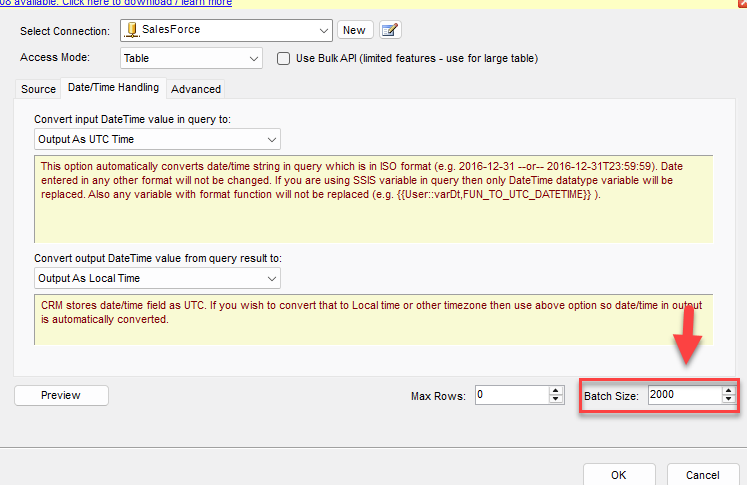
If queryMore is failing, it’s likely struggling with the size of the data chunks being passed.
- In your Salesforce Source component, look for the Batch Size property (the default is often 2000).
- Lower this to 500 or 1000. Smaller batches are less likely to trigger a timeout or a 503 under load.
2. Implement or Increase Retries
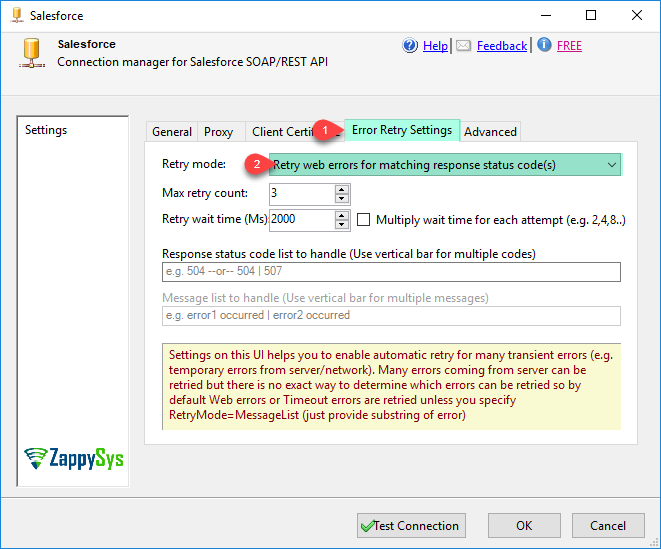
Since 503 errors are often “blips,” the most effective solution is a retry strategy.
- Check your ZappySys Salesforce Connection settings. Look for Retry Settings.
- Set the Retry Count to 3 or 5.
- Set a Retry Wait (back-off) of at least 5-10 seconds. This gives the Salesforce instance a moment to breathe before you hit it again.
3. Switch to Bulk API (Recommended for Large Tables)
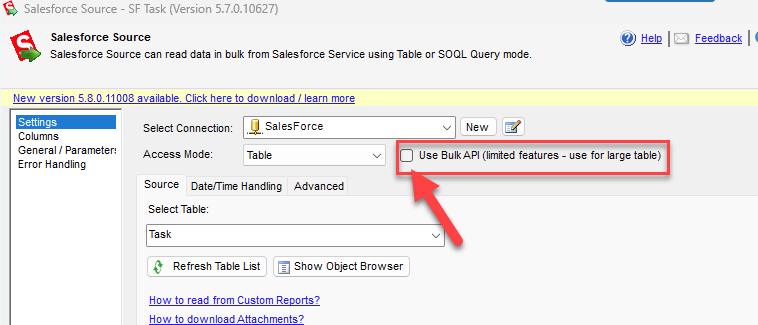
If the table you are querying contains millions of records, the standard API can struggle. We recommend switching the API Type to Bulk or Bulk V2 within the ZappySys component.
The Bulk API is designed for high-volume data and is much more resilient to 503 timeout errors.
4. Check Salesforce “Trust”
If this is happening consistently, check the Salesforce Trust site. Search for your specific instance (e.g., NA112, EU40) to see if there are any ongoing performance degradations or maintenance windows.
5. Check for “Zombies”
If you have multiple SSIS packages running in parallel, you might be exhausting the Concurrent API Request Limit (usually 25 for most editions).
Try staggering your package execution times so they don’t all dogpile the API at once.
Summary
The HTTP 503 error is Salesforce’s way of saying “Try again in a moment.” By combining Retry Logic with Smaller Batch Sizes, you can create a robust integration that handles these server-side hiccups gracefully.