Problem
When running a SQL query against a MongoDB collection using a ZappySys MongoDB component (for example, MongoDB Source), the query fails with this error:
ZappySys.Common.Parser.Query.ParseException: Where expected
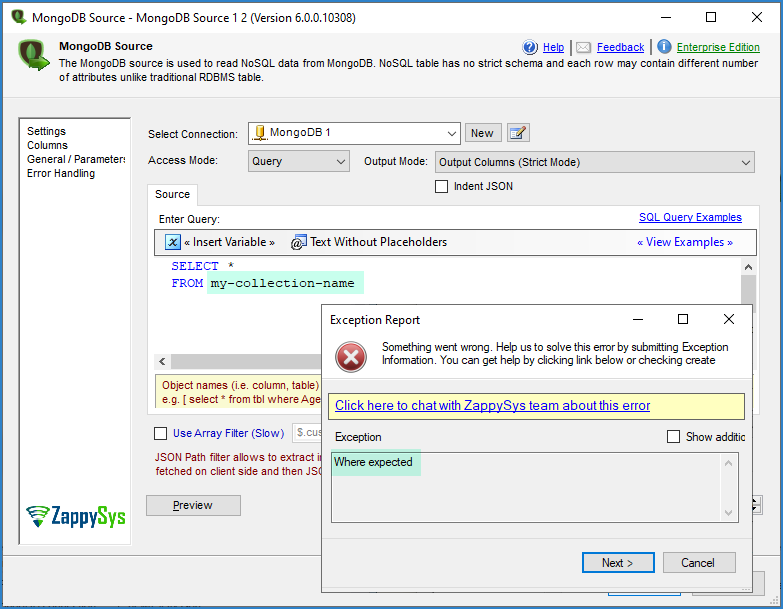
The same query works fine on other collections and fails only on one collection:
SELECT * FROM my-collection-name WHERE date_scraped > ''
Cause
The collection name contains a hyphen (-). The SQL query parser treats the hyphen as a minus operator, so:
- The parser stops reading the table name early (at
my). - It then looks for the
WHEREclause, does not find it where it expects it, and throws the “Where expected” error. - Collections without special characters in the name work fine with the same query, which is why the issue looks random.
Solution
Wrap the collection name in square brackets so it is treated as a single identifier:
SELECT * FROM [my-collection-name] WHERE date_scraped > ''
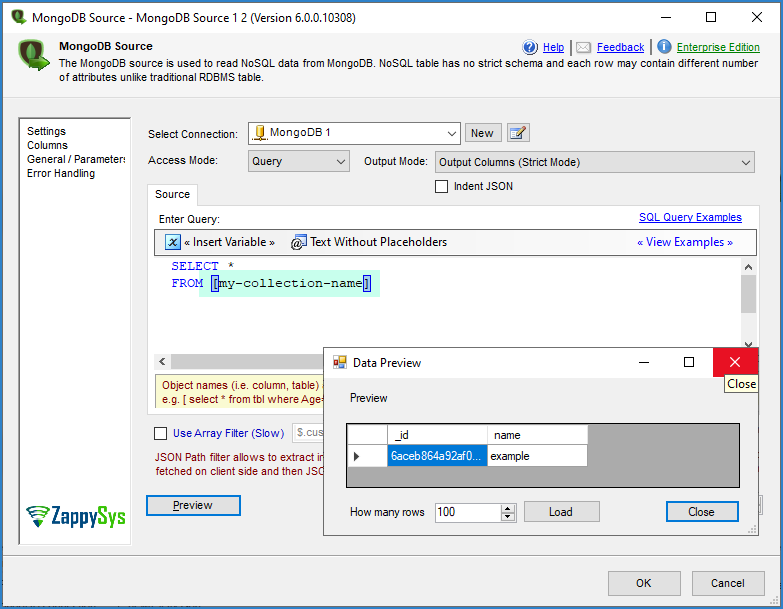
The same applies to any collection or field name that contains special characters such as hyphens, spaces, or dots.
Best practice
To avoid recurring issues:
- Use square brackets around every collection and field name that has hyphens, spaces, dots, or other special characters.
- When a query works on one collection but fails on another, compare the names first, since special characters are a common cause.
Need more help?
If the issue persists, contact ZappySys Support:
- Live Chat: Use the chat widget (bottom-right corner)
- Email: support@zappysys.com
- Support Center: Support | ZappySys