Introduction
When attempting to read a JSON file with the JSON Source component in SSIS, you may encounter an error message like this:

You then validate the file with a JSON validator, which reports it as valid. So why is it not working with the JSON Source?
Possible Causes
One common reason for this issue is that the JSON file is encoded in UTF-16 Little Endian or another encoding that the JSON Source component does not automatically detect. This can prevent the component from correctly reading the file. You can use tools like Notepad++ to check and view the encoding of your file.
Solution Using ZappySys JSON Components
You can easily resolve encoding issues by specifying the correct encoding in the JSON Source component. Here’s how to do it:
- Open the JSON Source component in your SSIS package.
- Navigate to the Encoding/Character Set tab.
- From the dropdown, select the appropriate encoding for your file. In this case, select UTF-16 (or any other encoding you need based on your file’s actual encoding).
- Click OK to save your configuration.
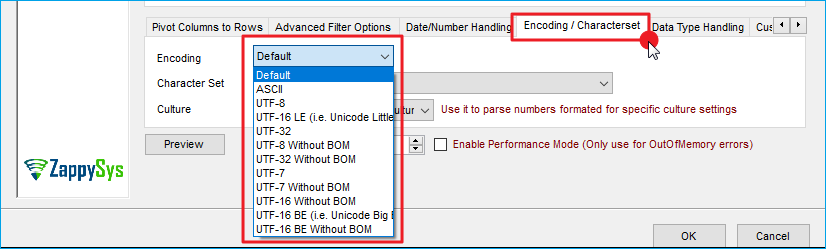
Using this setting, the JSON Source should now correctly read the JSON file with the correct encoding.
Conclusion
Encountering encoding issues when working with JSON files in SSIS is common, mainly when the file uses non-standard encodings such as UTF-16. However, by configuring the JSON Source component correctly, specifically by selecting the appropriate encoding on the Encoding/CharacterSet tab, you can easily resolve these issues. This simple adjustment ensures your JSON Source component reads the file correctly and that your SSIS workflows run smoothly.
Explore our SSIS PowerPack for more information and download and install it to start building smarter, faster, and more scalable solutions.
References
Contact Us
If you encounter any further issues or need additional help, please reach out to our support team via live chat or submit a support ticket at support@zappysys.com.