Introduction
When using the Jira Connector to integrate with your Jira instance, you might encounter the following error message:
The underlying connection was closed: Could not establish trust relationship for the SSL/TLS secure channel.
This error typically arises from issues with SSL/TLS certificates or from the inability of the connection to verify the server’s identity. In this article, we’ll guide you through the troubleshooting steps to resolve this issue.
Possible Causes
The error is most commonly caused by one of the following:
- Invalid or Missing Certificate: If your Jira instance uses an SSL certificate that is untrusted, expired, or missing, the connection cannot be established.
- Misconfigured Jira URL: If the URL used for Jira is incorrect or inaccessible, it could trigger this error.
- SSL/TLS Configuration Issues: The connection might fail to establish trust if the SSL/TLS configuration between your Jira instance and the connector is misconfigured.
Solution
Step 1: Verify the Jira URL
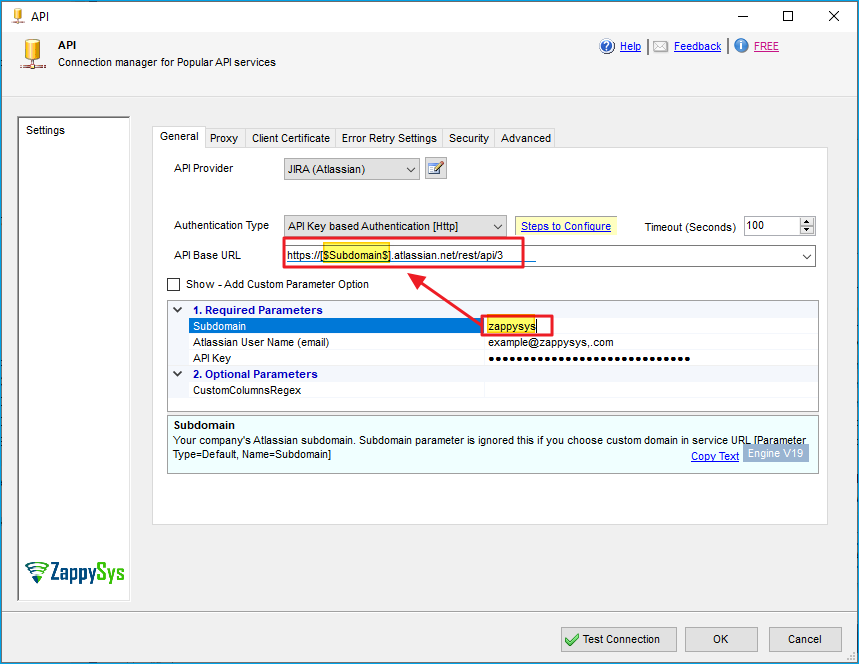
The first thing you should do is verify the Jira URL to ensure it’s correct. For example, if the URL you provided (zappysys.atlasian.net) doesn’t exist or is incorrect, it could prevent a successful connection.
- Double-check that the Jira URL is spelled correctly.
- Ensure that the URL is reachable via your browser.
- If the URL is incorrect, update the Jira Connector configuration with the correct URL.
Step 2: Check the certificates
If the Jira URL is correct, the next step is to verify the certificate used by your Jira instance. A mismatch between your client’s trusted certificates and the server’s certificate can result in this error.
Follow these steps to troubleshoot certificate issues:
-
Check the Certificate in Your Browser:
- Open your Jira URL in a web browser. If the certificate is not valid, you will typically see a security warning.
- If the certificate is self-signed or issued by an untrusted authority, the connection may fail.
-
Ensure the Certificate is Valid and Trusted:
- Make sure that the certificate is issued by a trusted Certificate Authority (CA) and is not expired.
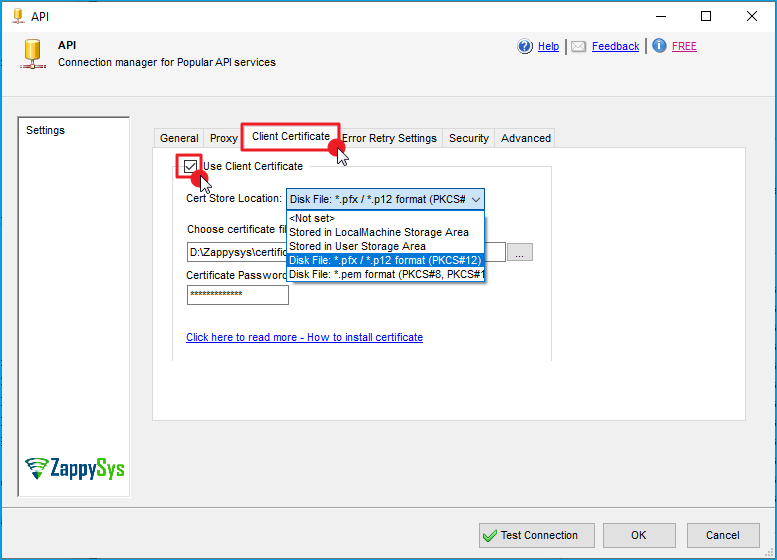
- If your Jira instance is using a self-signed certificate, you will need to manually install and trust the certificate on the client machine.
-
Generate a New Certificate (if necessary):
- If the current certificate is expired or invalid, generate a new certificate for your Jira instance, ensuring it is issued by a trusted CA.
-
Install the Certificate (if needed):
- On the client machine (where the connector is running), install the Jira server’s certificate into the trusted certificate store. This ensures that the connector can establish a secure connection.
Conclusion
The error typically occurs due to incorrect Jira URL configuration, invalid SSL certificates, or misconfigured SSL/TLS settings. By verifying the Jira URL, ensuring the certificate is valid and trusted, and confirming the appropriate SSL/TLS configurations, you should be able to resolve this issue and successfully establish a secure connection to your Jira instance.
If the issue persists, ensure all system and network settings related to SSL/TLS are properly configured, or consult your Jira administrator for assistance.
References
Contact Us
If you encounter any further issues or need additional help, please reach out to our support team via live chat or submit a support ticket at support@zappysys.com.