Introduction
The ZappySys Logging Task is a free SSIS task that writes custom messages, including SSIS variable values, to a message box, the SSIS log, or a file. This article shows how to log variable values and errors without writing code.
Prerequisites
- Download and install the ZappySys SSIS PowerPack.
When to use the Logging Task
- You want to check variable values while building a package, without writing a Script Task.
- You need to record values such as row counts or file names for each run.
- You want a readable error message when a package fails.
Steps
-
Open the SSIS Variables pane (SSIS > Variables) and create two variables:
User::FileName(String) with the valueC:\Data\Customers.csvUser::RowCount(Int32) with the value250
-
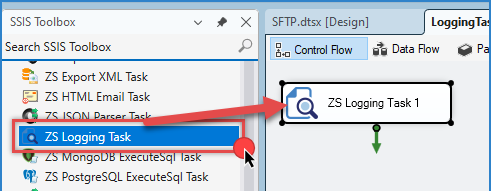
Drag the ZS Logging Task from the SSIS Toolbox onto the Control Flow and double-click it to edit.
-
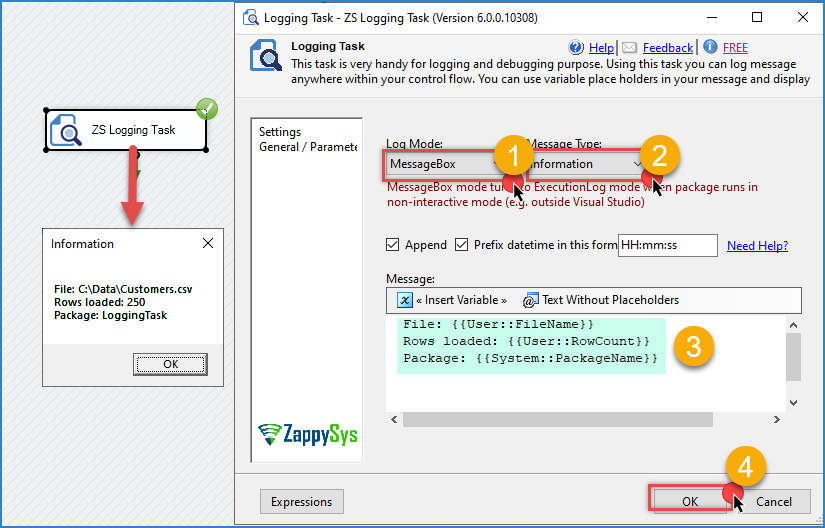
Set the logging mode to show a message box.
-
Enter the message. Type each variable name inside double curly braces, and the task replaces it with the value at runtime:
File: {{User::FileName}} Rows loaded: {{User::RowCount}} Package: {{System::PackageName}} -
Click OK to save the configuration.
-
Right-click the task and select Execute Task. A message box shows the message with the variable values.
Logging to the SSIS log or a file
A message box waits for a click, so use it only while developing. For packages that run on a schedule, change the logging mode:
- SSIS log: messages appear in the Progress tab in Visual Studio and in the SSIS catalog reports on the server.
- File: enter a path such as
C:\Logs\LoadCustomers.log. The account that runs the package needs write access to the folder.
Logging errors
-
Open the Event Handlers tab, select the package, select OnError, and click the link to create the event handler.
-
Drag a Logging Task onto it, set the logging mode to write to a file, and enter this message:
Package {{System::PackageName}} failed.
Task: {{System::SourceName}}
Error: {{System::ErrorDescription}}
Conclusion
The Logging Task writes messages with variable values to a message box, the SSIS log, or a file, for free and without code. Use the message box while developing, and the SSIS log or a file for scheduled runs and error logging.
Still need help?
If you need assistance using the Logging Task, please get in touch with our support team:
- Live Chat: Open the chat widget (bottom right of this page)
- Email: support@zappysys.com
- Support Center: Support | ZappySys