Introduction
The Foreach Loop Container in SSIS is a powerful control flow tool used to iterate over collections of items, such as files, database records, or API responses. When combined with ZappySys SSIS PowerPack, it enables seamless automation for dynamic ETL scenarios.
In this tutorial, you’ll learn how to use the Foreach Loop with ZappySys components to iterate over a list of files and upload them via a REST API Task without coding or scripting.
Prerequisites
- Download and install the ZappySys SSIS PowerPack
Steps
Step 1: Create Required Variables
First, we will create some SSIS variables.
Go to SSIS > Variables and define the following:
| Variable Name | Type | Description |
|---|---|---|
User::FileList |
Object | Stores the list of files |
User::FilePath |
String | Stores the current file’s full path |
User::FileName |
String | Stores the current file’s name |
Step 2: Get the List of Files with Advanced File System Task
-
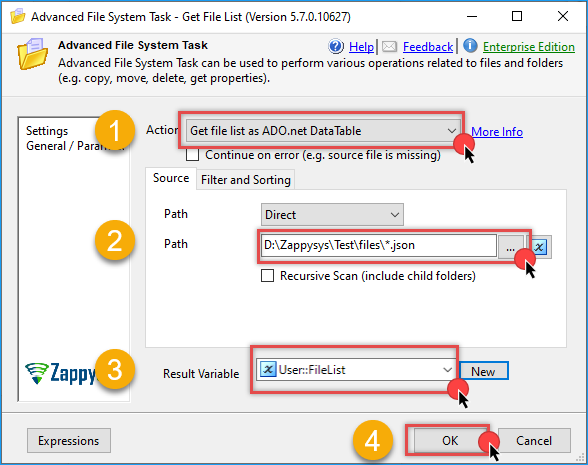
Drag ZS Advanced File System Task onto the Control Flow.
-
Set Action to
Get File List as ADO.net DataTable. -
Specify your folder path and use a wildcard filter to get more than one file. In this example, we will retrieve all JSON files (e.g.,
C:\MyFiles\*.json). -
Output the results to the
User::FileListvariable. -
Click OK to save.
Step 3: Configure Foreach Loop Container
-
Drag a Foreach Loop Container and connect it to the previous task.
-
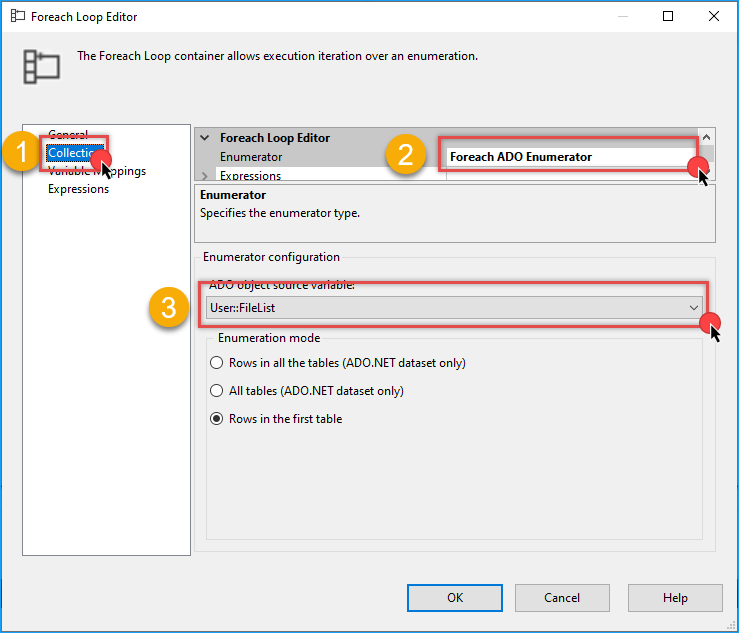
Double-click it and go to the Collection tab.
-
Set Enumerator to Foreach ADO Enumerator.
-
Set the source variable to
User::FileList.
-
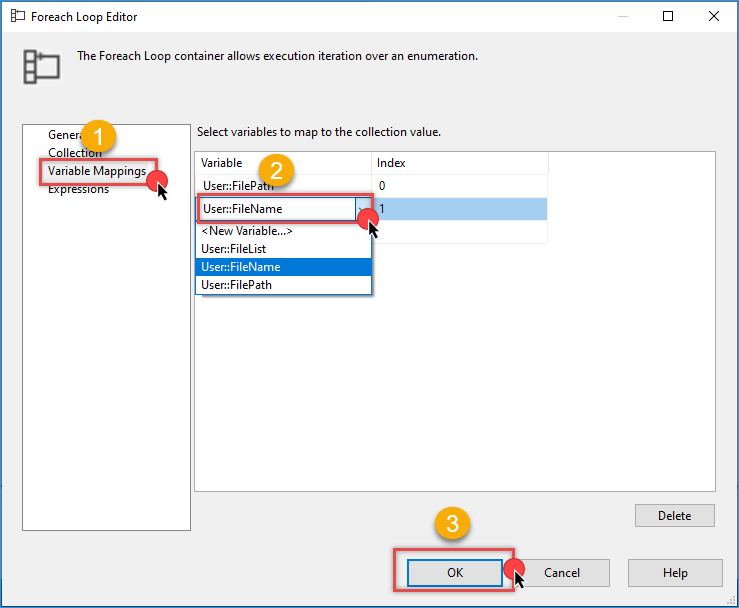
Go to the Variable Mappings tab, configure the variables.
-
Map Index 0 to
User::FilePath. -
Map Index 1 to
User::FileName. -
Click Ok to save the configuration
Step 4: Log File Information (Optional)
-
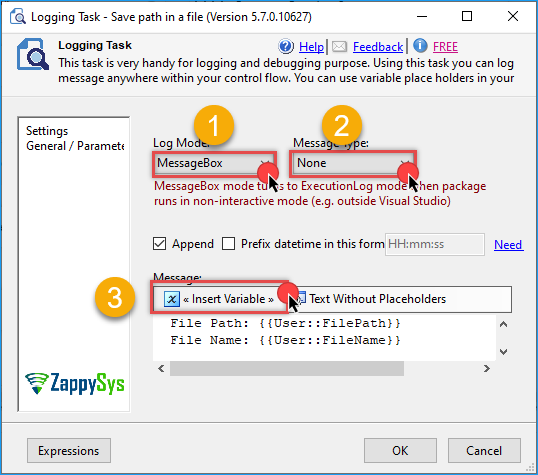
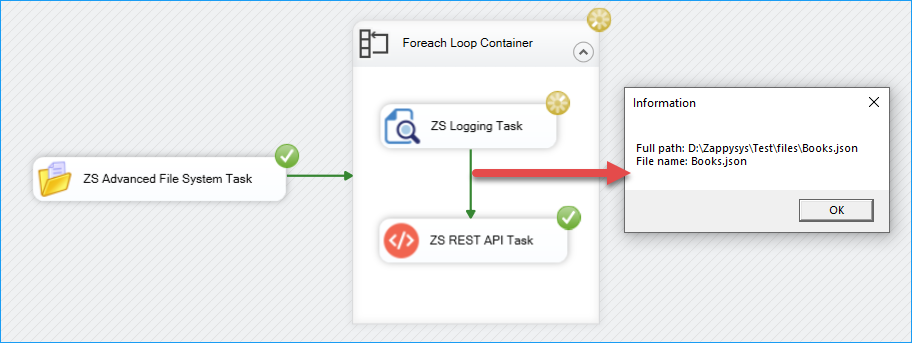
Inside the Foreach Loop, drag a ZS Logging Task.
-
Log the variables
User::FileNameandUser::FilePathto verify each iteration. -
Save and close the configuration.
Step 5: Upload Each File Using REST API Task
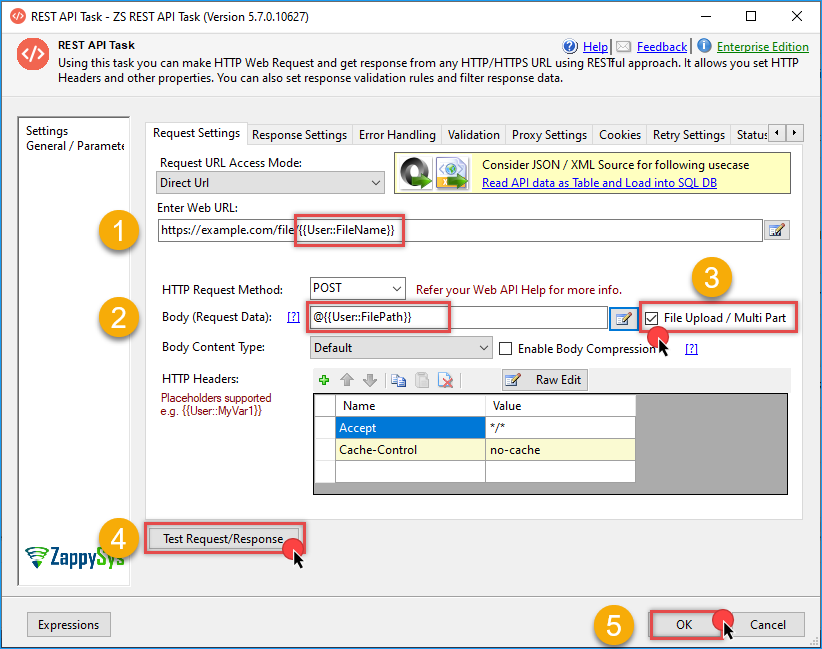
Finally, we will upload multiple files using the REST API task.
-
Add a ZS REST API Task inside the Foreach Loop.
-
Configure it to perform a POST or PUT request depending on the API documentation you are using.
-
Pass variables dynamically:
- Use
@[User::FileName]in the URL or query string. - Use
@[User::FilePath]in the body to upload the file.
- Use
-
Refer to this detailed guide on file upload.
-
Test the request with valid values in the variables and click OK to save the configuration.
-
Run the package. You should see the name of each file logged, followed by an API call to upload the file.
Benefits of Using ZappySys with Foreach Loop
- Dynamic automation – easily process multiple files or records.
- REST support – handle APIs with no custom code.
- Flexible file handling – supports wildcard filters and recursion.
- Real-time monitoring – track each iteration using logging tasks.
Conclusion
The Foreach Loop Container combined with ZappySys SSIS components offers a powerful way to build flexible and scalable ETL workflows. Whether you’re integrating file uploads, processing dynamic API calls, or looping through records, this approach reduces manual effort and increases efficiency.
Visit our official page to explore more SSIS components, automation features, and real-time data integration tools included in ZappySys SSIS PowerPack.
References
- Advanced File System Task
- Advanced File System Task documentation
- REST API Task
- REST API Task documentation
- Blog articles
- SSIS PowerPack
Contact us
If you encounter any issues or have specific questions, reach out to our support team via live chat or support ticket using our email support@zappysys.com.