Introduction
When assigning SSIS expressions to a connection manager, task, or data flow component, you need to target the exact property name as it appears in the Properties window, not the field label shown in the object’s editor UI. In many cases, these names are different.
This article explains how to find the correct underlying property name for any field, so you can reference it correctly in an SSIS Expression, regardless of whether it belongs to a Connection Manager, a Control Flow Task, or a Data Flow Component.
Prerequisites
- Download and install the ZappySys SSIS PowerPack.
Steps
- Open the editor for the object you want to target — this could be a Connection Manager, a Task on the Control Flow surface, or a Component on the Data Flow surface (e.g. Secure FTP connection).
- Locate the field you want to target. For example, the Private key file field.
- Enter a value in that field; it can be a large string.
- Click OK to save the configuration
- Open the Properties window: View > Properties Window, or press F4 in Visual Studio.
- Compare the value shown in the editor field against the values listed in the Properties window.
- The property whose value matches is the one that corresponds to that UI field.
- Use that property name, not the UI label, when assigning SSIS Expressions.
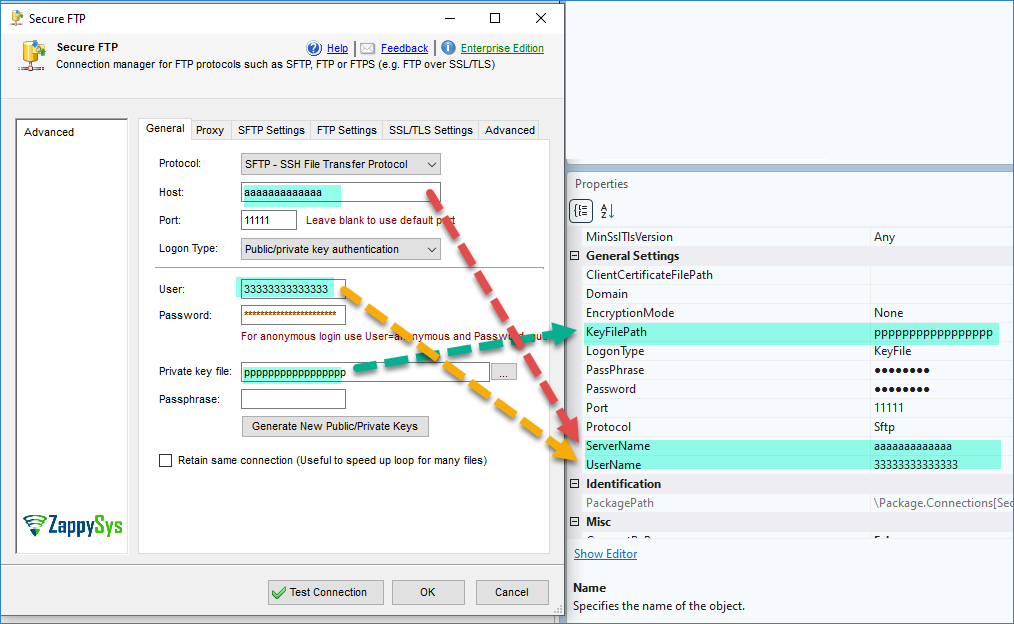
In the example above (Secure FTP Connection Manager):
| UI Field | Properties Window Name |
|---|---|
| Host | ServerName |
| User | UserName |
| Private key file | KeyFilePath |
| Password | Password |
| Port | Port |
| Protocol | Protocol |
| Logon Type | LogonType |
Notes on fields that don’t map directly
Some fields, such as Passphrase or Password, are masked or hidden in the Properties window for security reasons and may not display a visible value for comparison.
Conclusion
The labels shown in a connection manager’s, task’s, or component’s editor don’t always match the property names used internally by SSIS Expressions. Comparing the value in the UI field with the values listed in the Properties window is a reliable way to identify the correct property name before building an expression, avoiding failed or ignored expressions caused by targeting a non-existent property.
Still need help?
If you encounter any issues or have questions, please get in touch with our support team:
- Live Chat: Open the chat widget (bottom right of this page)
- Email: support@zappysys.com
- Support Center: Support | ZappySys