Introduction
The ZappySys SFTP Task lets you control exactly which remote files get processed by applying a filter expression before the transfer runs. You can define conditions based on file name, extension, path, size, or date attributes, so only the files you actually want are picked up, while others are skipped entirely.
Prerequisites
- Download and install the ZappySys SSIS PowerPack.
Steps
-
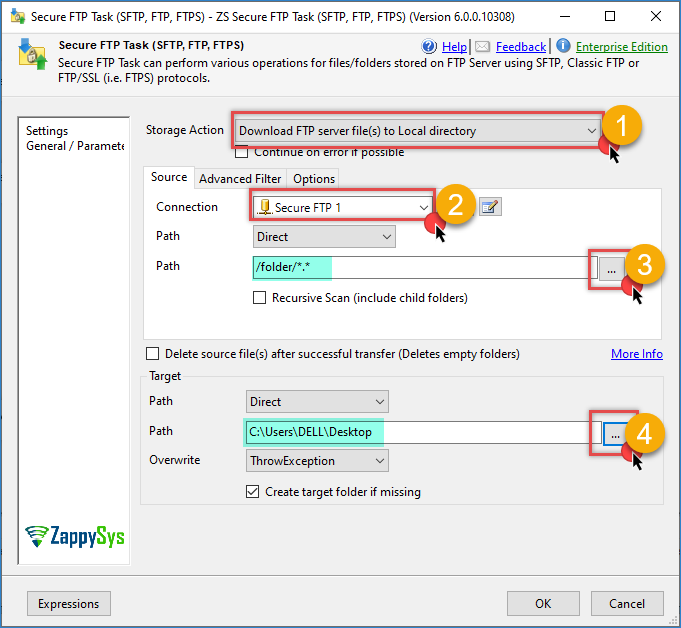
Open the SFTP Task editor.
-
Select an action like Download FTP server file(s) to local directory.
-
Create or select an SFTP connection.
-
Enter a path for the source, use a wildcard to get all files.
-
Enter the destination folder path.
-
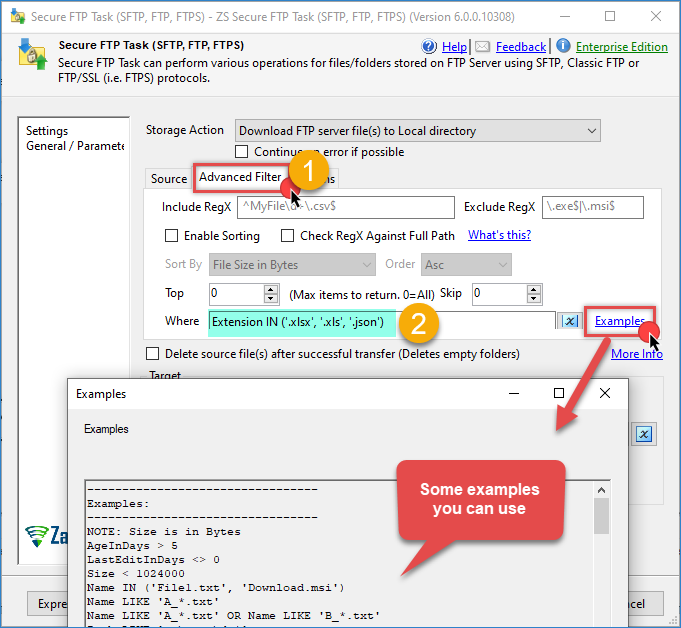
Go to the Advanced Filter tab.
-
Locate the Where field.
-
Enter a filter expression using the supported columns and operators (see tables below).
-
Click OK to save the configuration and run the task to confirm only the expected files are matched.
Supported columns
| Column | Description |
|---|---|
| Name | File name, including extension (e.g. Report.xlsx) |
| Path | Full remote path of the file |
| Extension | File extension, including the dot (e.g. .json) |
| FolderPath | Path of the folder containing the file |
| AgeInDays | Number of days since the file was created |
| LastEditInDays | Number of days since the file was last modified |
| Size | File size, in bytes |
| CreationTime | File creation date/time |
| LastWriteTime | File last-modified date/time |
Note on DateTime columns: CreationTime and LastWriteTime values must be wrapped in #...# and follow the format #yyyy-MM-dd# or #yyyy-MM-dd HH:mm:ss# (24-hour HH). If you use the equality operator (=), you must also include 7-digit milliseconds (e.g. #2025-12-31 23:33:15.1223445#).
Common filter examples
Include only specific file types (e.g. Excel and JSON):
Extension IN ('.xlsx', '.xls', '.json')
Exclude a specific file type (e.g. ZIP):
Extension <> '.zip'
Include Excel and JSON, and explicitly exclude ZIP and anything else:
Extension IN ('.xlsx', '.xls', '.json') AND Extension <> '.zip'
Name-based filters:
Name IN ('File1.txt', 'Download.msi')
Name LIKE 'A_*.txt'
Name LIKE 'A_*.txt' OR Name LIKE 'B_*.txt'
Path-based filters:
Path LIKE 'c:\temp\da*'
FolderPath LIKE '*/Re*/Yea*'
Size-based filters (bytes):
Size < 1024000
Age-based filters:
AgeInDays > 5
LastEditInDays <> 0
Date-based filters:
LastWriteTime > #2025-01-31#
LastWriteTime > #2025-01-31 23:59:59#
LastWriteTime = #2025-01-31 23:59:59.1234567#
LastWriteTime >= #2025-01-31# AND LastWriteTime <= #2025-02-28#
LastWriteTime >= #2025-01-31 23:59:59# AND LastWriteTime <= #2025-02-28 23:59:59#
CreationTime >= #2025-01-31#
CreationTime >= #2025-01-31 23:59:59#
CreationTime = #2025-01-31 23:59:59.1234567#
CreationTime >= #2025-01-31# AND CreationTime <= #2025-02-28#
CreationTime >= #2025-01-31 23:59:59# AND CreationTime <= #2025-02-28 23:59:59#
Dynamic date filters using placeholder functions:
LastWriteTime > #<<yearstart+7d,FUN_TO_DATETIME>>#
LastWriteTime > #<<monthstart+7d,FUN_TO_DATETIME>>#
LastWriteTime > #<<monthend+7d,FUN_TO_DATETIME>>#
LastWriteTime > #<<weekstart-1d,FUN_TO_DATETIME>>#
LastWriteTime > #<<today-7d,FUN_TO_DATETIME>>#
LastWriteTime > #<<yesterday+24h,FUN_TO_DATETIME>>#
LastWriteTime > #<<now+2hour-10minute,FUN_TO_DATETIME>>#
LastWriteTime > #{{User::MyOrderDate,yyyy-MM-dd HH:mm:ss.fff}}#
LastWriteTime > #<<+2month||yyy-MM-dd HH:mm:ss.fff||{{User::MyOrderDate}},FUN_TO_DATETIME>>#
For the full list of placeholder functions supported in dynamic date expressions, see: Format Specifiers / Placeholder Functions
Conclusion
The SFTP Task’s filter expression gives you fine-grained control over which files are processed, by name, path, extension, size, or date, without needing custom script logic. Combining IN/LIKE conditions with exclusions like Extension <> ‘.zip’ is a reliable way to make sure only the intended file types (e.g. Excel and JSON) are picked up during a transfer.
Still need help?
If you encounter any issues or have questions, please get in touch with our support team:
- Live Chat: Open the chat widget (bottom right of this page)
- Email: support@zappysys.com
- Support Center: Support | ZappySys