Introduction
The ZappySys Advanced File System Task supports a WHERE condition to filter which files are processed, the same filter syntax used in other ZappySys file components. This lets you target files that follow a numeric sequence or fall within a specific range, for example, processing only XXXX113.xlsm through XXXX118.xlsm out of a folder with hundreds of files. This article explains how to filter files by a numeric sequence or range using string comparisons on the Name column.
Prerequisites
- Download and install the ZappySys SSIS PowerPack.
Steps
- Open the Advanced File System Task editor.
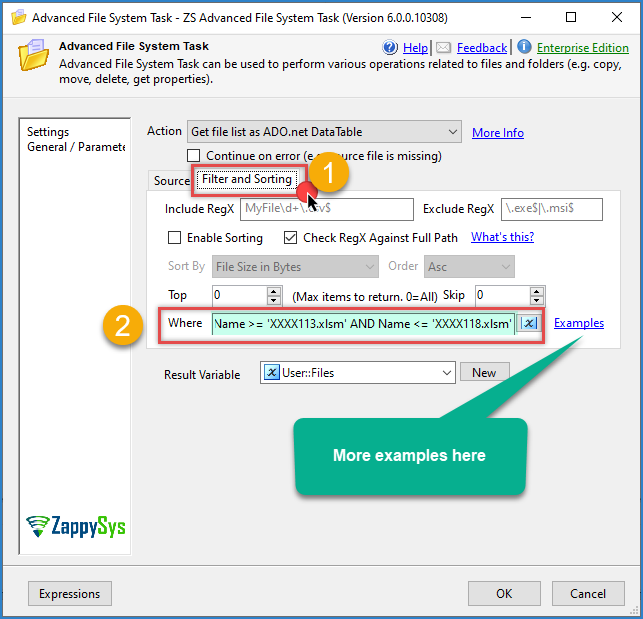
- Go to the Filter and Sorting tab and locate the WHERE Condition field.
- Enter a condition using the Name column with
>=and<=to define the range, for example:
Name >= 'XXXX113.xlsm' AND Name <= 'XXXX118.xlsm'
- If you only need files from a certain number onward (no upper limit), use a single condition:
Name >= 'XXXX113.xlsm'
- Save the configuration and run the task, or use a preview option if available, to confirm only the expected files are matched
How the range comparison works
Name,Path, and similar text columns are compared as strings, not as numbers. Hence, the comparison works character by character, the same way file names sort alphabetically in a file explorer.- This means the numeric portion of the file name must have the same number of digits across all files for the range to behave as expected; for example,
XXXX113throughXXXX118compares correctly, butXXXX9would sort beforeXXXX113as a string even though 9 is numerically smaller than 113, since'9'is compared digit by digit and strings aren’t padded automatically. - If your file names don’t have consistent digit padding (e.g.
File9.xlsm,File10.xlsm,File113.xlsm), zero-pad them at the source, or useLIKEwith wildcards instead to match a known prefix, then narrow further downstream if needed.
Additional filter examples
Name >= 'Report001.csv' AND Name <= 'Report050.csv'
Name LIKE 'XXXX1*.xlsm'
Extension = '.xlsm' AND Name >= 'XXXX113.xlsm' AND Name <= 'XXXX118.xlsm'
Conclusion
The Advanced File System Task’s WHERE condition can filter files by a numeric sequence or range using simple string comparisons like Name >= '...' AND Name <= '...'. Because the comparison is text-based, consistent digit padding in file names ensures the range behaves as you’d expect from numeric order.
Still need help?
If you need assistance filtering files by sequence or range in the Advanced File System Task, please get in touch with our support team:
- Live Chat: Open the chat widget (bottom right of this page)
- Email: support@zappysys.com
- Support Center: Support | ZappySys