Introduction
SQL Server Integration Services (SSIS) includes a default set of components in the Toolbox. However, these built-in tasks may not be sufficient when working with modern data sources such as REST APIs, cloud services, and SaaS platforms.
In this tutorial, we will show how to extend SSIS by adding additional tasks using ZappySys SSIS PowerPack. You will learn how to install the toolkit, how the Toolbox changes after installation, and what new connections and integrations become available.
Prerequisites
- SQL Server Integration Services (SSIS)
- Visual Studio (with SSIS extension installed)
- Download and install the ZappySys SSIS PowerPack
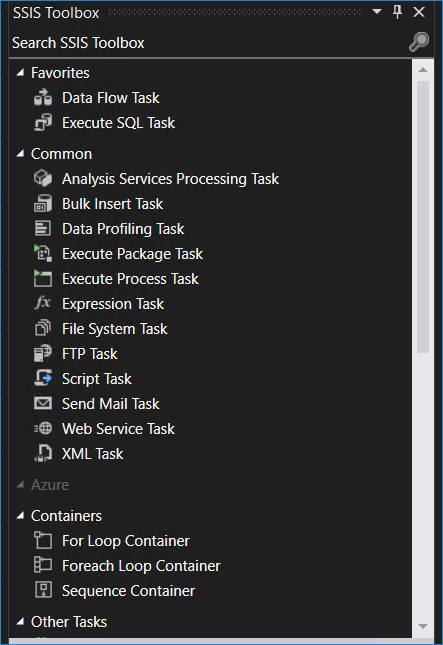
Understanding the default SSIS Toolbox
By default, SSIS provides a limited set of components, such as:
- Data Flow Task
- Execute SQL Task
- Script Task
- File System Task
While these are useful for basic ETL operations, they do not provide native support for modern APIs, cloud services, or advanced data integration scenarios.
Installing ZappySys SSIS PowerPack
To extend SSIS capabilities, you can install ZappySys SSIS PowerPack:
- Download the installer from the official website
- Run the installation wizard
- Restart Visual Studio after installation
- After installation, new components will be automatically added to your SSIS Toolbox
- If you do not see the components in the Toolbox, refer to this article
Exploring the extended SSIS Toolbox
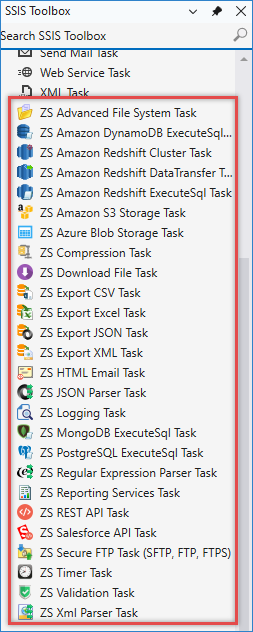
Once installed, you will notice several new components added to the Toolbox in the Control Flow, including:
- ZS Advanced File System Task
- ZS Amazon DynamoDB / Redshift / S3 / Blob Storage Task
- ZS Download Task
- ZS Export CSV / JSON / Excel / XML Task
- HTML Email Task
- ZS JSON / XML Parser Task
- ZS MongoDB / PostgreSQL Execute SQL Task
- ZS REST API Task
- ZS Salesforce API Task
- ZS Secure FTP Task
- ZS Validation Task
- And many more
Inside the Data Flow, you will find:
- ZS Amazon Source / Destination
- ZS Azure Source / Destination
- ZS API Source / Destination
- ZS Cosmos DB Source / Destination
- ZS CSV Source / Destination
- ZS XML Source / Destination
- ZS Excel Source / Destination
- ZS Dropbox Source / Destination
- ZS Dynamics Source / Destination
- ZS ElasticSearch Source / Destination
- ZS Google Ads Source / Destination
- ZS Google Analytics Source
- ZS Google BigQuery Source / Destination
- ZS Google Drive Source / Destination
- ZS Google Sheets Source / Destination
- ZS HubSpot Source / Destination
- ZS HTML Table Source
- ZS Jira Cloud Source / Destination
- ZS JSON Source / Destination
- ZS MongoDB Source / Destination
- ZS Power BI Source / Destination
- Outlook Mail Source / Destination
- ZS Salesforce Source / Destination
- ZS SharePoint Source / Destination
- ZS Smartsheet Source / Destination
- ZS XML Source / Destination
- ZS Zendesk Source / Destination
- ZS Zoho Source / Destination
- ZS Zoom Source / Destination
- Web API Destination
- Upsert Destination
- And many more
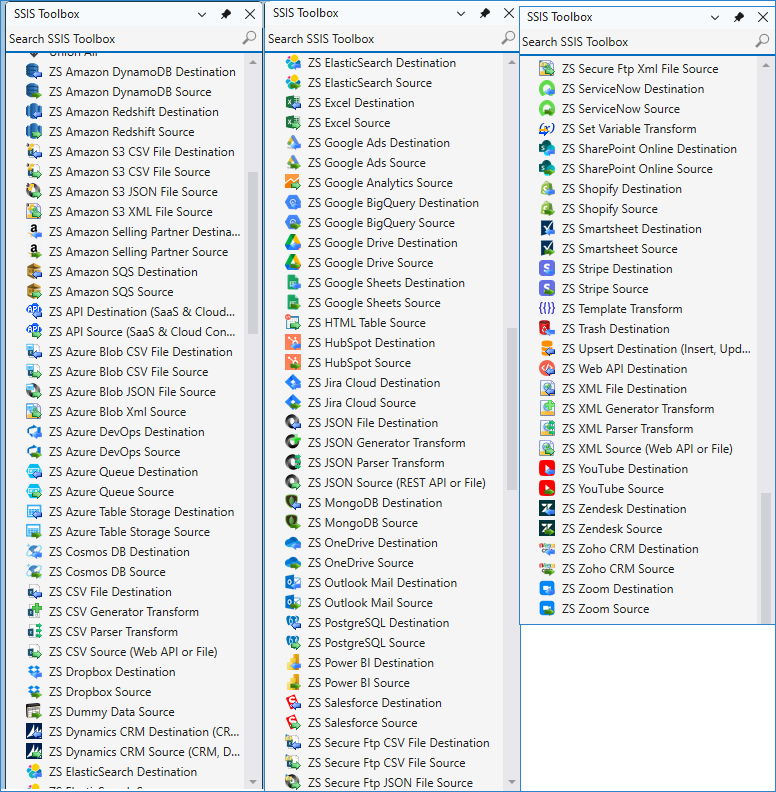
These components allow you to connect SSIS with modern systems without writing custom code.
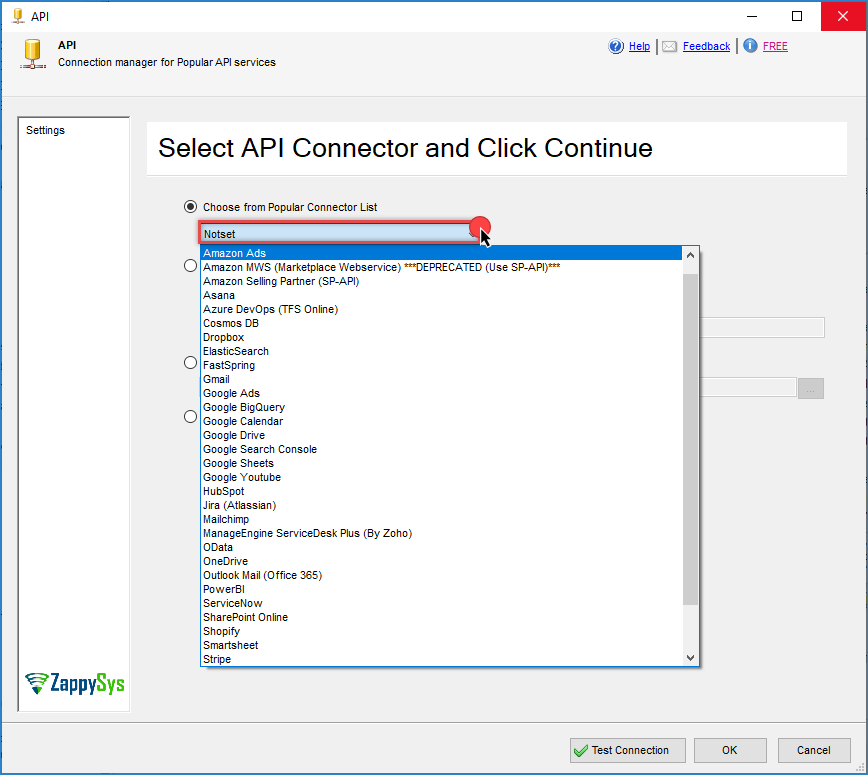
And within our API Source/Destination, we have more connectors. Here is an example
What you can connect to
With the extended Toolbox, you can integrate SSIS with a wide range of systems:
- REST APIs (e.g., CRM, ERP, SaaS platforms)
- Cloud services (Azure, AWS, Google APIs)
- Databases (SQL Server, PostgreSQL, Redshift)
- File formats (JSON, XML, Excel, CSV)
- Applications (Salesforce, HubSpot, Mailchimp, and more)
This enables you to build modern ETL pipelines directly inside SSIS. ZappySys continuously adds new connectors. In version 6.0.0.10308 (Mar 03, 2026), new components were introduced for services such as Google APIs, Power BI, Cosmos DB, Jira, and Zoom.
Example use cases
Here are some common scenarios enabled by the extended Toolbox:
- Extract data from REST APIs and load it into SQL Server
- Synchronize cloud data with on-premise databases
- Send automated HTML emails with query results
- Perform upsert (insert/update) operations without writing custom SQL
- Transform JSON or XML data into a relational format
Conclusion
The default SSIS Toolbox is designed for traditional ETL scenarios, but modern data integration requires connectivity to APIs and cloud platforms.
By installing ZappySys SSIS PowerPack, you can significantly extend SSIS capabilities, enabling seamless integration with modern data sources while reducing the need for custom scripts or complex coding. Download and install it to start building smarter, faster, and more scalable solutions.
Still need help?
If the issue persists, please get in touch with our support team:
- Live Chat: Open the chat widget (bottom right of this page)
- Email: support@zappysys.com
- Support Center: Support | ZappySys