Introduction
When using the JSON Generator Transform or any other Transform component before a Web API Destination, each row produces its own JSON object (e.g. {"id":1,"name":"John"}), but that’s not automatically wrapped in the array structure most APIs expect for a bulk request (e.g. {"rows": [ {...}, {...} ] }). The Web API Destination’s Batch Settings tab lets you wrap and combine those per-row JSON objects into a single valid request body. This article explains how to configure it.
Prerequisites
- Download and install the ZappySys SSIS PowerPack.
Steps
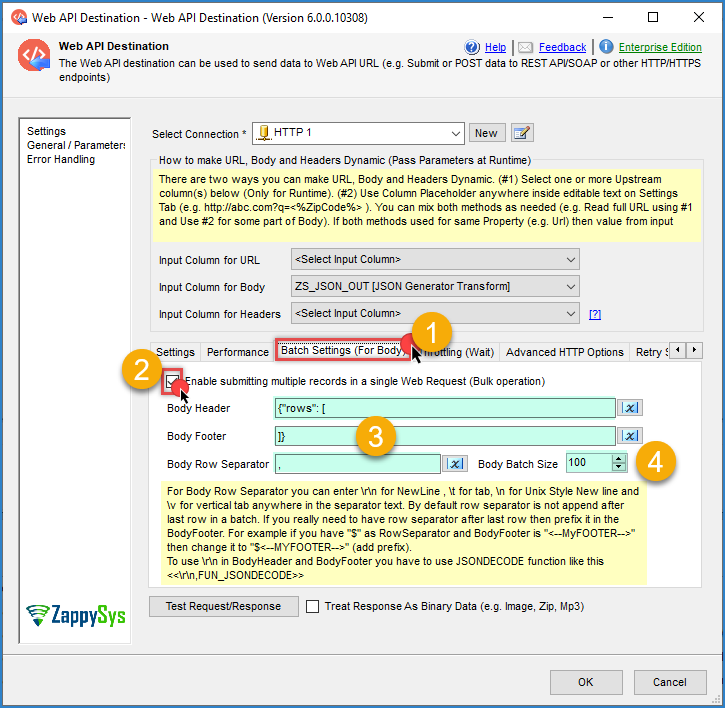
- Open the Web API Destination editor and go to the Batch Settings (For Batch) tab.
- Check Enable submitting multiple records in a single Web Request (Bulk operation).
- In Body Header, enter the text that should appear once, before all the rows, for example:
{"rows": [
- In Body Footer, enter the text that should appear once, after all the rows, for example:
]}
- In Body Row Separator, enter the character(s) that go between each row’s JSON object, typically a comma:
,
- Set Body Batch Size to the number of rows you want combined into a single request, for example
100. If you have more rows than the batch size, the destination automatically sends multiple requests, each with up to that many rows. - Click OK to save the configuration and run the package to test it.
Notes
- You can use
\n,\t, or\vin Body Row Separator for a newline, tab, or vertical tab between rows, instead of a literal character. - The row separator is not appended after the last row in a batch. If your API requires a separator right before the footer, prefix it into the Body Footer instead. For example, if your separator is
$and the footer is<--MYFOOTER-->, change the footer to$<--MYFOOTER-->. - If you need to include a literal
\r\ninside Body Header or Body Footer (not as a row separator, but as part of the fixed text), use theFUN_JSONDECODEfunction, for example:<<\r\n,FUN_JSONDECODE>>. - This same Batch Settings approach works for XML bodies too; just adjust the header/footer to valid XML (e.g.
<?xml version="1.0"?><data>/</data>) instead of JSON.
Conclusion
The Batch Settings tab on Web API Destination turns the individual JSON objects produced by JSON Generator Transform into a single, correctly wrapped request body, using Body Header, Body Footer, and Body Row Separator to control how rows are combined, and Body Batch Size to control how many rows go into each request.
Explore our SSIS PowerPack for more information and download and install it to start building smarter, faster, and more scalable solutions.
Still need help?
If you need assistance configuring bulk requests in Web API Destination, please get in touch with our support team:
- Live Chat: Open the chat widget (bottom right of this page)
- Email: support@zappysys.com
- Support Center: Support | ZappySys