Introduction
The ZappySys Regular Expression Parser Task is a FREE SSIS task that reads raw text and extracts one or more values from it using regular expressions (regex). The text can come from a direct string, a file, or an SSIS variable, and the extracted values can be saved to SSIS variables for use later in your package. This article explains when to use the task and how to configure it, using the same demo that comes built into the component: extracting emails from raw text.
Prerequisites
- Download and install the ZappySys SSIS PowerPack.
When to use the Regular Expression Parser Task
- You need to pull a specific value out of unstructured text, such as an email, phone number, order ID, or date inside a longer message.
- A REST API Task returned HTML or plain text (not JSON or XML), and you need only one piece of it, such as a total count or a token.
- You need to read a value from the content of a log or text file, for example, an error code or a file name mentioned inside it.
- You do not need it when the data is already structured. For JSON, XML, or CSV, use the matching source or parser component instead.
Steps
-
Create an SSIS variable, for example
User::Emails, type String, to store the extracted values. -
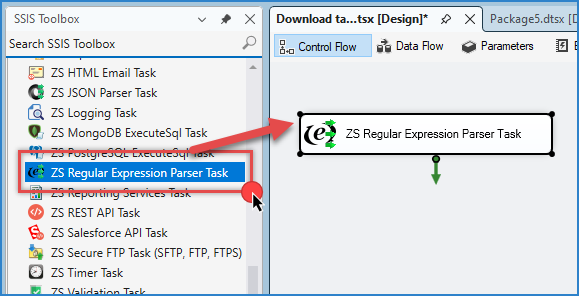
Drag the ZS Regular Expression Parser Task from the SSIS Toolbox onto the Control Flow and double-click it to edit. The editor includes a built-in demo that extracts emails from raw text, which we will use here.
-
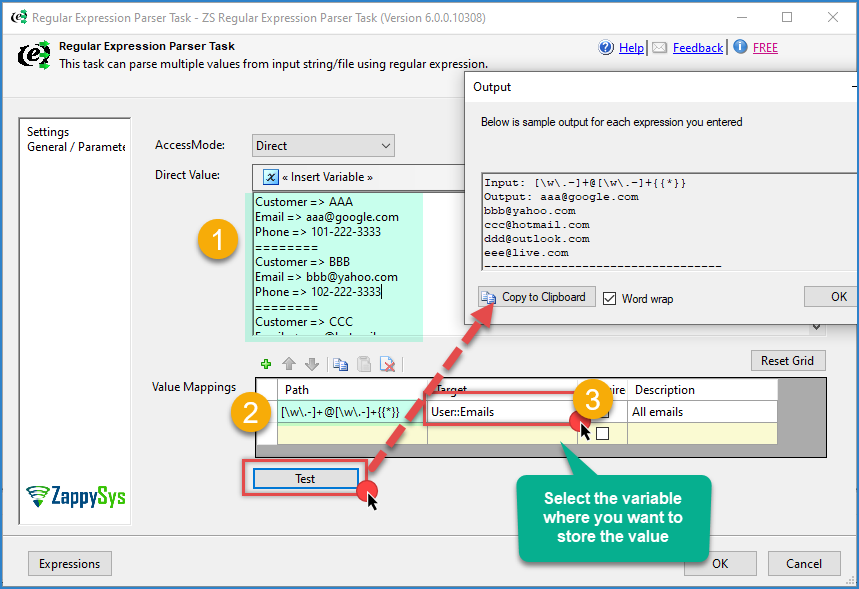
Choose where the input text comes from. The task supports a direct string, a file, or an SSIS variable. For this example, use a direct string with the following sample text:
Customer => AAA
Email => aaa@google.com
Phone => 101-222-3333
========
Customer => BBB
Email => bbb@yahoo.com
Phone => 102-222-3333
========
Customer => CCC
Email => ccc@hotmail.com
Phone => 103-222-3333
========
Customer => DDD
Email => ddd@outlook.com
Phone => 104-222-3333
========
Customer => EEE
Email => eee@live.com
Phone => 105-222-3333
========
- Enter the regular expression that matches an email address, and add
{{*}}at the end to return all matches instead of only one:
[\w\.-]+@[\w\.-]+{{*}}
- Use the test option in the editor to run the expression against the sample text and preview the result. You should see the five emails:
aaa@google.com,bbb@yahoo.com,ccc@hotmail.com,ddd@outlook.com, andeee@live.com. - Map the target to the
User::Emailsvariable so the extracted values are saved when the package runs. - Click OK to save the configuration, then run the package.
Choosing which match or group to extract
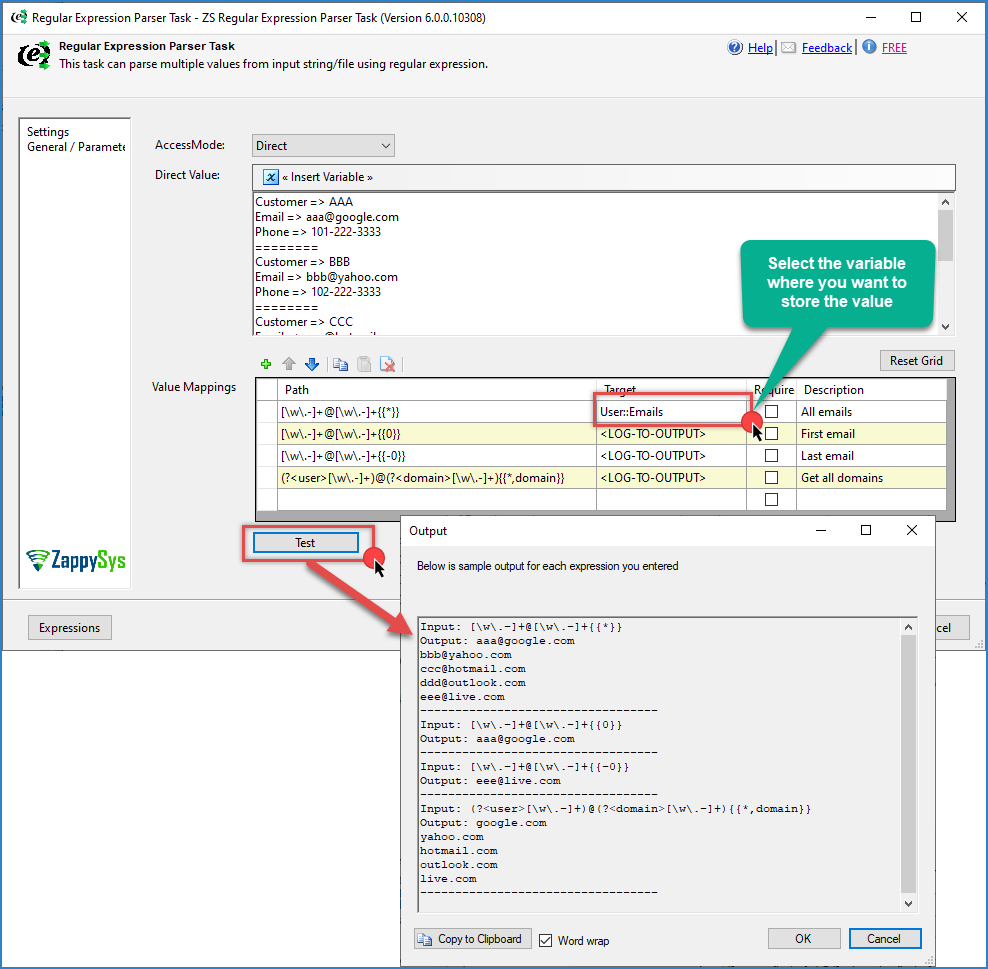
The task lets you control exactly which occurrence and group to return by adding a suffix at the end of the pattern:
<your Regular Expression>[{{X|*[,Y]}}][--regex-cs]
Xis the occurrence index you want.0means the first match, and*means all matches. A minus sign counts from the end, so{{-0}}returns the last match.Yis the group name or zero-based group index inside your pattern. Groups are the parts of the expression inside parentheses, and0means the first group.--regex-csmakes the pattern case-sensitive. Add it at the very end of the pattern.
Examples with the demo text:
[\w\.-]+@[\w\.-]+{{0}}
Returns the first email: aaa@google.com.
[\w\.-]+@[\w\.-]+{{-0}}
Returns the last email: eee@live.com.
(?<user>[\w\.-]+)@(?<domain>[\w\.-]+){{*,domain}}
Returns only the domain part of every email, using the named group domain: google.com, yahoo.com, hotmail.com, outlook.com, and live.com.
Notes
- Always test your expression with real samples, including edge cases like missing values or extra spaces, before using it in production.
- The email expression above is simple and works well for this demo. It does not cover every possible email format.
- To test expressions online, you can use free tools such as regex101, RegExr, or Regex Hero.
- To browse ready-made expressions, see RegExLib. To learn regex from scratch, see regular-expressions.info.
- For more details about the task, see the help page.
- If your text comes from an API response, the article Using SSIS Regex Parser Task for Extracting HTML Content shows how to combine this task with the REST API Task.
Video tutorial
Conclusion
The Regular Expression Parser Task quickly extracts values from raw text without writing code. Choose the input (string, file, or variable), enter a regular expression, use the occurrence and group suffix to control what is returned, and map the result to an SSIS variable. Use it for unstructured text, and use the JSON, XML, or CSV components when your data is already structured.
Still need help?
If you need assistance using the Regular Expression Parser Task, please get in touch with our support team:
- Live Chat: Open the chat widget (bottom right of this page)
- Email: support@zappysys.com
- Support Center: Support | ZappySys