Introduction
The ZappySys SSIS Send HTML Email Task allows you to send richly formatted emails, including SQL result sets rendered as HTML tables. This is especially useful for sending dynamic reports, such as dashboards, data summaries, and alert emails, directly from your SSIS package. You can use Recordset Destination or Execute SQL Task to populate the SQL result into an Object type variable. In this topic, we will learn how to generate an HTML table from SQL data and send it directly in an email body. Let’s dive in!
Prerequisites
- Download and install the ZappySys SSIS PowerPack
- SQL Server Data Tools (SSDT) with SSIS project support
Step 1: Prepare the SQL Result Set
-
Create a new Object variable named
User::varResultin the SSIS Variables pane. -
Drag an Execute SQL Task onto the Control Flow.
-
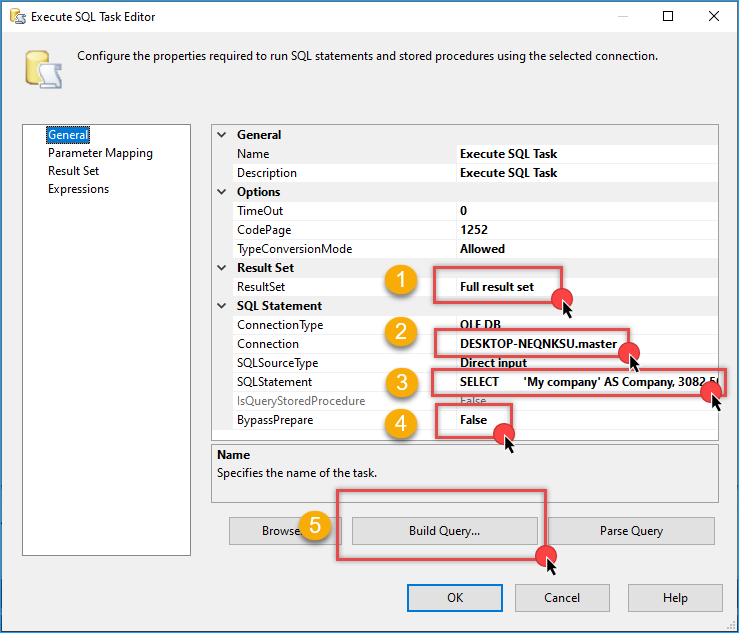
Set the ResultSet to Full result set.
-
In Connection, select or create your SQL connection
-
Enter a valid SQL query. Here is an example:
SELECT 'My company' AS Company, 3082.50 AS Sales, GETDATE() AS ReportDate UNION ALL SELECT 'Example Inc', 4725.00, GETDATE() -
Set BypassPrepare to
False(optional for complex queries). -
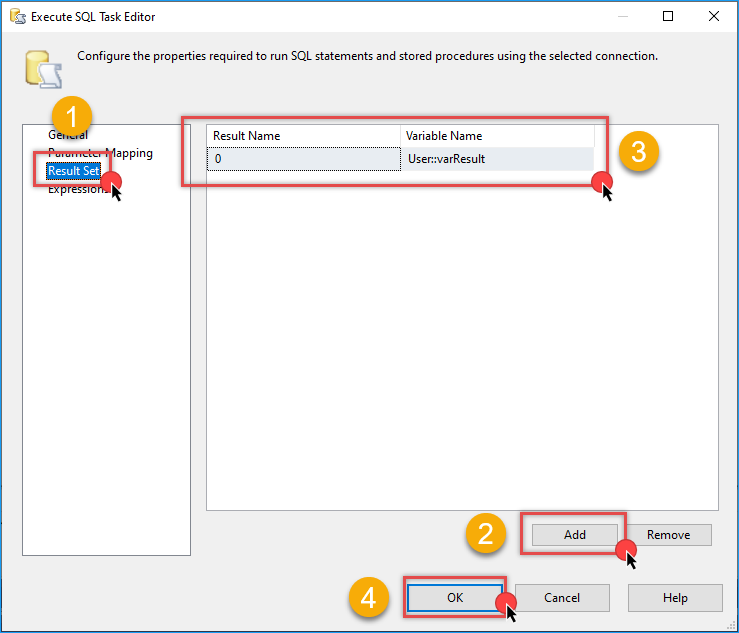
Go the Result Set tab and click Add
-
Set Result Name to
0 -
Set Variable Name to
User::varResult -
Click OK to save the configuration.
Step 2: Add and Configure the Email Task
- Drag the ZS Send HTML Email Task into the Control Flow and connect it after the Execute SQL Task.
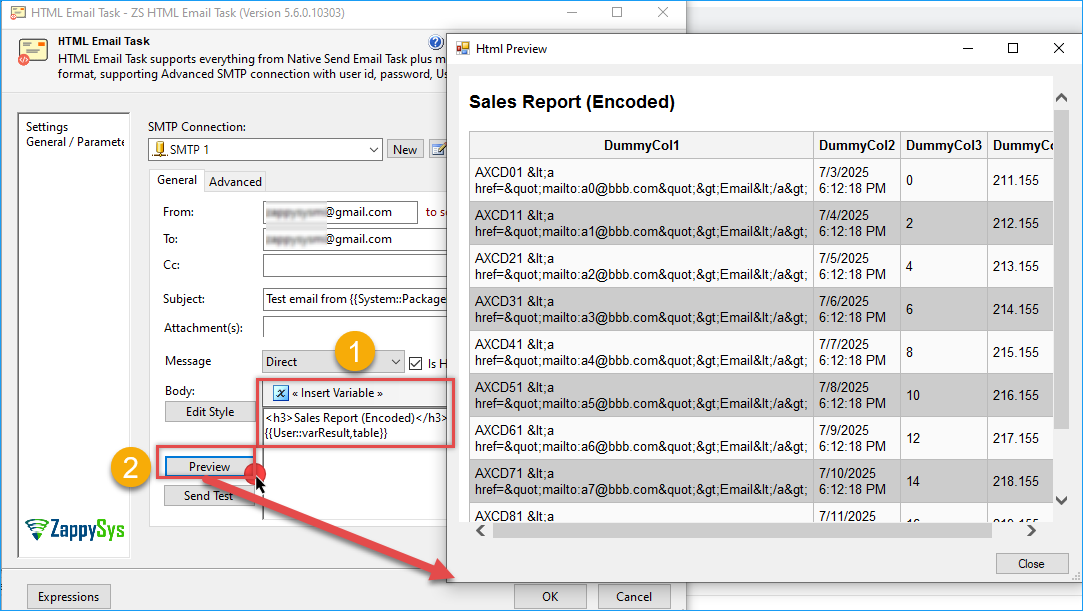
- In the Body tab, insert one of the following placeholders to render the table:
Option 1: Encoded Table (safe for most email clients)
<h3>Sales Report (Encoded)</h3>
{{User::varResult,table}}
Option 2: Raw HTML Table (preserve HTML formatting)
<h3>Sales Report (Raw)</h3>
{{User::varResult,table_no_encode}}
- Click Preview in the task editor to verify the email layout with dummy data.
Step 3: Run and Verify the Package
- Configure the remaining components, including the connection, recipient email, and other settings.
- Run the SSIS package.
- Check the email inbox. You should receive a formatted HTML table like this:
| Company | Sales | ReportDate |
|---|---|---|
| My company | 3082.50 | 2025-07-03 17:55:25.943 |
| Example Inc | 4725.00 | 2025-07-03 17:55:25.943 |
Conclusion
Displaying SQL data in email tables is simple with the ZappySys Send HTML Email Task. By using Object variables and placeholder syntax, you can automatically send clean, readable reports to your users. Whether you’re monitoring sales, alerts, or job results, this task streamlines reporting directly from your SSIS workflow.
Visit our official page to explore more SSIS components, automation features, and real-time data integration tools included in ZappySys SSIS PowerPack.
References
Contact us
If you encounter any issues or have specific questions, reach out to our support team via live chat or support ticket using our email support@zappysys.com.