Many customers ask whether they should use SSIS PowerPack or ODBC PowerPack for their data integration projects.
Both products can connect to REST APIs, JSON/XML files, and cloud services, but they are designed for different integration approaches.
This guide explains which product to choose and when.
Quick Decision Guide
| Scenario | Recommended Product |
|---|---|
| Building scheduled ETL pipelines | SSIS PowerPack |
| Prefer drag-and-drop workflow UI | SSIS PowerPack |
| Loading data into SQL Server or a data warehouse | SSIS PowerPack |
| Query APIs directly from BI tools | ODBC PowerPack |
| Access APIs from applications or scripts | ODBC PowerPack |
| Need real-time access to APIs using familier SQL Language (e.g. From Microsoft SQL Server, Crystal Report, Excel, MS Access…) | ODBC PowerPack |
Simple Rule of Thumb
Use SSIS PowerPack
→ When building Drag & Drop ETL pipelines or scheduled data workflows using SSIS as your primary tool
Use ODBC PowerPack
→ When applications or BI tools need to query APIs directly using SQL or needs real-time data rather than scheduled refresh (i.e. Hourly, Daily, Weekly)
When to Use SSIS PowerPack
Use SSIS PowerPack if your organization already uses Microsoft SQL Server Integration Services (SSIS) as the primary ETL tool.
SSIS PowerPack extends SSIS with 100+ additional connectors and tasks for working with APIs, modern data formats, and cloud services.
It is ideal for teams that prefer a visual drag-and-drop ETL development environment.
Best Fit Scenarios
Choose SSIS PowerPack if:
- Your company already uses SSIS for ETL workflows
- You prefer visual pipeline development
- Your integrations run on scheduled jobs (hourly, daily, nightly)
- You load data into SQL Server, a data warehouse, or analytics platform
- Your team already has SSIS experience
Integration Capabilities
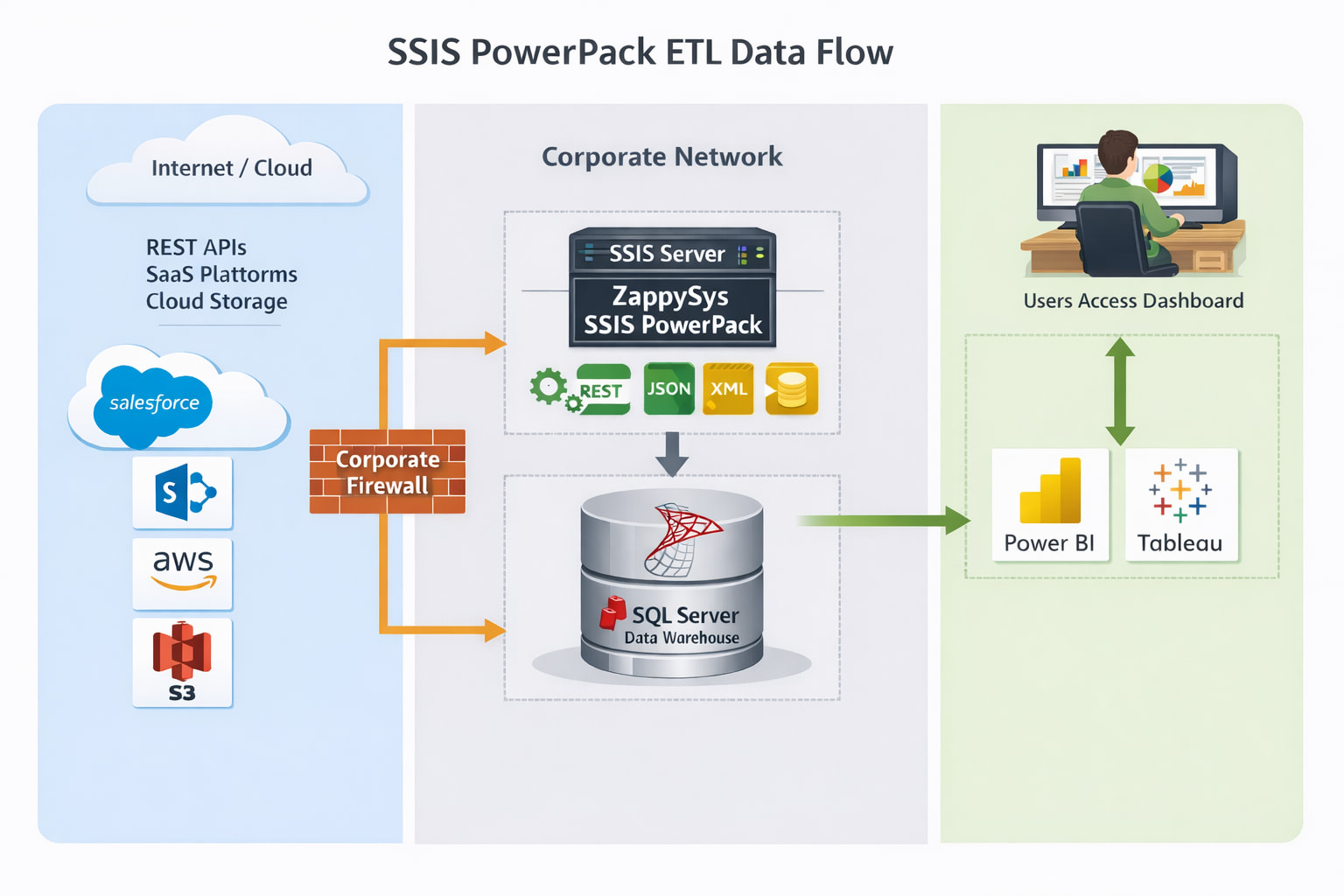
SSIS PowerPack focuses heavily on modern integration scenarios such as:
- REST API integrations
- JSON and XML file processing
- AWS S3
- Azure Blob Storage
- Azure Data Lake Storage
- Cloud SaaS applications
This makes it easy to integrate modern APIs and cloud services into SQL Server ETL pipelines.
Advanced ETL Tasks and Destinations
SSIS PowerPack also provides many advanced tasks and components that simplify common integration scenarios:
- Upsert Destination – Insert new records or update existing rows efficiently
- SFTP / FTP Automation – Download or upload files from remote servers
- Email Notifications – Send alerts or reports as part of your workflow
- File Processing – Work with CSV, JSON, XML, Excel, and other structured files
- Cloud Data Destinations – Load data into platforms such as Amazon Redshift and other cloud data warehouses
These capabilities allow you to build complete end-to-end data pipelines without custom scripting.
Visual: Typical SSIS ETL Architecture
Licensing Note
SSIS requires SQL Server licensing.
If you prefer not to manage SQL Server infrastructure, you can run SSIS in the cloud using:
 Azure Data Factory SSIS Integration Runtime
This allows you to execute SSIS packages using a pay-as-you-go cloud service.
When to Use ODBC PowerPack
Use ODBC PowerPack when you want to query APIs and cloud services directly using SQL from applications or BI tools.
ODBC PowerPack provides ODBC drivers that expose APIs and data sources as SQL tables, allowing many tools to access online data without building ETL pipelines.
Best Fit Scenarios
Choose ODBC PowerPack if:
- You want real-time or on-demand access to API data
- Your application or BI tool already supports ODBC connections
- You prefer querying APIs using SQL statements
- You want to connect cloud APIs directly to analytics or reporting tools
Supported Applications
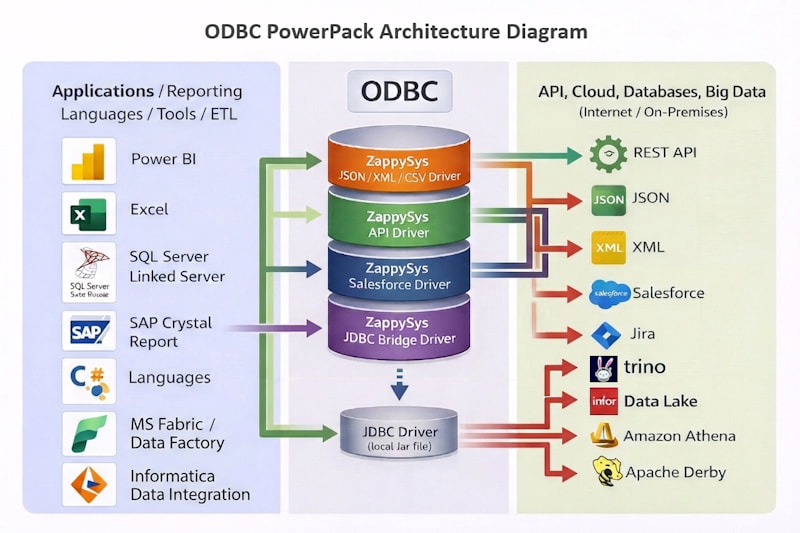
ODBC PowerPack works with many tools that support ODBC connections, including:
- Power BI
- Tableau
- Excel
- Qlik Sense
- SQL Server
- SSAS
- Informatica
- Pentaho
- Microsoft Access
It can also be used from programming languages such as:
- Python
- C#
- Java
- PHP
- Node.js
If your tool supports ODBC, you can use ODBC PowerPack to query APIs and online services like database tables.
Visual: Typical ODBC Query Architecture
ODBC PowerPack also supports a centralized architecture using ZappySys Data Gateway, allowing organizations to manage API integrations from a single server instead of installing drivers on every workstation.
Access JDBC Data from Non-Java Applications
Another common scenario is when a data source provides only a JDBC driver, but the application you want to use supports ODBC instead of JDBC.
In this case, you can use the ZappySys JDBC Bridge Driver included with ODBC PowerPack.
This allows non-Java applications to access JDBC data sources through ODBC.
Typical examples include:
- Microsoft Excel
- Power BI
- SQL Server (Linked Server)
- Tableau
- .NET applications
- Reporting tools that support ODBC only
With the JDBC-ODBC Bridge Driver, these tools can connect to any system that provides a JDBC driver, even if no native ODBC driver exists.
Centralized Access Using ZappySys Data Gateway
In many environments, installing API drivers on every workstation is not desirable.
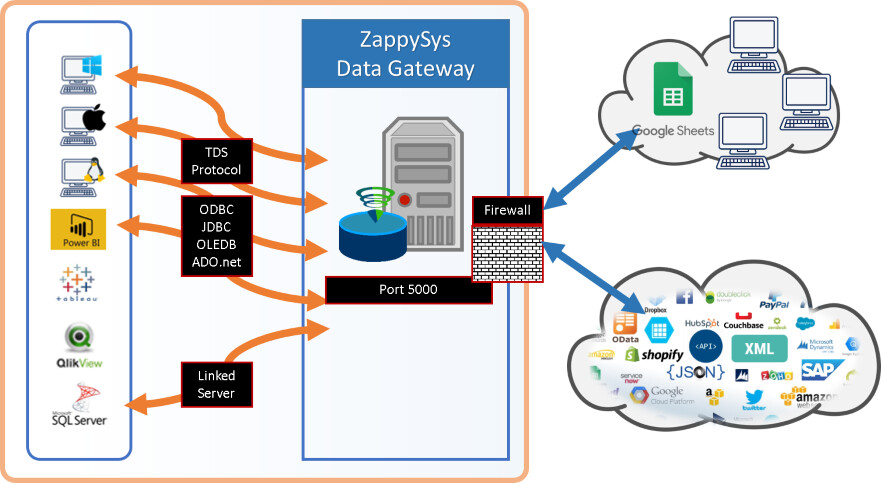
To solve this, ODBC PowerPack supports a centralized architecture using ZappySys Data Gateway.
With this approach, the ZappySys driver runs on a central server, and users connect through standard tools such as SQL Server Linked Server or applications using ODBC.
This architecture allows administrators to manage integrations in one place while users access the data as if it were coming from a normal database server.
Key Benefits
- Centralized security – API credentials and configuration stay on the gateway server
- Simplified administration – install and update drivers in one location
- Thin client setup – no need to install ZappySys drivers on every user machine
- Shared access – multiple users, servers, or BI tools can access the same gateway
- Standard connectivity – users connect using familiar tools such as SQL Server, Power BI, Excel, or other ODBC clients
Typical Architecture
Typical Use Case Examples
| Use Case | Best Product |
|---|---|
| Load API data into SQL Server every night | SSIS PowerPack |
| Power BI querying REST API data without ETL | ODBC PowerPack |
| Python application retrieving API data | ODBC PowerPack |
| Data warehouse ETL pipeline using SSIS | SSIS PowerPack |
| Querying Live API data in View/Stored Proc using Microsoft SQL Server Linked Server | ODBC PowerPack (via Data Gateway) |
Conclusion
Both products solve similar integration challenges but are designed for different architectures.
| Product | Best For |
|---|---|
| SSIS PowerPack | ETL pipelines and scheduled integrations using SSIS with more Visual approach |
| ODBC PowerPack | Real-time data access from REST API / Modern data sources using familier SQL Language |
If you are unsure which product is right for your scenario, feel free to contact our support team, and we will help you choose the best approach.
Contact us
If you encounter any issues or have specific questions, reach out to our support team via live chat or support ticket using our email support@zappysys.com.