Introduction
In this article, you will learn how to quickly and efficiently integrate Apache Derby data using ODBC, without writing any custom code. We will use the high-performance Apache Derby Connector in the ZappySys ODBC PowerPack to connect to Apache Derby and access its data via ODBC.
This approach allows you to query Apache Derby databases using standard SQL and integrate the data with ODBC-based tools and workflows.
Prerequisites
- Download and install the ZappySys ODBC PowerPack.
Steps
Step 1: Create a New ODBC Driver
-
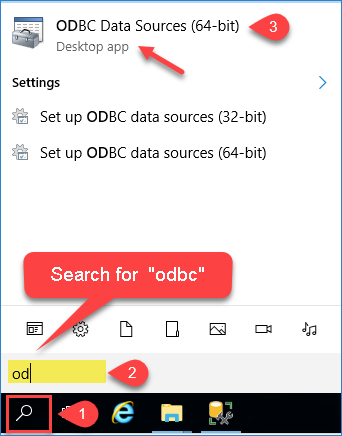
Open ODBC Data Sources by typing “ODBC” in the Windows search box and launching ODBC Data Sources (64-bit).
-
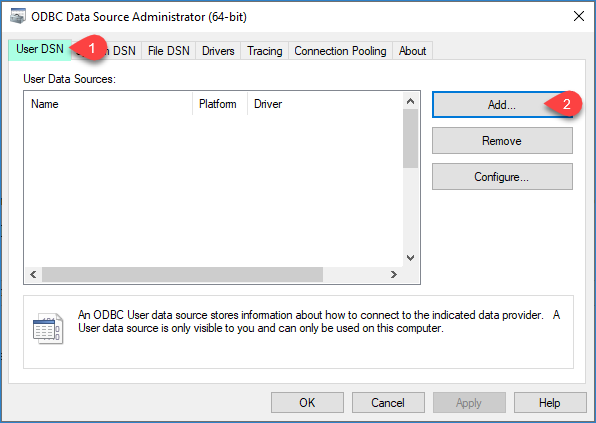
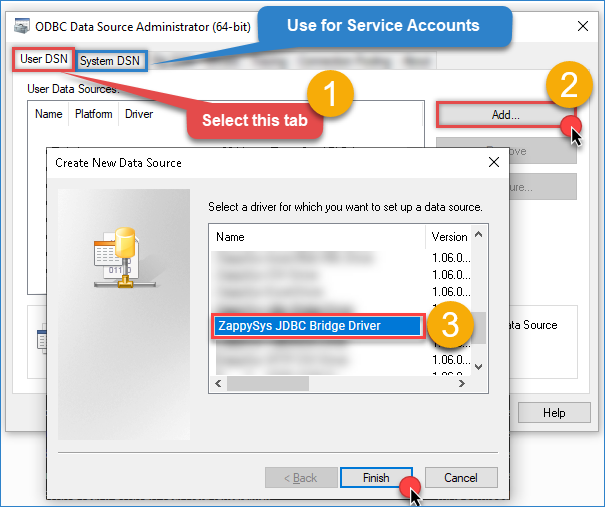
Go to System DSN (recommended) and click Add.
-
From the driver list, select ZappySys JDBC Bridge Driver, then click Continue.
Step 2: Configure the Apache Derby Data Source
-
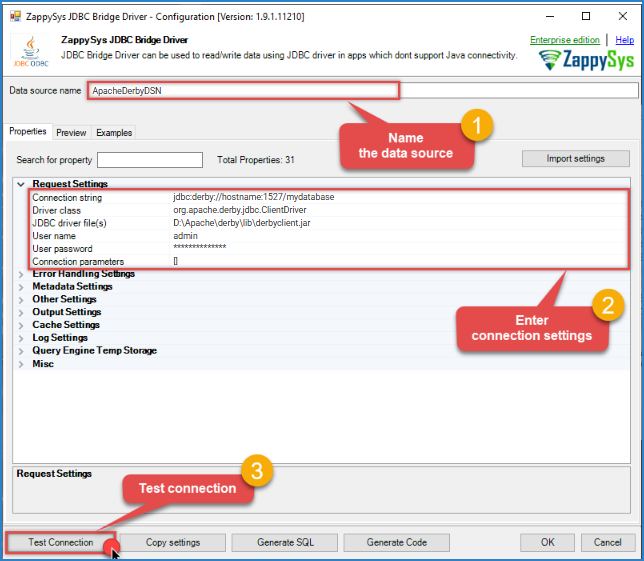
Enter the connection settings and configure the required parameters.
-
For a Client/Server environment, use the following values:
- Connection string:
jdbc:derby://hostname:1527/mydatabase - Driver class:
org.apache.derby.jdbc.ClientDriver - JDBC driver file(s):
D:\Apache\derby\lib\derbyclient.jar - User name:
admin - User password:
************** - Connection parameters:
[]
- Connection string:
-
For an Embedded environment, use the following values:
- Connection string:
jdbc:derby:c:\apache\derby\databases\mydatabase - Driver class:
org.apache.derby.jdbc.EmbeddedDriver - JDBC driver file(s):
D:\Apache\derby\lib\derby.jar
- Connection string:
-
Click Test Connection to validate the configuration.
-
Go to the Preview tab and run a sample SQL query to confirm access to the Apache Derby data. For more SQL examples, see the JDBC Bridge documentation.
SELECT * FROM "APP"."ORDERS"
- Verify that data is returned successfully, then click OK to save the configuration.
Conclusion
By integrating Apache Derby using the ZappySys ODBC JDBC Driver, you can efficiently query Apache Derby databases using SQL and integrate the data into ODBC-based workflows. This solution provides a flexible and powerful way to read Apache Derby data and automate data extraction.
Explore our ODBC PowerPack for more information and download and install it to start building smarter, faster, and more scalable solutions.
References
Contact us
If you encounter any issues or have specific questions, reach out to our support team via live chat or support ticket using our email support@zappysys.com.