Problem
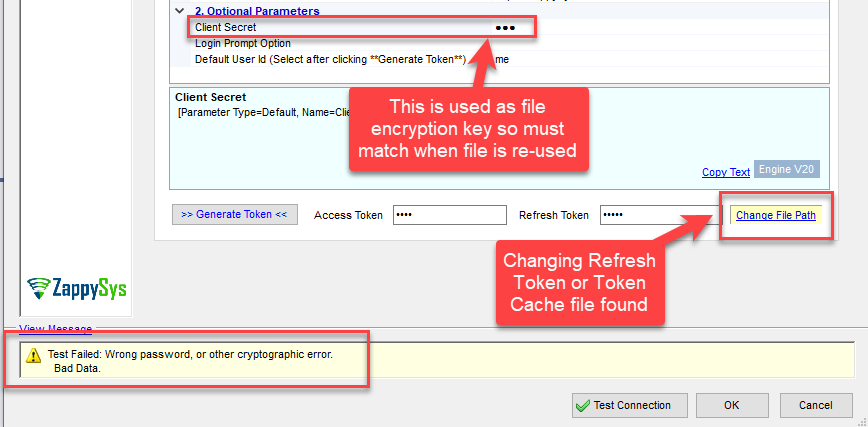
When using an OAuth connection with a refresh token/token cache file in ZappySys SSIS PowerPack or ZappySys ODBC PowerPack, you may encounter the following error at design time or runtime:
Test Failed: Wrong password, or other cryptographic error.
Bad Data.
Cause
The token cache file is encrypted using a combination of Client ID and Client Secret.
If either value changes, the file cannot be decrypted, resulting in a cryptographic error. Common scenarios:
- Client ID does not match the one used when the token file was created
- Client Secret was regenerated or modified after the token file was created
- Token file was copied from another environment with different OAuth settings
Solution
- Make sure both Client ID and Client Secret exactly match the values used when the token cache file was originally created.
- Do not regenerate or rotate the Client Secret unless you plan to re-authenticate.
- If the original Client ID or Client Secret is no longer available:
- Delete the existing token cache file.
- Re-run authentication to generate a new token file with the updated credentials.
Still need help?
If the issue persists, please contact our support team:
- Live Chat: Open the chat widget (bottom right of this page)
- Email: support@zappysys.com
- Support Centre: Support | ZappySys