Problem
There are times when you want to use default AWS credentials instead of specifying Access Key and Secret Key individually in Amazon S3 SSIS connectors (created with ZappySys SSIS PowerPack).
You can accomplish that by configuring them in AWS credentials file or in Windows Environment Variables. It is useful to set them in either of these locations because you can then control them in a central place. All you have to do to make this happen is to perform these steps below.
Solution
Step 1: Configure Amazon Storage Connection
- Open SSIS package
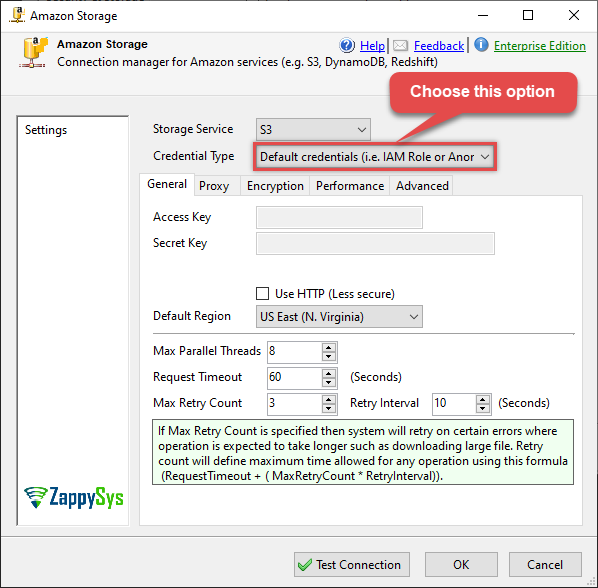
- Set
Default credentialsoption in Amazon Storage Connection Manager in SSIS package and configure it there:
Step 2: Configure default AWS credential keys
You can do in two places. Choose the one that suits you more:
- Windows
Environment Variables - AWS profile credentials file
Environment Variables configuration
- Hit Windows
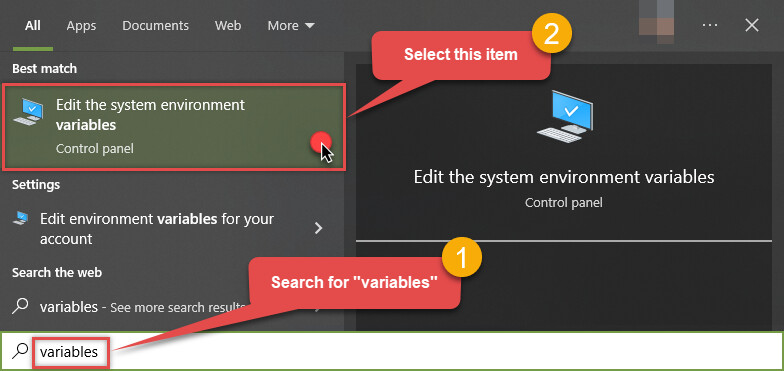
Startbutton and open System Properties window, by searching forvariables:
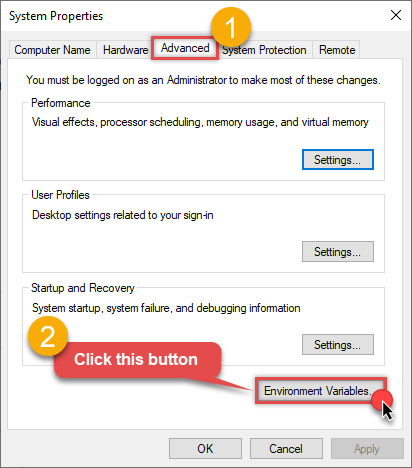
- Then select Advanced tab and click Environment Variables… button:
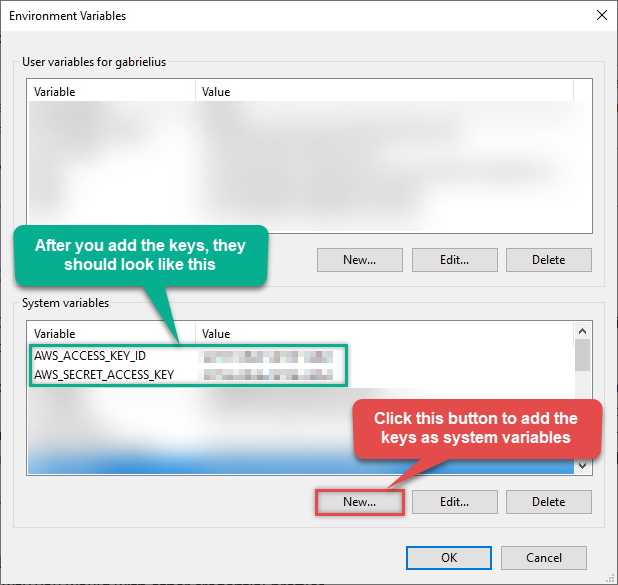
- Finally, create system variables for
Access KeyandSecret Key:
AWS credentials file configuration
- Open AWS credentials file for editing (it is usually located in
%USERPROFILE%\.aws\config) - Set
aws_access_key_idandaws_secret_access_keyproperties, e.g.:[default] aws_access_key_id = AKIAIOSFODNN7EXAMPLE aws_secret_access_key = wJalrXUtnFEMI/K7MDENG/bPxRfiCYEXAMPLEKEY
References
- AWS credential file documentation
- AWS credential and profile resolution documentation
- Amazon Storage Connection Manager documentation
- SSIS PowerPack
Contact us
If you encounter any challenges or have specific use cases, please contact our support team via chat or ticket.