If you use ZappySys Data Gateway to connect REST API into SQL Server via Linked Server, you may have faced this frustrating scenario:
 Data Gateway Preview works fine
- Postman API calls work fine
 SQL Server OPENQUERY hangs or throws a timeout error
This issue confuses many users, but the root cause usually comes down to different execution contexts and data size differences between tools. Let’s break down why this happens and how to fix it.
Why Does OPENQUERY Fail While Preview/Postman Work?
When you run a query in the Gateway Preview window, it only fetches a small sample (default: 100 rows). Postman requests usually deal with limited payloads too.
But when you execute the same query via OPENQUERY in SQL Server, the Data Gateway service might:
- Try to fetch the entire dataset, not just 100 rows.
- Run under a different Windows account (the service account).
- Be blocked by firewall/proxy rules that allow your user account but not the Gateway service account.
Understanding this difference is the key to fixing the problem.
Step 1: Test with a LIMIT Clause
The first step is to mimic the behavior of the Preview window by limiting rows.
SELECT *
FROM OPENQUERY(MY_LINKED_SERVER,
'SELECT * FROM $ LIMIT 100 /* WITH(...) */')
- If this works, the issue is not firewall-related. Instead, the problem is likely due to data volume or query performance.
- If this still hangs, continue with the next steps.
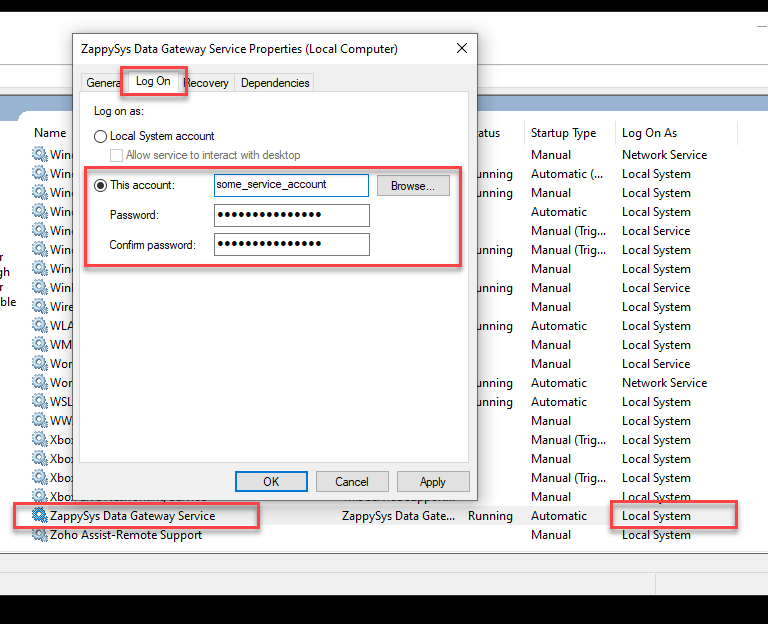
Step 2: Run the Data Gateway Service Under a Dedicated Account
By default, the ZappySys Data Gateway runs under the Local System account. This often causes issues because Local System doesn’t have the same network permissions as your logged-in user.
Best Practice:
- Create a dedicated service account (e.g.,
svc_zappygw). - Assign it as the Log On As user for the Data Gateway Windows service.
- Avoid using employee accounts — if the employee leaves and the account is disabled, your Gateway will stop working.
Step 3: Whitelist the Service Account in Proxy/Firewall
One of the most common reasons why OPENQUERY fails while Preview/Postman succeed is network rules.
- The Preview runs under your Windows user.
- OPENQUERY runs under the Gateway service account.
If the service account is blocked, queries will fail. To fix:
- Whitelist the service account in your proxy/firewall.
- Ensure HTTPS (443) and HTTP (80) traffic is open.
- If possible, whitelist specific domains/URLs used by your APIs.
Additional Tips
- Check Timeout Settings: In SQL Server Linked Server options, increase the
query timeoutto handle slow APIs. - Optimize API Queries: Use filtering, pagination, or
$selectclauses where available to avoid huge result sets. - Enable Gateway Logs: The Data Gateway log files can help pinpoint connection failures vs. query execution issues.
Final Thoughts
When ZappySys Data Gateway works in Preview and Postman but fails in SQL Server OPENQUERY, the cause usually comes down to data volume or account/network differences.
Try the LIMIT test first.
Then configure the Gateway service to run under a dedicated account.
Finally, make sure that account is whitelisted in firewall/proxy.
Following these steps resolves 90%+ of timeout or hanging issues with OPENQUERY.