Problem
Microsoft SQL Server Linked Server query may throw the following error when you try to load a bad datetime value into the default datetime column type.
Msg 8114, Level 16, State 8, Line 1
Error converting data type DBTYPE_DBTIMESTAMP to datetime.

Cause
This error occurs because a bad date value was inserted into the datetime column.
Example Of Bad Values:
0018-01-01 00:00:00
1200-01-01 00:00:00
SQL Server DATETIME → valid range: 1753-01-01 .. 9999-12-31 (approx)
SQL Server DATETIME2 → valid range: 0001-01-01 .. 9999-12-31
Solution
Basically, you have to force ZappySys Data Gateway Engine to treat datetime as datetime2 (a larger range). You have a few options.
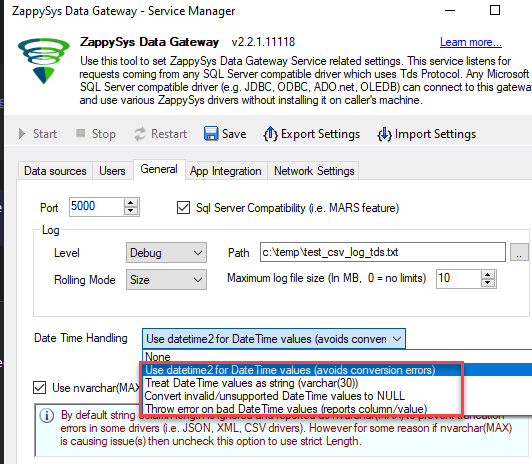
OPTION-1: Make sure to download the latest version of ZappySys Data Gateway or at least v2.2.1 or higher. Go to the General Tab and check the below option [Use “datetime2”…]. Or consider just checking the Validate Bad Date option just to see which column/value fails.
OPTION-2: Fix Bad data at the source.
OPTION-3: If you are using the API Connector file, you can consider using DT_DBTIMESTAMP2 (maps to SQL datetime2) type instead of DT_DBTIMESTAMP (this maps to SQL datetime).
Still need help?
If the issue persists, please contact our support team:
- Live Chat: Open the chat widget (bottom right of this page)
- Email: support@zappysys.com
- Support Centre: Support | ZappySys