Introduction
When you read a large number of records from an API, especially with pagination enabled, the API may sometimes reject requests with an error such as:
Too Many Requests

HTTP Status Code: 429
This usually means the API provider is throttling your requests because too many calls were made in a short period of time.
ZappySys products include retry and throttling settings in several places. These settings can help automatically retry failed API calls when temporary errors occur, such as:
429— Too Many Requests / Rate Limit420— Enhance Your Calm / Rate Limit, used by some APIs500— Internal Server Error502,503,504— Temporary server or gateway errors
You should enable retry settings when:
- You are reading many pages of API data.
- The API sometimes fails during pagination.
- The error is temporary and retrying after a short delay usually succeeds.
- You see errors like
429 Too Many Requests. - The API provider documents rate limits or throttling behavior.
Important: Retry settings cannot fix invalid credentials, bad URLs, incorrect query syntax, missing permissions, or permanent API errors. They are mainly useful for temporary API failures and rate-limit errors.
Important Note About Retry Wait Time
Some ZappySys user interfaces may show retry wait time in milliseconds, not seconds.
So if the UI asks for retry wait time in milliseconds, enter values like this:
| Desired Wait Time | Enter This Value in Milliseconds |
|---|---|
| 5 seconds | 5000 |
| 10 seconds | 10000 |
| 30 seconds | 30000 |
| 60 seconds | 60000 |
For example, if you want the retry to wait 10 seconds before trying again, enter:
10000
Do not enter 10 if the UI field expects milliseconds. That would mean only 10 milliseconds, which is usually too short and may not help with API rate limits.
API Connector UI — ODBC / SSIS API Source / Destination
If you are using:
- ODBC PowerPack API Driver
- SSIS API Source
- SSIS API Destination
then retry settings may be available in one of two places, depending on the connector.
Some connectors expose retry options directly inside the Authentication Parameters. Other connectors use the dedicated Throttling and Error Retry tab.
For example, connectors such as Zendesk may support retry settings because the API commonly applies rate limits.
Method 1 — Set Retry Options in Authentication Parameters
Some API connectors show retry-related settings directly in the authentication or connection parameters.
Use this method if you see retry settings directly on the connector configuration screen.
Typical settings may include:
- Enable retry on error
- Retry status codes
- Number of retry attempts
- Retry wait time or delay
Example:
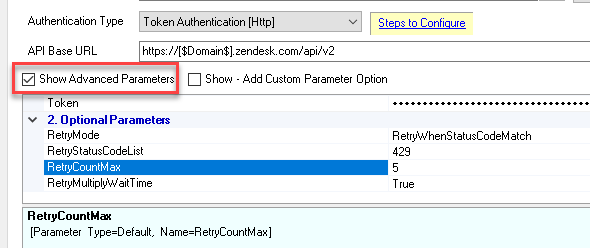
Recommended starting point:
Retry Status Codes: 429

Retry Count: 3 to 5

Retry Wait Time: 5000 to 10000 milliseconds
This means the retry waits around 5 to 10 seconds before trying again.
You can increase the wait time if the API continues to return rate-limit errors.
Method 2 — Use the Throttling and Error Retry Tab
If retry options are not shown in the Authentication Parameters, open the connection settings and look for the Throttling and Error Retry tab.
Example:
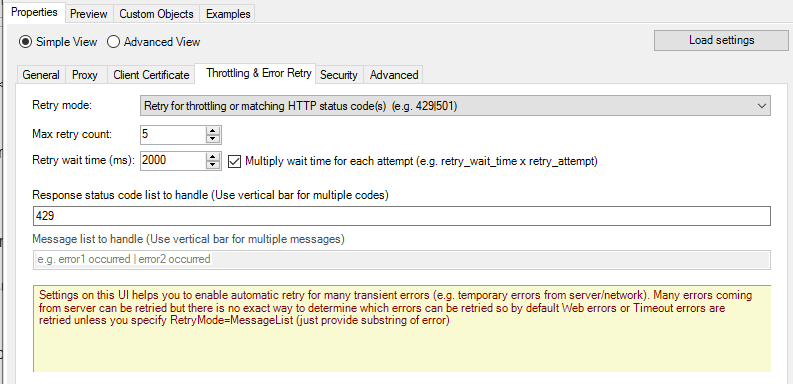
In this tab, configure retry behavior for specific HTTP response status codes.
For example:
Retry for matching response status code(s): Enabled

Response Status Code(s): 429

Retry Count: 3 to 5

Retry Wait Time: 5000 to 10000 milliseconds
This means the retry waits around 5 to 10 seconds between attempts.
You may also enter multiple status codes if needed:
429|500|502|503|504
Use this when the API sometimes returns temporary failures during large data reads.
SSIS JSON / XML / CSV Source
The retry concept also applies to many SSIS components in SSIS PowerPack, including:
-
JSON Source
-
XML Source
-
CSV Source
-
Other components that use HTTP or OAuth connections
The screenshot below shows the settings for SSIS JSON Source, but the same idea applies to other ZappySys SSIS components.
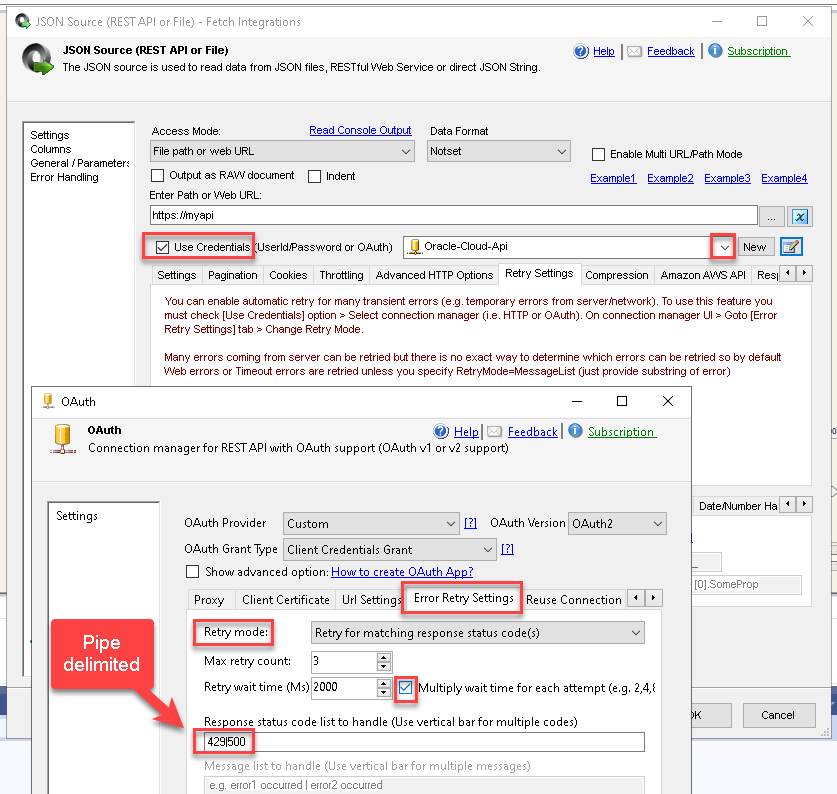
To configure retry settings:
- Open your SSIS source component, such as JSON Source, XML Source, or CSV Source.
- Choose the HTTP or OAuth connection used by the component.
- Open the connection settings.
- Go to the Error Retry or Throttling and Error Retry tab.
- Enable retry for matching HTTP status codes.
- Enter the status code you want to retry, such as
429. - Set the retry count and retry wait time.
Example retry configuration:
Status Code(s): 429

Retry Count: 5

Retry Wait Time: 10000 milliseconds
This means the retry waits around 10 seconds before trying again.
For APIs with strict rate limits, use a higher wait time, such as:
30000
or:
60000
These values mean 30 seconds and 60 seconds.
SSIS REST API Task
The SSIS REST API Task can also use retry settings through a ZappySys HTTP connection.
This is useful when your REST API Task sometimes fails because of temporary API errors such as 429 Too Many Requests.
Step-by-Step Setup
- Open the SSIS REST API Task.
- In Request URL Access Mode, select:
Url from connection
- In the Select Url Connection dropdown, choose:
<New ZS-HTTP Connection>
- When the new connection dialog opens, enter any dummy URL.
Example:
https://example.com
This URL can be ignored later if you override the URL directly inside the REST API Task.
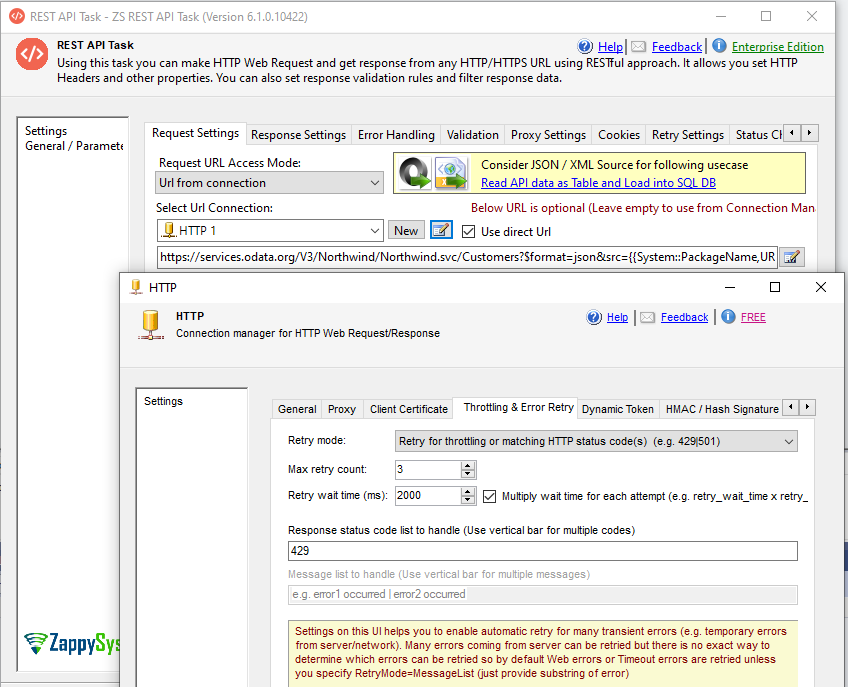
5. Go to the Throttling and Error Retry tab.
6. Enable:
Retry for matching response status code(s)
- Enter one or more HTTP status codes.
Examples:
429
or:
420|429|500|502|503|504
- Set the retry count and retry wait time.
Recommended starting point:
Retry Count: 3 to 5

Retry Wait Time: 5000 to 10000 milliseconds
This means the retry waits around 5 to 10 seconds between attempts.
9. Go back to the REST API Task UI.
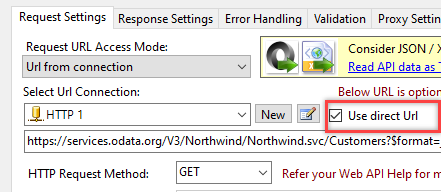
10. If needed, use the direct URL option in the REST API Task to override the dummy URL from the HTTP connection.
REST API Task Screenshots
REST API Task using a ZS-HTTP connection:
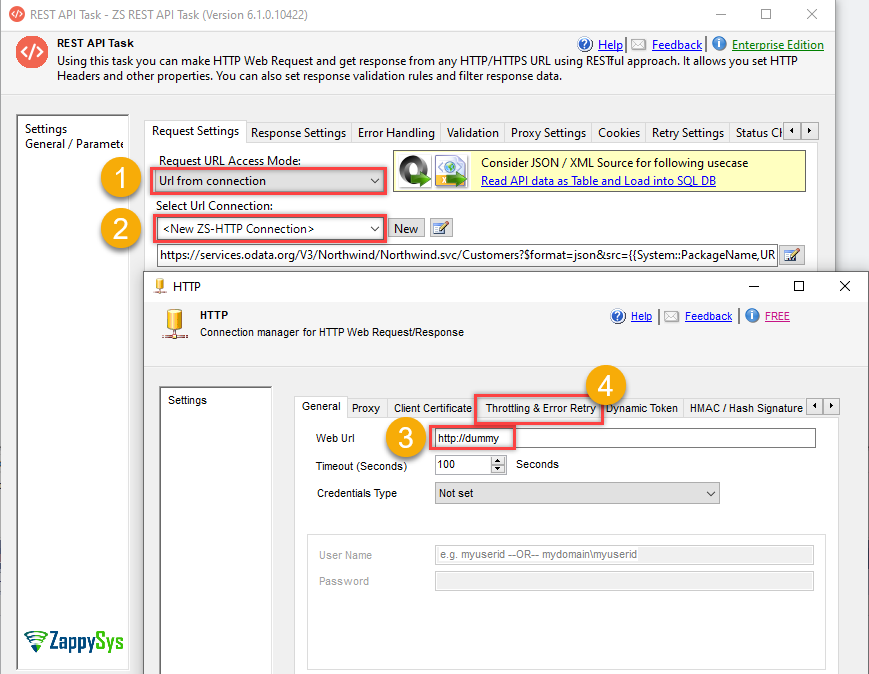
ZappySys HTTP Connection retry settings:
REST API Task URL override when ZS-HTTP connection is used:
Suggested Retry Values
Start with conservative retry settings first.
Status Code(s): 429

Retry Count: 3

Retry Wait Time: 10000 milliseconds
This means 10 seconds.
If the API still fails, try:
Status Code(s): 429|500|502|503|504

Retry Count: 5

Retry Wait Time: 30000 milliseconds
This means 30 seconds.
For very strict APIs, you may need a longer wait time:
Status Code(s): 429

Retry Count: 5

Retry Wait Time: 60000 milliseconds
This means 60 seconds.
Best Practices
Use retry settings carefully. Retrying too aggressively can make rate-limit problems worse.
Recommended practices:
-
Retry only temporary errors such as
429,500,502,503, or504. -
Do not retry authentication errors such as
401or403unless you fully understand the cause. -
Do not retry bad request errors such as
400, because those usually indicate a query or parameter issue. -
Use a longer retry wait time for APIs with strict rate limits.
-
If the UI asks for milliseconds, enter values like
10000, not10. -
Reduce page size if the API fails frequently during pagination.
-
Check the API provider documentation for official rate-limit rules.
-
If available, use API-specific throttling settings along with retry settings.
Common Status Codes
| Status Code | Meaning | Should You Retry? |
|---|---|---|
400 |
Bad Request | Usually no |
401 |
Unauthorized | Usually no |
403 |
Forbidden | Usually no |
404 |
Not Found | Usually no |
420 |
Rate limit / throttling in some APIs | Yes |
429 |
Too Many Requests | Yes |
500 |
Internal Server Error | Sometimes |
502 |
Bad Gateway | Sometimes |
503 |
Service Unavailable | Yes |
504 |
Gateway Timeout | Yes |
Summary
If your package or driver fails during large API reads with errors like 429 Too Many Requests, enable retry settings in the connection or component UI.
Depending on the product and connector, retry settings may be available in:
- API connector Authentication Parameters
- Throttling and Error Retry tab
- HTTP / OAuth connection settings
- SSIS REST API Task through a ZS-HTTP connection
For most rate-limit errors, start with:
Status Code(s): 429

Retry Count: 3 to 5

Retry Wait Time: 10000 to 30000 milliseconds
This means around 10 to 30 seconds between retry attempts.
Then adjust based on the API provider’s rate limits and how often the error occurs.