Introduction
In this article, we will learn how to execute Salesforce APEX code using ZappySys PowerPack.
Salesforce does not allow external systems to run arbitrary APEX directly, but you can execute Apex logic through supported methods such as:
-
Apex REST API
-
Apex SOAP API
-
Tooling API (Execute Anonymous Apex)
-
Triggers / Flows via standard CRUD operations
ZappySys fully supports all these methods.
This guide shows the recommended approach: Calling Apex REST endpoints from ZappySys REST API Task.
Prerequisites
To follow this article, you will need:
-
ZappySys SSIS PowerPack (latest version recommended)
-
A Salesforce Connected App with OAuth enabled
-
Administrator access to create APEX classes
-
Basic understanding of SSIS (for using the REST API Task & OAuth Connection)
Step 1: Create Apex REST Endpoints in Salesforce
Salesforce allows developers to expose Apex logic via REST endpoints using the @RestResource annotation.
Below are two sample endpoints used in this article.
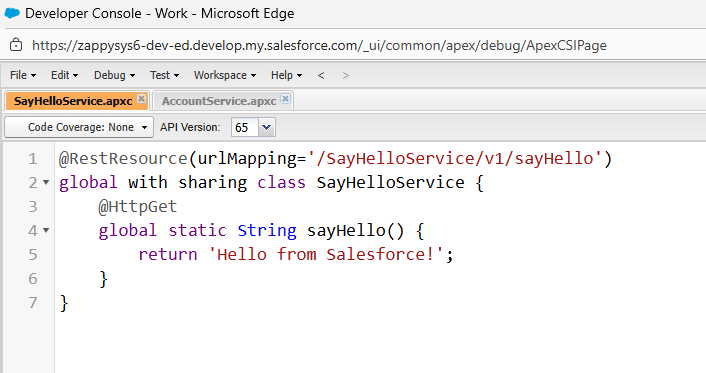
1.1 Sample GET Endpoint (sayHello)
@RestResource(urlMapping='/SayHelloService/v1/sayHello')
global with sharing class SayHelloService {
    @HttpGet
    global static String sayHello() {
        return 'Hello from Salesforce!';
    }
}
Salesforce REST URL
https://yourInstance.salesforce.com/services/apexrest/SayHelloService/v1/sayHello
Screenshot:
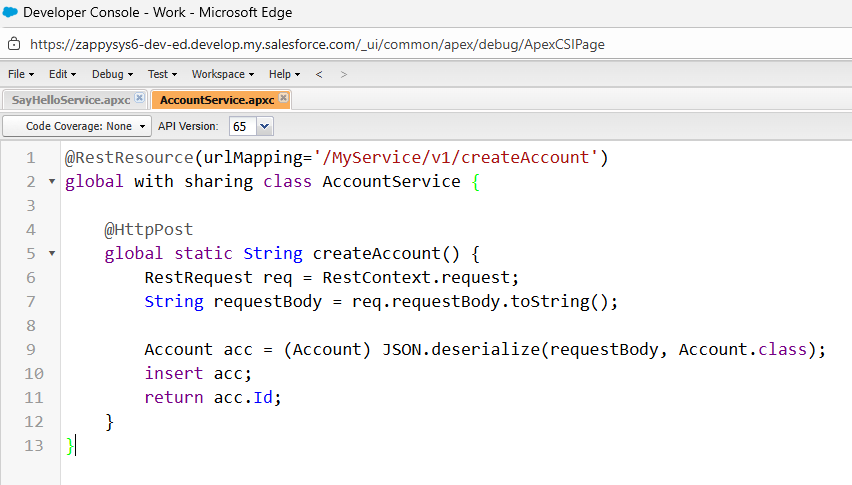
1.2 Sample POST Endpoint (createAccount)
@RestResource(urlMapping='/MyService/v1/createAccount')
global with sharing class AccountService {

    @HttpPost
    global static String createAccount() {
        RestRequest req = RestContext.request;
        String requestBody = req.requestBody.toString();

        Account acc = (Account) JSON.deserialize(requestBody, Account.class);
        insert acc;
        return acc.Id;
    }
}
Salesforce REST URL
https://yourInstance.salesforce.com/services/apexrest/MyService/v1/createAccount
Expected Request Body (JSON → maps to Account fields)
{
  "Name": "Test Account ZappySysDemo 12-12-2025"
}
Screenshot:
Step 2: Configure the OAuth Connection Manager for Salesforce
ZappySys provides a built-in Salesforce OAuth Connection Manager.
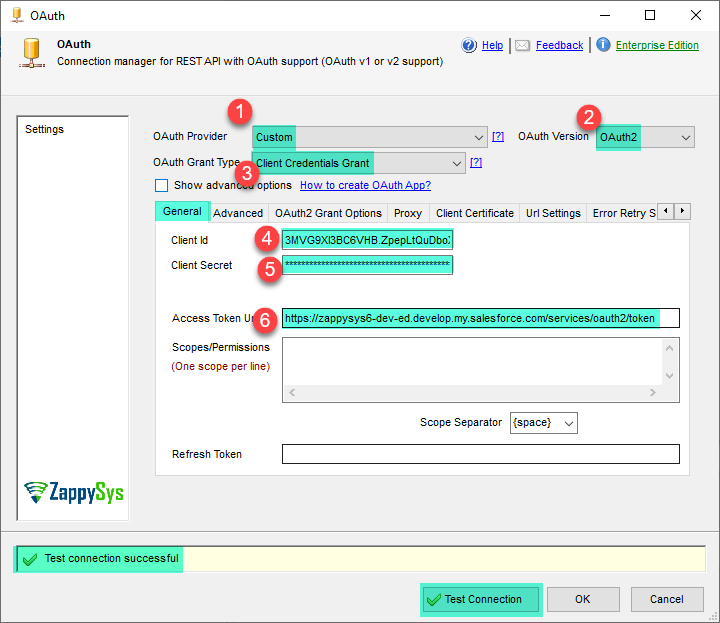
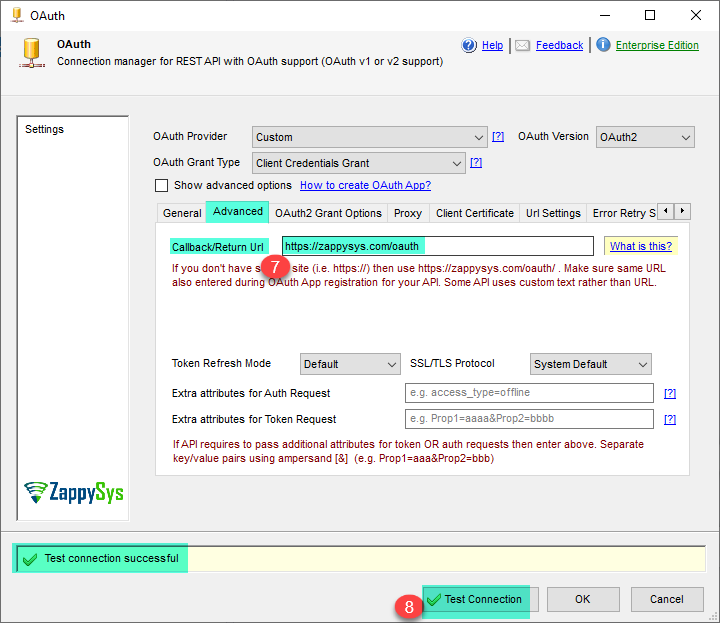
Important Settings:
-
Select OAuth Provider as Custom, OAuth Version as OAuth2, and OAuth Grant Type as Client Credentials Grant
-
In the General Tab: Enter Client ID, Client Secret, and Access Token URL
-
In the Advanced Tab: Enter Callback/Return URL
-
After configuring all these details, do the Test Connection
Screenshot:
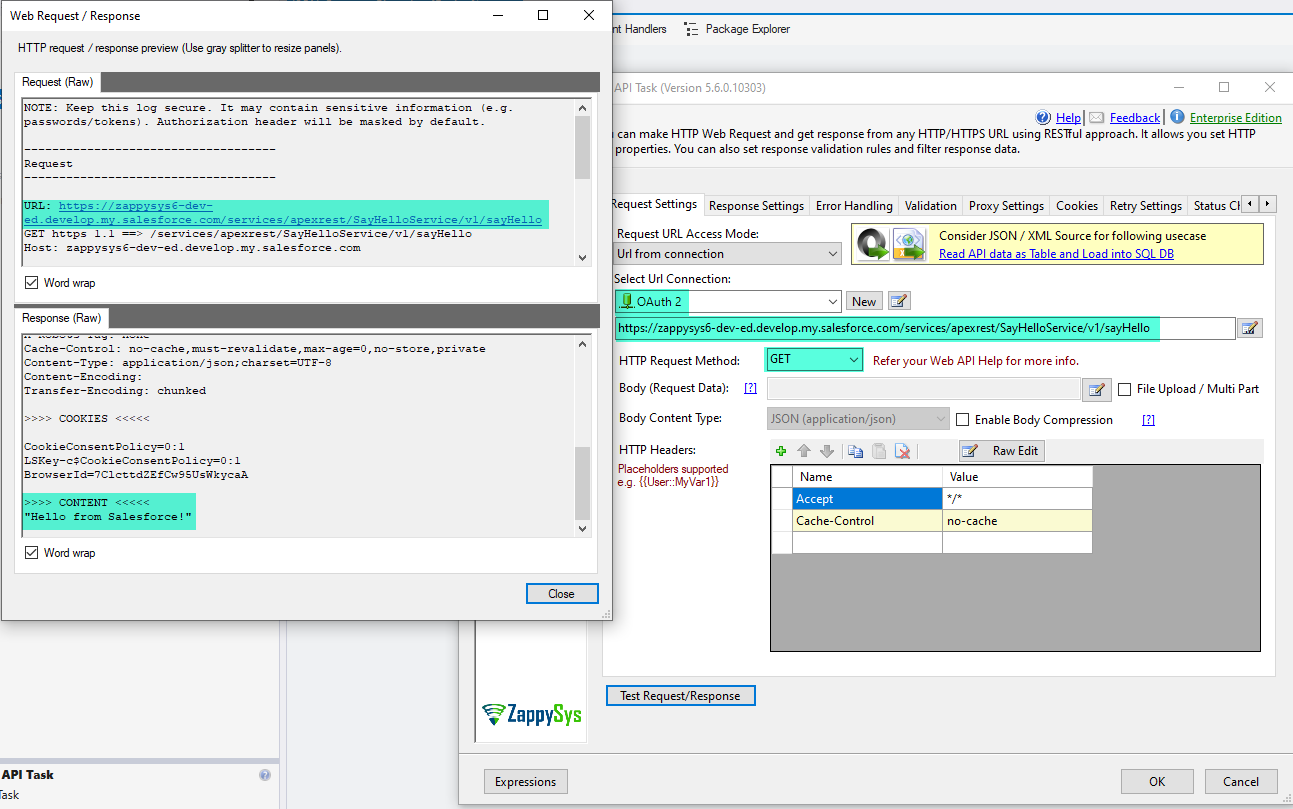
Step 3: Call the Apex REST GET Endpoint using the REST API Task
Follow the steps below to call the sayHello Apex method.
-
Drag the REST API Task into your SSIS package
-
Select the Salesforce OAuth Connection
-
Set method to GET
-
Enter URL:
https://yourInstance.salesforce.com/services/apexrest/MyService/v1/sayHello
- Click Test Request
Expected Response
"Hello from Salesforce!"
Screenshot:
Step 4: Call the Apex REST POST Endpoint using the REST API Task
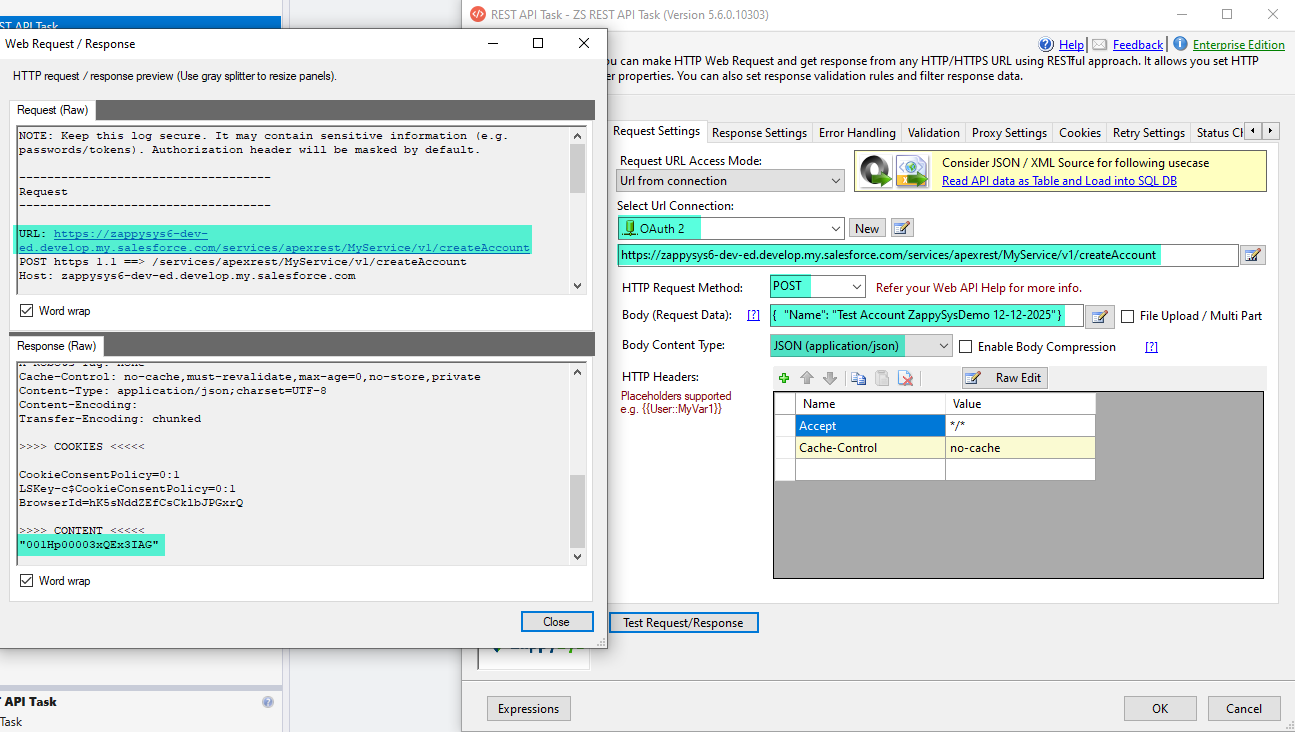
Now call the createAccount POST API.
-
Open REST API Task
-
Method: POST
-
URL:
https://yourInstance.salesforce.com/services/apexrest/MyService/v1/createAccount
-
Body Content Type: application/json
-
Sample request body:
{
  "Name": "Test Account ZappySysDemo 12-12-2025"
}
- Click Test Request
Sample Response
Account Id
Screenshots:
Step 5: Verify the Created Record in Salesforce
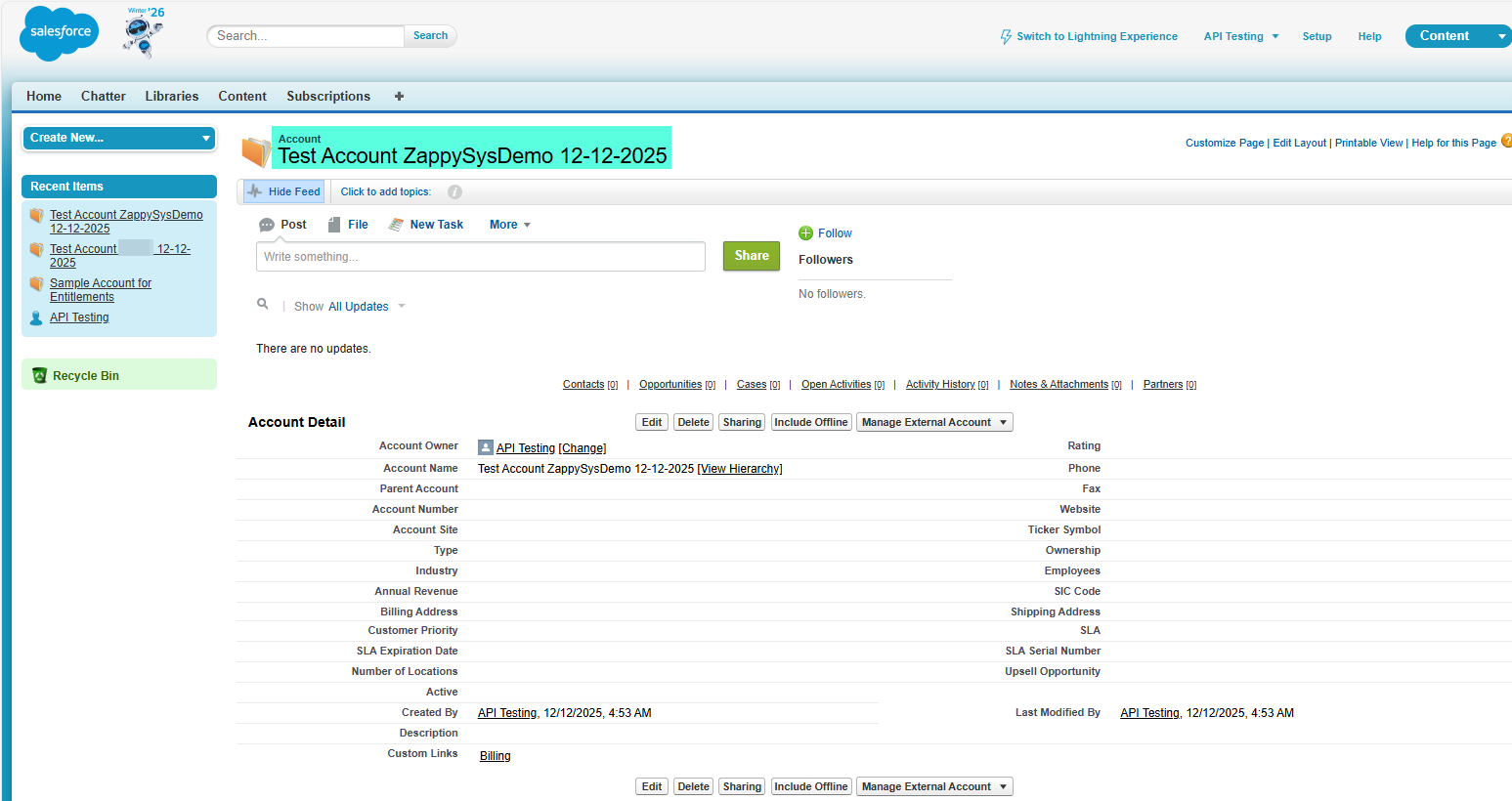
Log in to Salesforce → Go to Accounts → Verify that the new account has been created.
Screenshot:
Optional: Execute Anonymous Apex (Tooling API)
Salesforce Tooling API allows running Apex anonymously (similar to Developer Console → Execute Anonymous).
Endpoint
https://yourInstance.salesforce.com/services/data/v57.0/tooling/executeAnonymous/
Request Body
{
  "anonymousBody": "System.debug('Hello from ZappySys');"
}
Notes
-
Good for deployment tasks, admin automation
-
Not recommended for business logic
-
Works with ZappySys REST API Task using OAuth
When to Use Which Method?
| Requirement | Recommended Method |
|---|---|
| Execute business logic | Apex REST API |
| Create/Update Salesforce objects | Salesforce Destination / CRUD API |
| Trigger triggers/flows | Standard operations (Insert/Update) |
| Run Apex scripts on the fly | Tooling API — Execute Anonymous |
| SOAP-based legacy integration | Apex SOAP API |
Conclusion
ZappySys provides complete support for integrating with Salesforce Apex:
-
Apex REST (recommended)
-
Apex SOAP
-
Tooling API (Execute Anonymous Apex)
-
CRUD operations that trigger Apex logic
Using the ZappySys REST API Task with Salesforce OAuth makes the entire process simple and fully automated (token refresh, secure access, logging, etc.).