 Overview
When using SFTP/FTP Task in SSIS PowerPack, you may want to download files and delete them from the source after processing.
ZappySys provides an option:
Download FTP Server file(s) to local directory → Delete source file(s) after successful transfer (delete empty folders)
However, this option also removes empty folders, which may not be suitable when you need to preserve the folder structure.
 Problem
Requirement:
 Download files from SFTP
- Delete files after download
 Keep the folder (even if empty)
Actual Behavior:
When using:
Delete source file(s) after successful transfer (delete empty folders)
 The task deletes:
- Files
- Empty folders (unexpected in this use case)
 Limitation
Currently, there is no built-in option to:
Delete only files while preserving folders
Solution (Workaround)
To achieve the desired behavior, avoid using the built-in “Delete after download” option and instead use a two-step approach.
 Step-by-Step Implementation
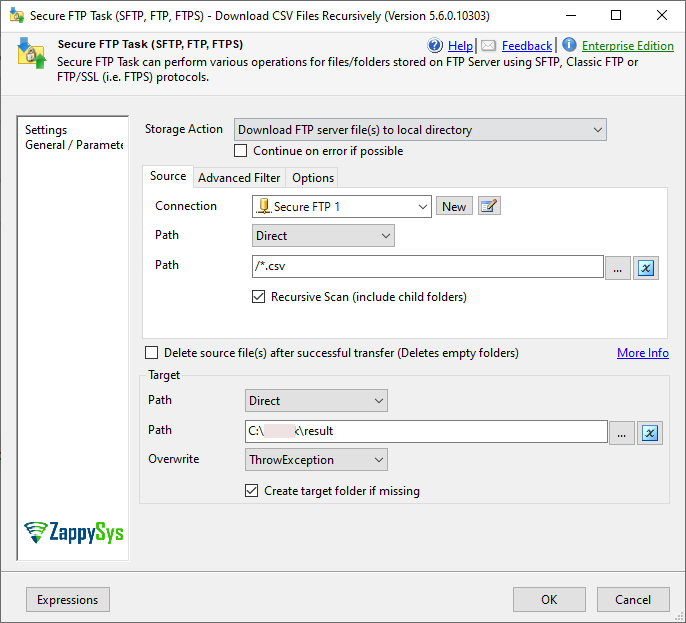
 Step 1: Download Files (Without Delete Option)
Use SFTP Task:
Configuration:
- Operation:
Download File(s) - Recursive: Enabled (if needed)
- Uncheck:
Delete source file(s) after successful transfer
Step 2: Delete Files Separately
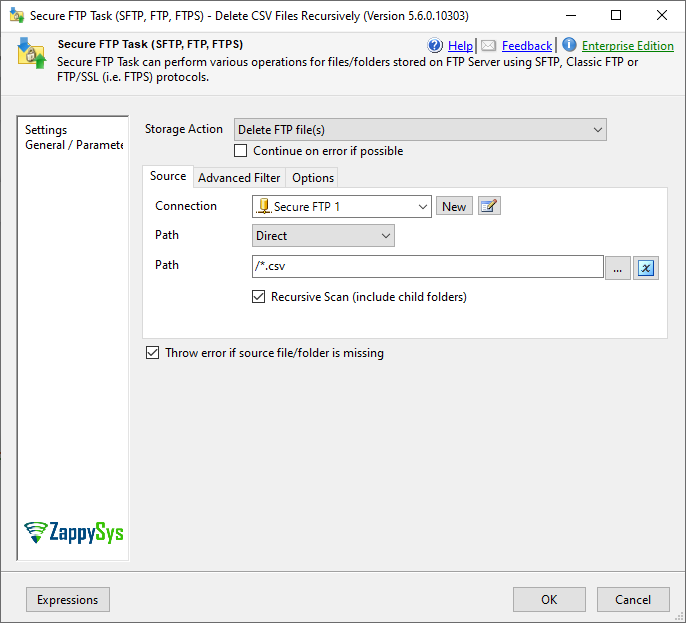
Add another SFTP Task to delete files explicitly.
Configuration:
- Operation:
Delete File(s) - Recursive: Enabled
- Target only files in the folder
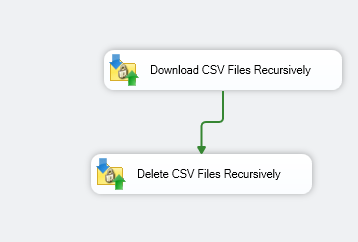
 Package Design
Use two separate tasks in Control Flow:
Important Notes
- Do not use the built-in delete option if you want to preserve folders
- The separate delete step ensures only files are removed
- Folder structure will remain intact even if empty
- Always test with sample data before production
 Summary
| Feature | Behavior |
|---|---|
| Built-in delete after download | Deletes files + empty folders |
| Separate delete task | Deletes files only |
| Folder preservation | Supported via workaround |
 Conclusion
The built-in option:
Delete source file(s) after successful transfer
It is not suitable when folder preservation is required.
Instead, using a separate delete step provides full control and ensures:
- Only files are deleted
- Folder structure remains untouched
Need Help?
If you still face issues, share logs/screenshots with the ZappySys support team:
* Live Chat: Open the chat widget (bottom right of this page)
* Email: support@zappysys.com
* Support Center: Support | ZappySys