Introduction
Tripletex is a comprehensive cloud-based accounting and business management platform that helps organisations manage finances, invoicing, and transactions. Many businesses need to integrate Tripletex data with Power BI to create advanced analytics, financial reports, and business intelligence dashboards.
Using the ZappySys ODBC Driver for Tripletex, you can easily query financial data, currency information, and other business metrics directly from Power BI using standard SQL queries without writing custom code.
Prerequisites
- Download and install the ZappySys ODBC PowerPack
- A Tripletex account with API access enabled
- Microsoft Power BI Desktop installed
- Basic knowledge of SQL queries and Power BI
Steps
Creating a Tripletex connection using ZappySys ODBC
- We already have a detailed tutorial about how to connect to Tripletex using ZappySys ODBC in this article
- In the preview section, you can use the following SQL queries to retrieve information from the currency table.
1. Get all active currencies
SELECT id, code, description, factor, displayName
FROM _root_
WHERE isDisabled = 0
ORDER BY code ASC;
2. Get only disabled (obsolete) currencies
SELECT id, code, description, displayName
FROM _root_
WHERE isDisabled = 1
ORDER BY code ASC;
3. Search for a specific currency by code
SELECT *
FROM _root_
WHERE code = 'USD';
4. Get currencies with a factor of 100 (quoted per 100 units)
SELECT code, description, factor
FROM _root_
WHERE factor = 100
AND isDisabled = 0
ORDER BY code ASC;
5. Get currencies with a factor of 1 (quoted individually)
SELECT code, description, factor
FROM _root_
WHERE factor = 1
AND isDisabled = 0
ORDER BY code ASC;
6. Search for currencies by description (country or region)
SELECT id, code, description, displayName
FROM _root_
WHERE description LIKE '%Europa%'
AND isDisabled = 0;
7. Count active versus disabled currencies
SELECT
    isDisabled,
    COUNT(*) AS total
FROM _root_
GROUP BY isDisabled;
8. Get active European currencies
SELECT code, description, displayName
FROM _root_
WHERE code IN ('EUR', 'GBP', 'CHF', 'SEK', 'DKK', 'NOK', 'PLN', 'CZK', 'HUF')
AND isDisabled = 0
ORDER BY code;
9. Get currencies with the latest version number
SELECT code, description, version
FROM _root_
WHERE isDisabled = 0
ORDER BY version DESC, code ASC;
10. Get a currency by ID
SELECT id, code, description, factor, displayName, isDisabled
FROM _root_
WHERE id = 5; -- EUR
Connect Power BI to Tripletex ODBC
-
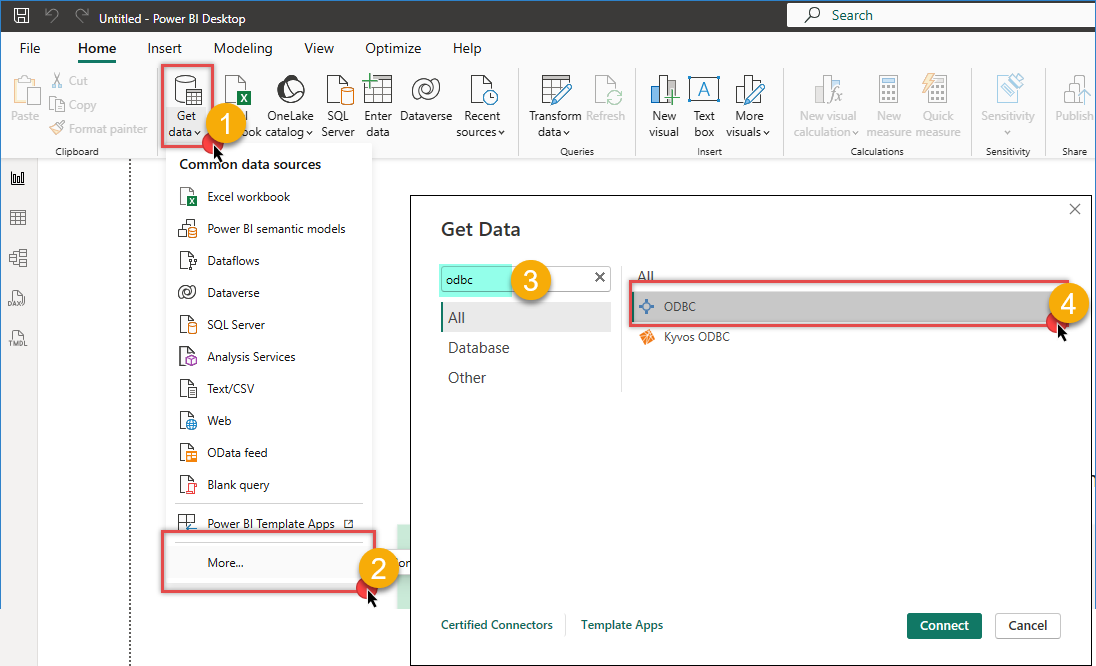
Open Power BI Desktop
-
Click Get Data from the Home tab
-
Search for ODBC and select it
-
Click Connect to continue
-
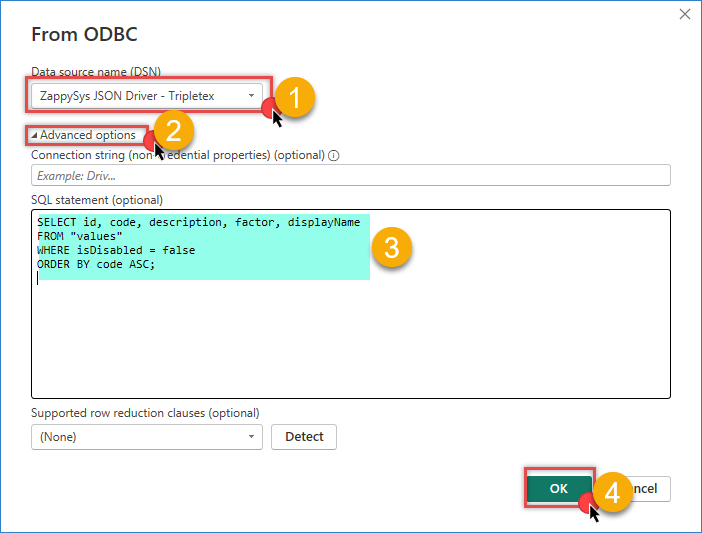
In the ODBC connection dialogue, select your Tripletex ODBC DSN from the dropdown list
-
Enter the SQL query you want to execute
-
Click OK to establish the connection
-
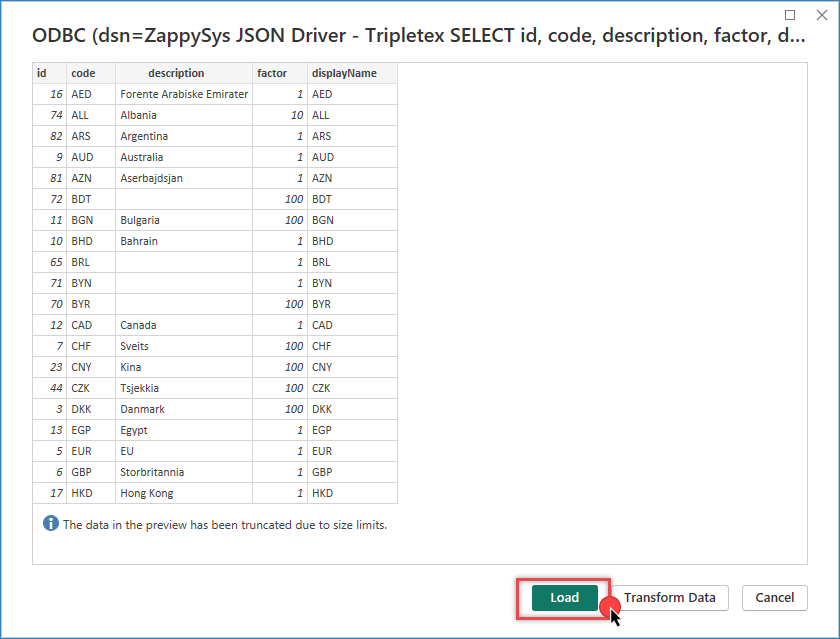
Power BI will display the query results. Click Load to import the data into Power BI
-
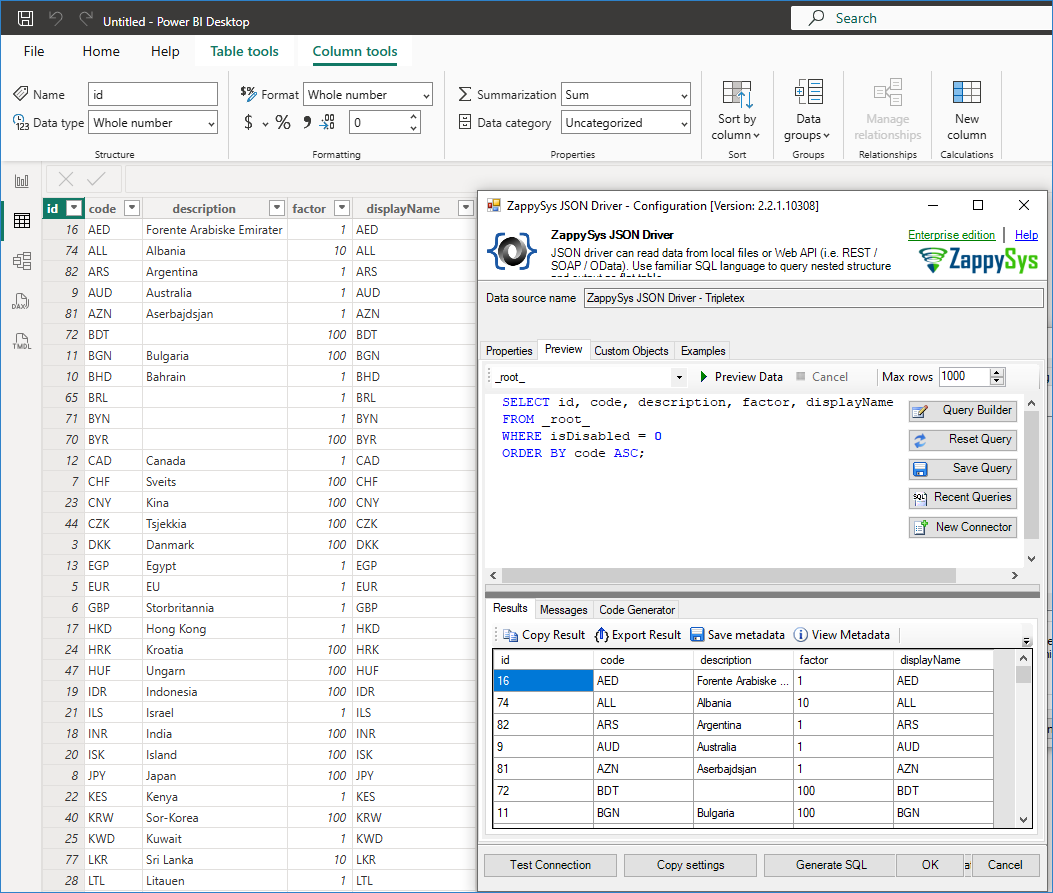
You can now create reports and visualisations using the extracted Tripletex REST API data.
Troubleshooting Common Issues
Connection Failed — Verify that your Tripletex API token is valid and has not expired.
No Tables Visible — Ensure your Tripletex user account has the required API access permissions. Contact your Tripletex administrator if necessary.
Query Timeout — For large datasets, use WHERE clauses to reduce the amount of data retrieved. Consider using DirectQuery for real-time reporting scenarios.
Authentication Errors — Verify that the API token configured in the ODBC DSN is correct and matches your current Tripletex credentials.
Power BI Refresh Issues — Ensure that the Power BI Gateway is installed and configured correctly when using Power BI Service. A System DSN is required for scheduled refreshes.
Empty Data in Visualisations — Verify that filters are not overly restrictive and confirm that the data exists in Tripletex by testing the SQL query in another tool, such as SSMS.
Conclusion
Connecting Tripletex to Power BI using the ZappySys ODBC Driver allows you to create powerful financial dashboards and reports without requiring complex integrations or custom development. By following the steps in this tutorial, you can query Tripletex data using standard SQL queries and build interactive visualisations for financial analysis, business intelligence, and executive reporting.
Explore our ODBC PowerPack for more information and download and install it to start building smarter, faster, and more scalable solutions.
Need Help?
If you encounter any issues, our support team is here to help:
- Live Chat — Use the chat widget (bottom-right corner of this page)
- Email — support@zappysys.com
- Support Center — Visit the ZappySys Support Portal