Overview
Salesforce now recommends OAuth authentication instead of the legacy SOAP Login API. This article explains how to create a Connected App, configure OAuth in Salesforce, and connect using ZappySys products.
Applies To
- SSIS PowerPack – Salesforce Source & Destination
- ODBC PowerPack – Salesforce Driver
- SSIS Salesforce REST API Task
What Is Changing in Salesforce?
Salesforce is retiring the SOAP API login() method for authentication in API versions 31.0 through 64.0, and this method will be fully disabled starting Summer ’27.
Official Salesforce announcement:
What does this mean?
If your integration is still using username + password + security token, Salesforce will block those login requests, which can cause:
- Connection failures
- Package execution errors
- Broken production workflows
To prevent this, Salesforce recommends moving all integrations to OAuth-based authentication.
How Does This Affect ZappySys Users?
If You Are Already Using OAuth
No action is required. Your integrations will continue to work normally.
If You Are Using Username / Password Authentication
If your Salesforce connection in ZappySys is configured using legacy login, you will need to migrate to OAuth to avoid service disruption.
This applies to:
- Existing SSIS packages
- Scheduled SQL Agent jobs
- Power BI refresh workflows using ODBC
- API Connector jobs
We strongly recommend migrating to OAuth as early as possible.
Why Switch to OAuth?
Besides being required by Salesforce, OAuth also provides:
- Better security
- Token-based authentication (no stored passwords)
- Automatic token refresh
- Long-term compatibility with Salesforce API changes
In short — OAuth is safer, more reliable, and future-proof.
How to Configure Salesforce OAuth in ZappySys
Below are the recommended steps to configure OAuth authentication for Salesforce connections in ZappySys. Please refer to this blog for detailed steps on How to register Salesforce App and obtain Client ID / Secret (for API Call / OAuth)
Step 1 – Create a Connected App in Salesforce
-
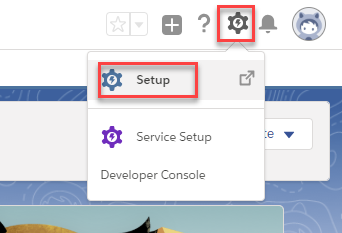
Log in to Salesforce and go to Setup as shown below (click on the gear icon in the top right corner)
-
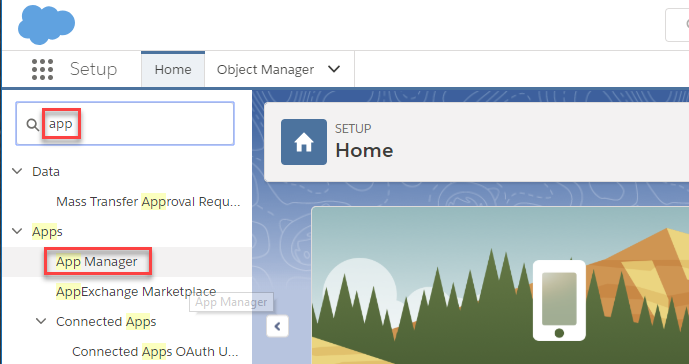
Then in the search bar, input “app” and open App Manager:
-
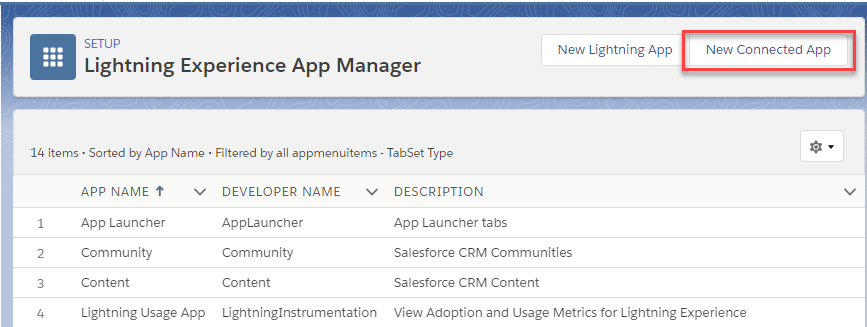
Then click New Connected App to create a new OAuth App
NOTE: In some versions, it may say New External Client App
Look for one of the following buttons:
-
New Connected App (Classic name)
-
New External Client App (Lightning name)
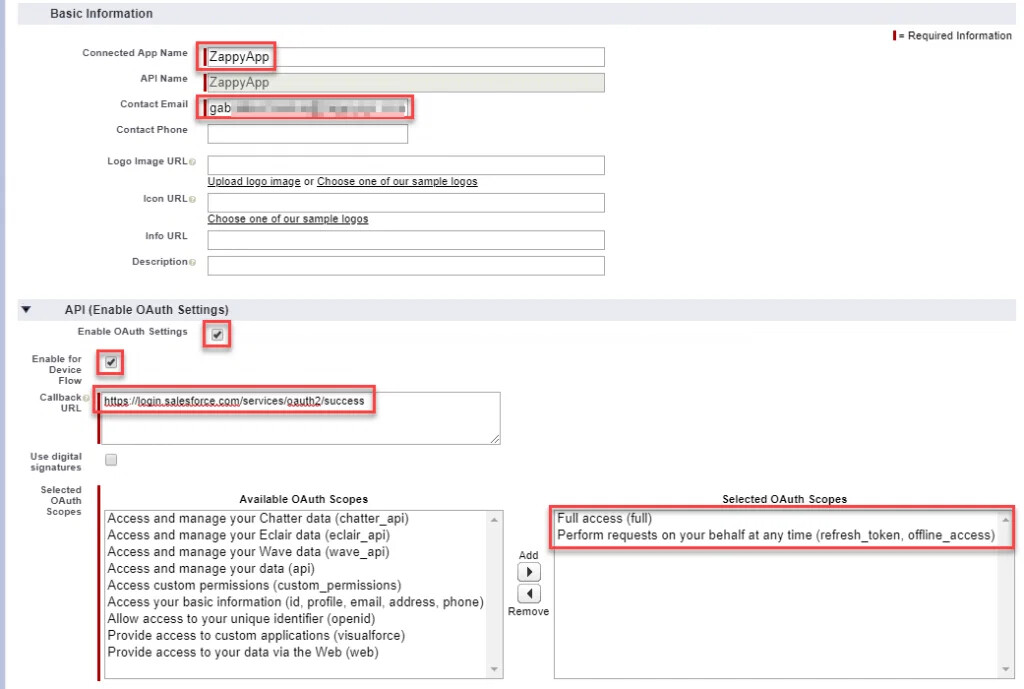
- Enter:
- Connected App Name
- API Name
- Contact Email
-
Enable: Enable OAuth Settings
-
Enter Callback URL:
https://zappysys.com/oauth -
Select OAuth Scopes:
- Full access (full)
- Perform requests on your behalf (refresh_token, offline_access)
- Access and manage your data (api)
- Click Save
- Copy the following values — you will need them in ZappySys:
- Consumer Key (Client ID)
- Consumer Secret (Client Secret)
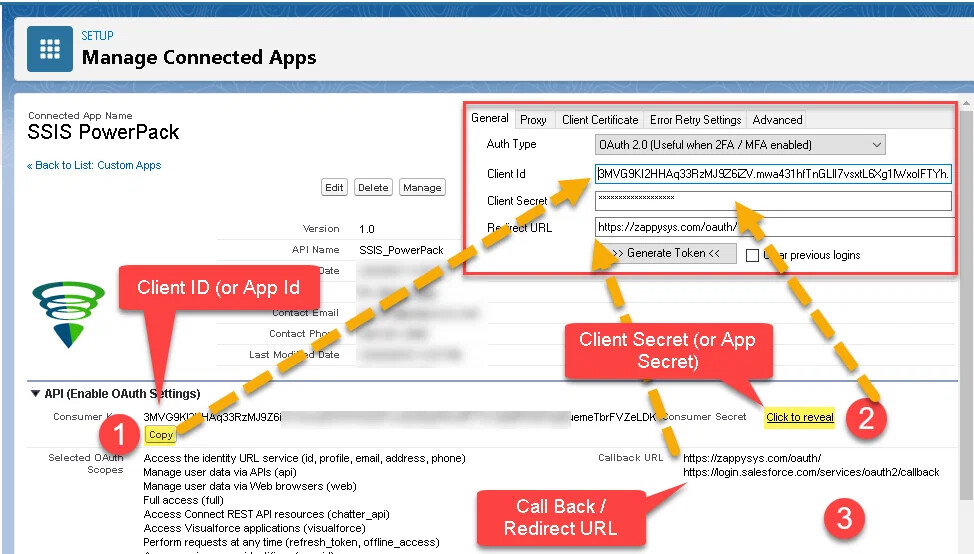
Step 2 – Configure OAuth in ZappySys
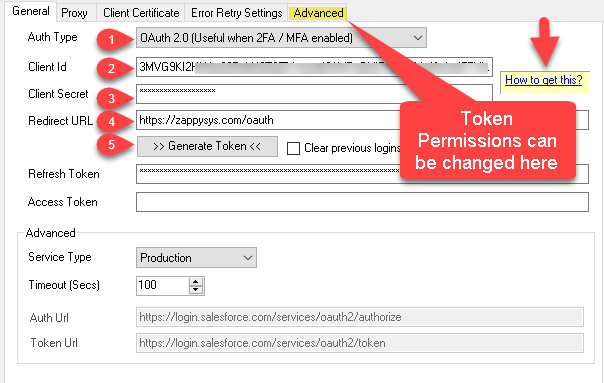
- Open your SSIS Package
- Edit the Salesforce Connection Manager
- Set: Authentication Type = OAuth
- Enter:
- Client ID
- Client Secret
- Click Get New Token
- Log in to Salesforce and approve the access request
- Save the connection
Step 3 – Test Your Connection
Click Test Connection to confirm everything is working correctly.
How to Migrate Existing Packages Safely
If your current packages are using username/password authentication, follow these steps:
- Open Salesforce Connection Manager
- Change authentication to OAuth
- Complete OAuth setup
- Test the connection
- Redeploy your SSIS packages
- Run a test execution
This ensures your workflows continue running without interruption.
When Should You Migrate?
Salesforce will fully disable SOAP login in Summer ’27, but we recommend migrating well before that deadline to avoid last-minute issues.
Best practice: Plan and complete migration as early as possible.
Common Errors & Fixes
1. Invalid URI: The format of the URI could not be determined
Error
While testing the Salesforce connection, you may see the following error:
Test Failed: Invalid URI: The format of the URI could not be determined.
Cause
This issue can occur if a previous OAuth authentication session is cached in the connection manager, especially after making changes to:
- Client ID
- Redirect URL
- OAuth configuration
- Salesforce Connected App settings
Solution
Follow these steps to reset the authentication session:
- Open the Salesforce Connection Manager in SSIS.
- Locate the option: Clear previous logins
- Enable the checkbox:
 Clear previous logins
 - Click: Generate Token <<
- Complete the Salesforce authorization process again.
Why This Fix Works
Sometimes, previously stored OAuth session information conflicts with the new configuration. Enabling Clear previous logins forces a fresh OAuth authentication flow and resolves the URI formatting error.
2. Redirect URL Mismatch Error
Error
During OAuth authentication, Salesforce may return an error indicating the Redirect URL does not match.
Cause
The Redirect URL configured in ZappySys Connection Manager must match the Callback URL configured in the Salesforce Connected App.
Solution
Ensure the following Redirect URL is configured in both places: https://zappysys.com/oauth
Steps:
- Open Salesforce Setup
- Go to App Manager
- Locate your Connected App
- Click Edit
- Under API (Enable OAuth Settings) ensure the Callback URL is set to:
https://zappysys.com/oauth - Save the changes and regenerate the OAuth token.
3. Sandbox Login Issues
Error
Authentication fails or redirects to the wrong Salesforce environment.
Cause
The connection manager may be configured for Production, while the user is trying to authenticate against a Sandbox org.
Solution
In Salesforce Connection Manager → General section, change: Service Type: Sandbox
This will automatically use the correct Salesforce endpoints.
4. invalid_grant or Expired Authorization Code
Error
During OAuth authentication, you may see an error similar to:
invalid_grant
expired authorization code
Cause
This error usually occurs when:
- The authorization code has expired before being exchanged for a token.
- The OAuth flow was interrupted or the browser was closed.
- A previous cached session is interfering with the authentication process.
Salesforce authorization codes are short-lived, so they must be exchanged quickly during the OAuth flow.
Solution
Follow these steps to regenerate the token:
- Open Salesforce Connection Manager in SSIS.
- Enable: Clear previous logins
- Click: Generate Token <<
- Complete the Salesforce login and authorization again.
This will start a fresh OAuth authentication session and generate a new access token.
5. The user hasn’t approved this consumer
Error
During authentication Salesforce may return the error: user hasn’t approved this consumer
Cause
This happens when the Salesforce user has not authorized the Connected App or the OAuth policy requires explicit approval.
Solution
You can resolve this in one of the following ways.
Option 1 – Approve During Login
When the OAuth login page appears:
- Log in to Salesforce.
- Click Allow when prompted to grant access to the application.
Option 2 – Pre-Authorize the Connected App (Recommended for Teams)
Salesforce administrators can pre-authorize the app so users don’t need to approve it individually.
Steps:
- Go to Salesforce Setup
- Navigate to App Manager
- Find your Connected App
- Click Manage
- Under OAuth Policies, set:
Permitted Users: Admin-approved users are pre-authorized
- Assign the Connected App to the appropriate Profiles or Permission Sets
This allows users to authenticate without seeing the approval prompt.
Frequently Asked Questions
Will my existing integrations stop working?
Only if they are still using legacy username/password authentication. OAuth-based connections are not affected.
Does ZappySys fully support OAuth?
Yes. ZappySys provides native OAuth support with automatic token refresh, suitable for production and scheduled workloads.
Does this affect REST or Bulk APIs?
No. This change only impacts SOAP-based authentication. REST and Bulk APIs continue to work normally with OAuth.
Final Notes
Salesforce is making this change to improve security, compliance, and platform stability. Migrating to OAuth ensures your integrations remain reliable and future-proof.
If you need help configuring OAuth or migrating your existing packages, ZappySys Support Team is always happy to help.