Many REST APIs use a parent-child pattern.
First, you call one endpoint to get a list of parent records:
https://mysite.com/api/customers
That response may return columns such as:
customer_id
customer_email
customer_name
Then, for each customer, you need to call another endpoint to get related child records:
https://mysite.com/api/customers/{customer_id}/orders
The common question is:
How do you call the child API once per parent row without writing a custom foreach loop or script?
The answer is to let the SSIS Data Flow do the looping for you. You read the parent records first, pass each parent row downstream, and use a dynamic URL in ZappySys Web API Destination to call the child endpoint for each incoming row.
Problem
Suppose you need to extract customers and their orders from a REST API.
The API works like this:
- Call the customer API to get all customers.
- Take each
customer_id. - Call the orders API for that customer.
- Parse the JSON response.
- Save the order records into a database table.
In traditional programming, you might write a loop like this:
for each customer
    call /customers/{customer_id}/orders
    save orders
next
In SSIS, you can implement the same pattern visually inside a single Data Flow.
Solution
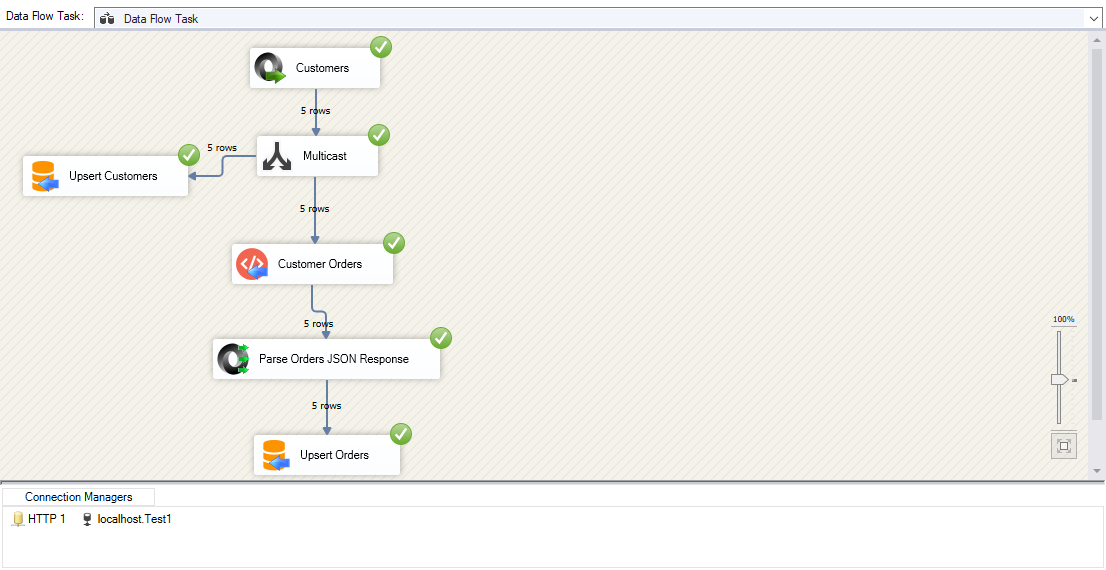
Use this Data Flow pattern:
JSON Source
   |
   +-- optional Multicast --> Save parent customers
   |
Web API Destination
   |
JSON Parser
   |
OLE DB Destination / other destination
The key idea is simple:
Each row coming from the parent API becomes one request to the child API.
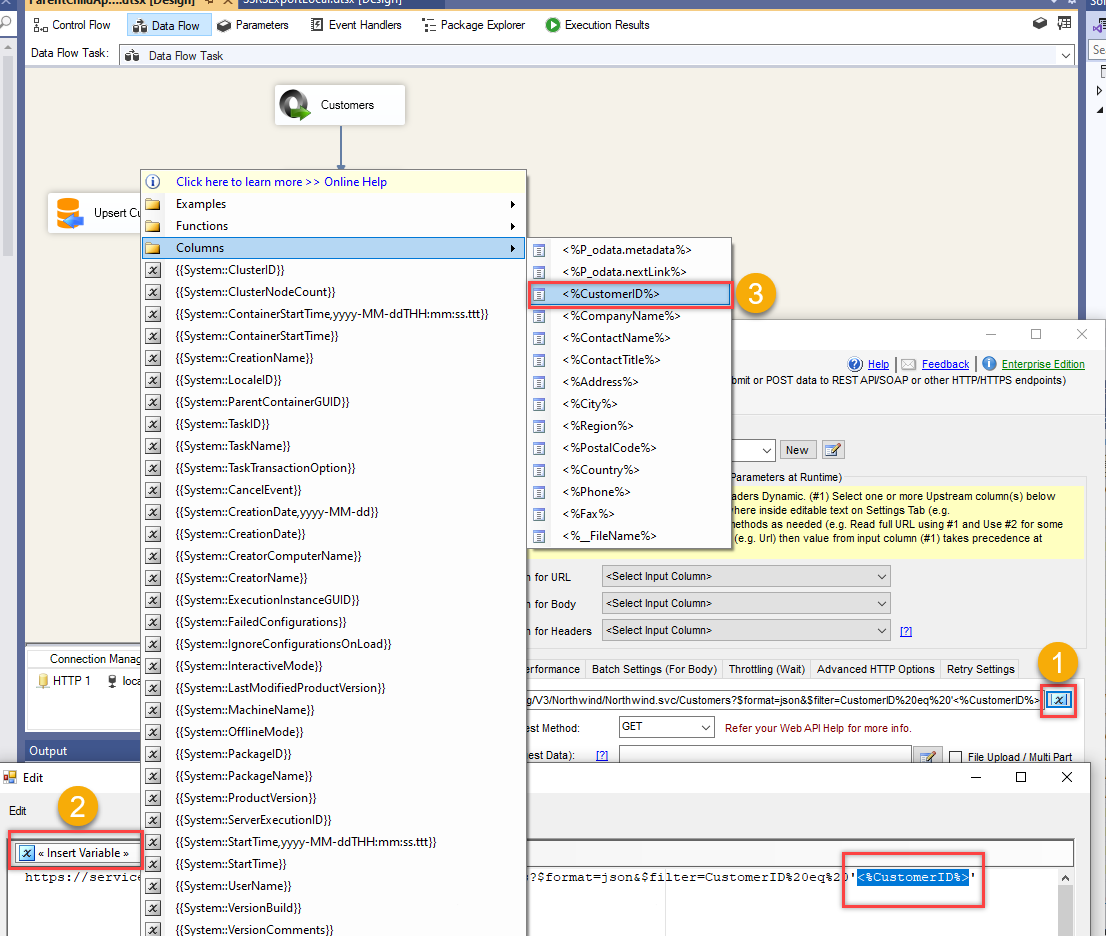
ZappySys Web API Destination can use upstream column values inside the API URL by using column placeholders such as:
<%customer_id%>
So your child API URL can become:
https://mysite.com/api/customers/<%customer_id%>/orders
At runtime, SSIS replaces <%customer_id%> with the value from the current row.
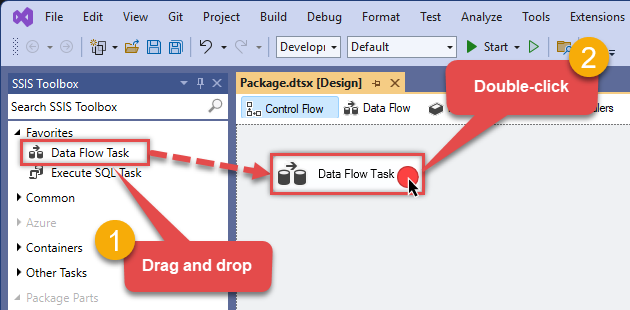
Step 1: Add a Data Flow Task
In your SSIS package, drag a Data Flow Task onto the Control Flow surface.
Open the Data Flow Task. This is where you will build the parent-child API pipeline.
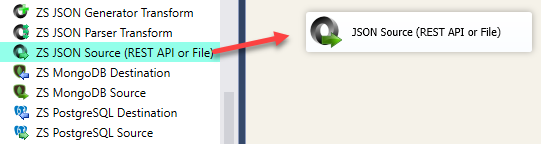
Step 2: Drag JSON Source from the toolbox
From the SSIS toolbox, drag ZappySys JSON Source onto the Data Flow surface.
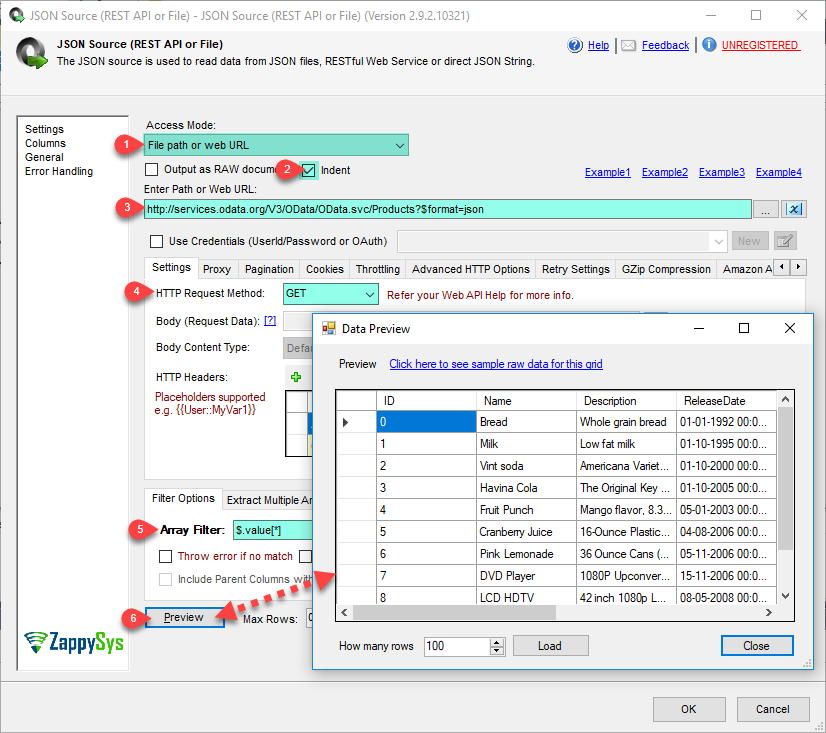
Configure it to call the parent API, for example:
https://mysite.com/api/customers
This source should return one row per customer. Make sure the output includes the parent key column you need later, such as:
customer_id
You can also use another source type if your parent records come from XML, CSV, a database table, or another API source. The important requirement is that the parent key column must be available in the Data Flow output.
Step 3: Optional - add Multicast to save parent records
If you also want to save the parent customer records, drag Multicast from the SSIS toolbox and connect the JSON Source to it.
Use one output path to save parent customers into a destination table.
Use the other output path to continue calling the child API.
This step is optional. If you only need child records, you can connect the JSON Source directly to the Web API Destination.
Step 4: Drag Web API Destination from the toolbox
Next, drag ZappySys Web API Destination onto the Data Flow surface.
Connect the parent rows into the Web API Destination.
This component will call the child API once for each incoming parent row.
Configure the request URL using a column placeholder:
https://mysite.com/api/customers/<%customer_id%>/orders
Here, <%customer_id%> comes from the upstream JSON Source output. When the pipeline runs, the URL is evaluated row by row.
For example:
https://mysite.com/api/customers/1001/orders
https://mysite.com/api/customers/1002/orders
https://mysite.com/api/customers/1003/orders
This is the part that replaces the manual foreach loop.
Step 5: Capture the child API response
Configure Web API Destination so the response body is returned as an output column.
For example, you may have an output column like:
response_body
This column contains the raw JSON returned by the child API for each parent row.
At this stage, the data still looks like raw JSON text. The next step is to parse it into columns.
Step 6: Get a sample child API response
Before configuring JSON Parser, get a sample response from the child API.
You can do this directly inside Web API Destination:
- Enter a real sample URL with a known customer ID.
- Click Test.
- Copy the response JSON.
- Use that sample JSON when configuring JSON Parser.
Example test URL:
https://mysite.com/api/customers/1001/orders
The sample response helps JSON Parser detect the fields returned by the orders API.
Step 7: Drag JSON Parser from the toolbox
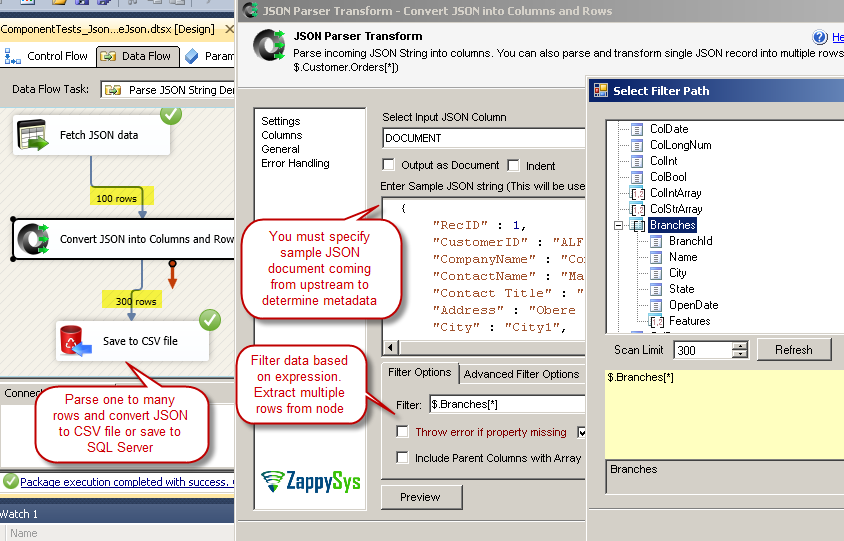
Drag ZappySys JSON Parser onto the Data Flow surface.
Connect Web API Destination to JSON Parser.

In JSON Parser:
- Select the raw response column from Web API Destination, such as
response_body. - Paste the sample JSON response.
- Choose the correct array or object path for the order records.
- Preview the output columns.
- Click OK to generate parsed columns.
After this step, fields from the child API response become normal SSIS columns, such as:
order_id
order_date
order_total
order_status
If the child API returns an array, set the JSON filter/path to the array node that contains the records you want to output. For example, if the response looks like this:
{
  "customer_id": 1001,
  "orders": [
    {
      "order_id": 50001,
      "order_date": "2026-01-15",
      "order_total": 125.75
    }
  ]
}
Then the parser path would usually be:
$.orders[*]
If you need the parent columns, such as customer_id, to flow through with the parsed child rows, enable the option to include upstream or parent columns in the JSON Parser output.
Step 8: Save child records to a destination
Finally, drag your destination component onto the Data Flow surface.
This could be:
OLE DB Destination
SQL Server Destination
Flat File Destination
another API destination
For database loading, ZappySys Upsert Destination is useful when you want to insert new child records and update existing records using a key column.
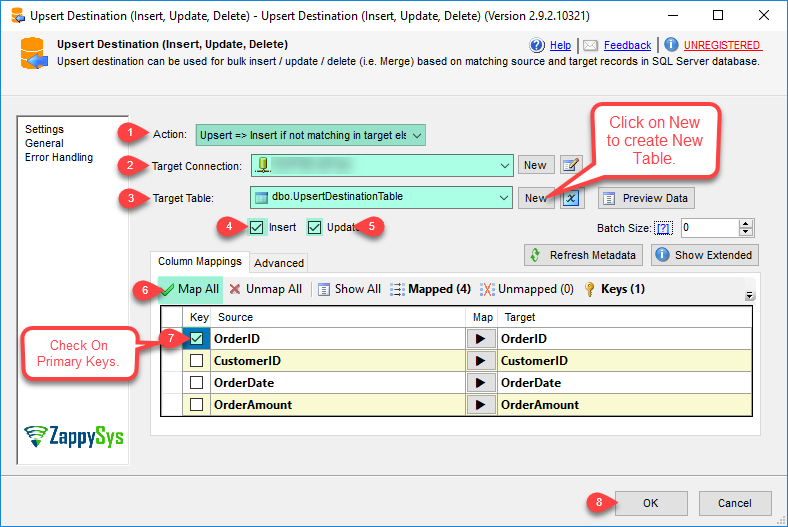
Connect JSON Parser to the destination and map the parsed child fields to your table columns.
For example:
order_id       -> OrderId
customer_id    -> CustomerId
order_date     -> OrderDate
order_total    -> OrderTotal
order_status   -> OrderStatus
If you need to keep the parent key with each child record, make sure customer_id is passed through the pipeline along with the parsed order columns.
For an upsert pattern, choose the key columns that identify one unique child record. For order data, that is often order_id. If order IDs are only unique inside a customer, use both customer_id and order_id as the matching key.
Why this pattern works
This design works because the SSIS Data Flow already processes records row by row.
Instead of creating a script loop, you allow the upstream source to produce parent rows, then let Web API Destination use each row to build a dynamic child API request.
The placeholder syntax is the important part:
<%column_name%>
Any upstream column can be inserted into the API URL, request body, header, or parameter, depending on how your API call is configured.
Common use cases
You can use this same pattern for many REST API parent-child scenarios:
customers -> orders
orders -> order items
accounts -> contacts
projects -> tasks
invoices -> invoice lines
users -> activities
folders -> files
Any time one API gives you IDs and another API requires those IDs, this pattern is usually a good fit.
Summary
To call a child REST API for each parent record in SSIS:
- Use JSON Source to call the parent API.
- Optionally use Multicast to save parent records.
- Use Web API Destination to call the child API.
- Make the child API URL dynamic using column placeholders.
- Use JSON Parser to parse the child API response.
- Save the parsed child records to your final destination.
This gives you a clean, visual parent-child REST API extraction pattern without writing a custom foreach loop.