Overview
When working with OAuth-based APIs in ZappySys ODBC PowerPack or SSIS PowerPack, a common concern is token reuse.
Many APIs create a new session for every OAuth token request, which can lead to unnecessary overhead, rate limits, or even blocks from the API provider.
In this article, we’ll explain how to cache OAuth tokens and reuse the same session across multiple API calls using ZappySys PowerPack—based on a real-world support case.
Problem Overview
A customer was calling the same OAuth-enabled API multiple times (once per user) using an OAuth-enabled HTTP / OAUTH connection.
Although the API calls were successful, the API provider noticed that:
- A new OAuth session was created on every call
- This resulted in multiple login sessions, which was not desired
Goal:
Reuse the OAuth session created during the first call and avoid generating a new token/session for each request.
Why This Happens
By default, OAuth works like this:
- Request an access token
- Use a token to call the API
- Token expires → request again
If token caching is not enabled, ZappySys will:
- Request a new token for each execution
- Create a new API session every time
This is expected behavior unless explicitly configured otherwise.
Solution: Enable OAuth Token Caching (Session Reuse)
SSIS/ODBC PowerPack provides a built-in option to reuse OAuth tokens automatically.
Key Setting to Enable
You need to configure your OAuth-enabled connection (OAUTH / HTTP Connection Manager) to reuse the OAuth session.
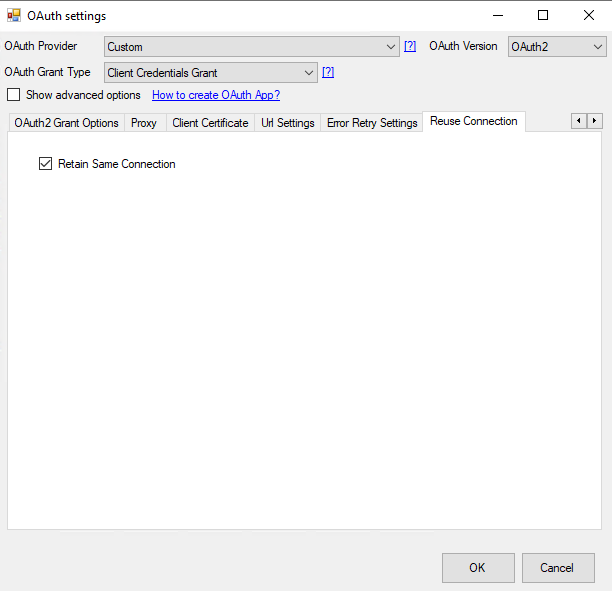
Steps to Configure
1. Open Your OAuth Connection
- OAUTH Connection Manager
or - HTTP Connection Manager
2. Go to OAuth / Security Settings
Locate the OAuth configuration section where:
- Access Token URL
- Client ID / Secret
- Grant Type
are defined.
3. Enable Token Reuse / Session Caching
Turn ON the option similar to:
- Use OAuth session for multiple calls
- Cache OAuth Token
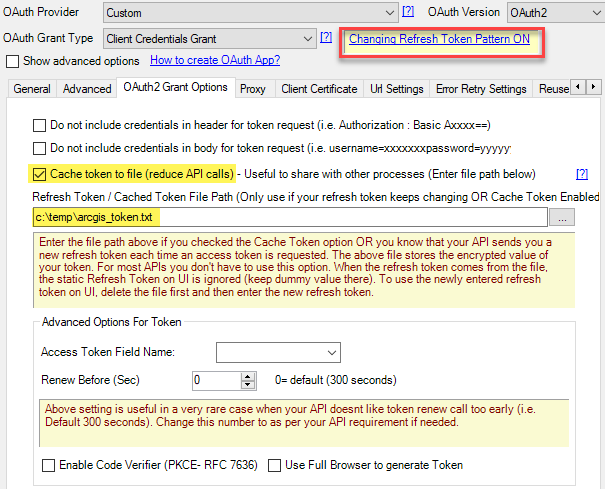
This setting ensures that once the token is generated, it is stored in memory and reused for subsequent API calls.
4. Execute Multiple API Calls Using the Same Connection
- Call the API in a loop (e.g., Foreach Loop Container in SSIS)
- Use the same connection manager
- ZappySys will automatically:
- Reuse the existing token
- Request a new token only when it expires
Result
After enabling this option:
 Same OAuth session reused across API calls
- No new session created for every request
- Reduced API overhead and login activity
- Fully compliant with API provider expectations
The customer confirmed:
“Looks good! Seems to work for me.”
Best Practices for OAuth in ZappySys PowerPack
 Always reuse the same connection manager for multiple calls
- Enable token caching when calling APIs in loops
- Avoid manually passing access tokens in headers if OAuth is configured
- Let ZappySys handle token refresh automatically
When Should You NOT Cache Tokens?
Do not reuse tokens if:
- API explicitly requires a new token per request
- Tokens are user-specific and change per call
- Security policies forbid token reuse
Summary
If your API provider reports too many sessions or logins, chances are your OAuth token is not being reused.
Enable OAuth session reuse/token caching in ZappySys PowerPack
Use a single connection for repeated API calls
Let ZappySys manage token lifecycle automatically
This simple configuration can significantly improve performance and API reliability.