Problem
When working with SSIS packages, you may encounter one of the following errors while connecting ZappySys Source components to SQL Server destinations or other non-Unicode components.
Cannot convert between unicode and non-unicode string data types.
or
The column cannot be converted because of a potential loss of data.
This happens because the source produces Unicode (DT_WSTR) columns while the downstream component expects Non-Unicode (DT_STR) columns.
This article explains three different ways to resolve the issue.
Why does this happen?
Many REST APIs, JSON files, XML files, Excel files, and several ZappySys connectors expose string columns as Unicode (DT_WSTR) by default.
However, many legacy databases or Flat File Destinations use VARCHAR (DT_STR) columns.
Since SSIS does not automatically perform this conversion, the package validation fails with a Unicode/Non-Unicode mismatch.
Solution 1 - Change the Data Type in the ZappySys Source (Recommended)
This is usually the easiest solution because the conversion happens directly inside the ZappySys component.
Steps
- Open your ZappySys Source.
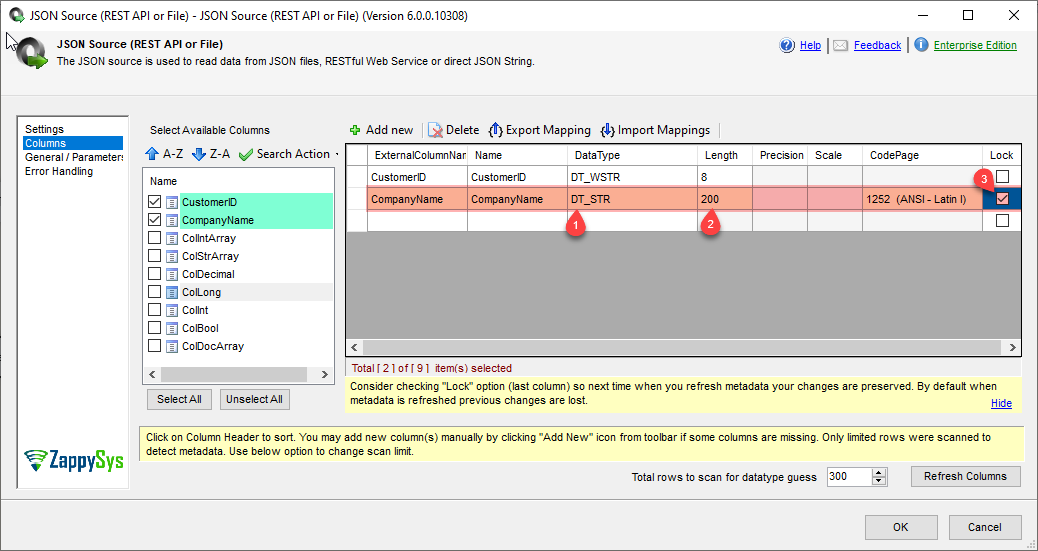
- Navigate to the Columns tab.
- Locate the affected column.
- Change the data type from
DT_WSTR
to
DT_STR
- Specify the appropriate length.
- Click OK.
- Enable Lock.
- Execute the package again.
Why this works
Changing the datatype inside the source ensures that every downstream component receives the correct datatype, eliminating the need for additional SSIS transformations.
Tip
If your data contains only English or ASCII characters,
DT_STRis usually sufficient.If your data contains multilingual characters (Chinese, Japanese, Arabic, emojis, etc.), you should continue using Unicode (
DT_WSTR) whenever possible.
Solution 2 - Use the SSIS Data Conversion Transformation
If you don’t want to modify the source component, use the built-in SSIS Data Conversion transformation.
Steps
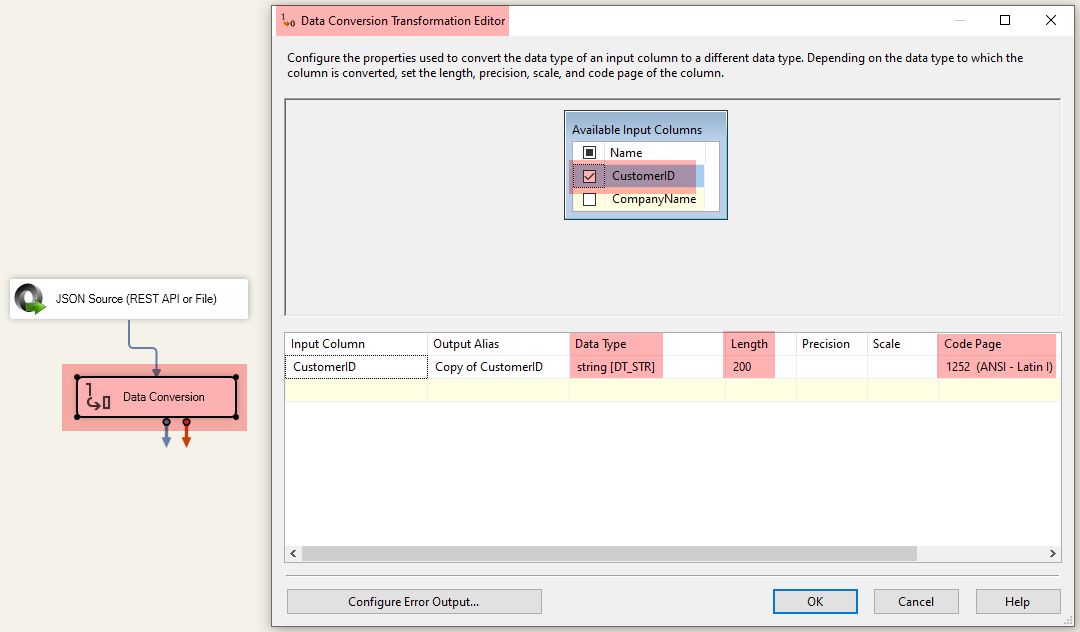
- Drag a Data Conversion transformation into the Data Flow.
- Connect the ZappySys Source to the Data Conversion component.
- Select the Unicode column.
- Change the output datatype to:
DT_STR
- Choose the correct Code Page (typically 1252 for Western characters).
- Map the converted column to the destination.
Advantages
- No changes required in the source component.
- Keeps the original Unicode column available.
- Easy to identify converted columns.
This is Microsoft’s standard approach for converting Unicode to Non-Unicode values in SSIS.
Solution 3 - Modify the Destination to Accept Unicode
Sometimes the issue is caused by the destination rather than the source.
Instead of converting the source, modify the destination to support Unicode data.
Examples include:
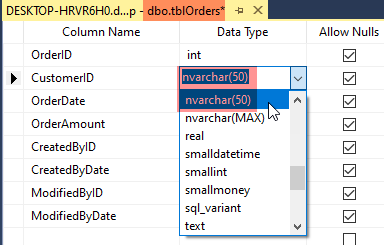
- Change SQL Server columns from:
VARCHAR
to
NVARCHAR
- Update Flat File Connection Manager column types to Unicode.
- Refresh destination metadata after altering the target schema.
Why this is often the best long-term solution
Unicode supports:
- International characters
- Multiple languages
- Special symbols
- Emoji characters
If your application may eventually store multilingual data, keeping everything as Unicode avoids future conversion issues.
Which solution should I choose?
| Scenario | Recommended Solution |
|---|---|
| You control the ZappySys Source |  Solution 1 Solution 1 |
| You cannot modify the source | Solution 2 |
| You control the database schema | Solution 3 |
| Database already uses NVARCHAR | Keep Unicode (no conversion needed) |
Best Practices
- Keep your data Unicode whenever possible.
- Convert to
DT_STRonly when required by downstream components. - Ensure SQL column types match your SSIS metadata.
- Refresh destination metadata after changing SQL column types.
- Verify string lengths after conversion to avoid truncation errors.
Summary
Unicode/Non-Unicode conversion errors are among the most common SSIS validation issues and are typically caused by mismatched string datatypes between components.
You can resolve the issue using one of these approaches:
- Option 1: Change the datatype in the ZappySys Source Columns tab (recommended).
- Option 2: Use the SSIS Data Conversion transformation.
- Option 3: Modify the destination to accept Unicode data (e.g.,
NVARCHAR).
Selecting the approach that best fits your package architecture will eliminate datatype conversion errors while keeping your ETL process clean and maintainable.